Rota planning explained: a practical guide for managers
Discover effective rota planning explained. Learn key actions to optimize scheduling, reduce costs, and improve team efficiency today!

Rota planning is the process of matching the right people, skills, and contracted hours to the right shifts, reliably and in line with UK law. If you manage a team and you’re still building schedules from a blank spreadsheet each week, three actions will make the biggest immediate difference: lock every employee’s contracted hours before you fill anything else, collect availability in writing before the planning period starts, and publish your rota at least two weeks ahead.
TL;DR:
- Good rota planning reduces overtime costs, last-minute gaps, and staff disputes in one move.
- Contracted hours come first. Open shifts and flexible cover fill what remains.
- Publish early, rotate fairly, and keep an audit trail.
Three actions you can take in the next 60–90 minutes:
- Pull your team’s contracted hours from their employment contracts and enter them into your schedule template before adding anything else.
- Send a simple availability form (email or messaging app) to every team member and set a 24-hour deadline to respond.
- Build a two-week rota using those inputs, run a quick compliance check against the Working Time Regulations, and share it with your team.
Pro Tip: Don’t start with open shifts. Managers who fill gaps before locking contracted hours routinely create accidental contract breaches and availability clashes that take hours to unpick.
Table of Contents
- What every manager needs to know about rotas, rosters, and core scheduling terms
- Why good rota planning matters for your operations, costs, and team
- Common rota patterns and how to choose the right one
- Frequent rota planning errors and how to avoid them
- UK legal requirements that affect every rota you publish
- How to create a rota: a step-by-step process with timings
- What to look for in rota software: must-haves and nice-to-haves
- Moving from spreadsheets to digital rota software without disruption
- Real-world outcomes from better rota management
- Data privacy and security when you use rota software
- Key takeaways
- The part of rota planning most managers underestimate
- Timeprof makes compliant, fair rota planning straightforward
- Useful sources for UK managers
What every manager needs to know about rotas, rosters, and core scheduling terms
A rota is a template showing when shifts occur and how they rotate across a team. A roster is the filled-in version of that template with named staff assigned to each slot. The distinction matters in practice: if you change the rota pattern, you affect everyone’s schedule going forward; if you change a roster entry, you’re adjusting one person’s assignment for one period.
The core components of any rota are:
- Shift types: The defined start and end times for each working period (e.g., 07:00–15:00, 15:00–23:00, 23:00–07:00).
- Minimum staffing levels: The floor number of people required per shift, often broken down by role or skill.
- Skills matrix: A record of which staff hold which qualifications or competencies, so you never schedule an unqualified person for a specialist role.
- Availability: Each employee’s confirmed working windows, including approved leave and any contractual restrictions.
- Contractual hours: The guaranteed weekly or monthly hours each employee is entitled to under their contract.
- Templates: Reusable shift patterns that form the backbone of your schedule, rather than rebuilding from scratch each week.
Understanding how availability affects rota planning is one of the most underestimated skills in scheduling. Managers who treat availability as a data input rather than an afterthought consistently see fewer last-minute changes and lower rates of absenteeism.
Key term: A skills matrix is a grid mapping each staff member against the competencies your operation requires. Without one, you risk scheduling gaps where shifts are technically covered but operationally unsafe.
Why good rota planning matters for your operations, costs, and team
Poor scheduling is expensive in ways that rarely appear on a single line in the accounts. Overtime costs, agency cover, and the management time spent firefighting gaps all accumulate quietly. A well-structured rota addresses all three at once.
Operational benefits:
- Consistent coverage across all shifts, with fewer last-minute calls to find cover.
- Predictable service quality because the right skills are always matched to the right slots.
- Reduced manager time spent on reactive scheduling rather than planned work.
Financial benefits:
- Fewer unplanned overtime hours, which typically carry a premium rate.
- Lower reliance on agency staff, whose day rates often exceed permanent staff costs significantly.
- Better labour cost forecasting because contracted hours are locked and visible in advance.
People benefits:
- Staff who receive their rota well in advance can plan their personal lives, which directly affects retention.
- Fair rotation of unpopular shifts (nights, weekends, bank holidays) reduces resentment and absenteeism.
- Transparent scheduling builds trust: employees can see they’re being treated consistently.
The benefits of automated shift scheduling extend beyond time saved. When managers stop spending hours on manual scheduling, they have capacity to focus on the people management that actually drives performance.
Common rota patterns and how to choose the right one

The pattern you choose shapes your team’s working lives and your compliance obligations. Here are the most widely used models in UK operations.
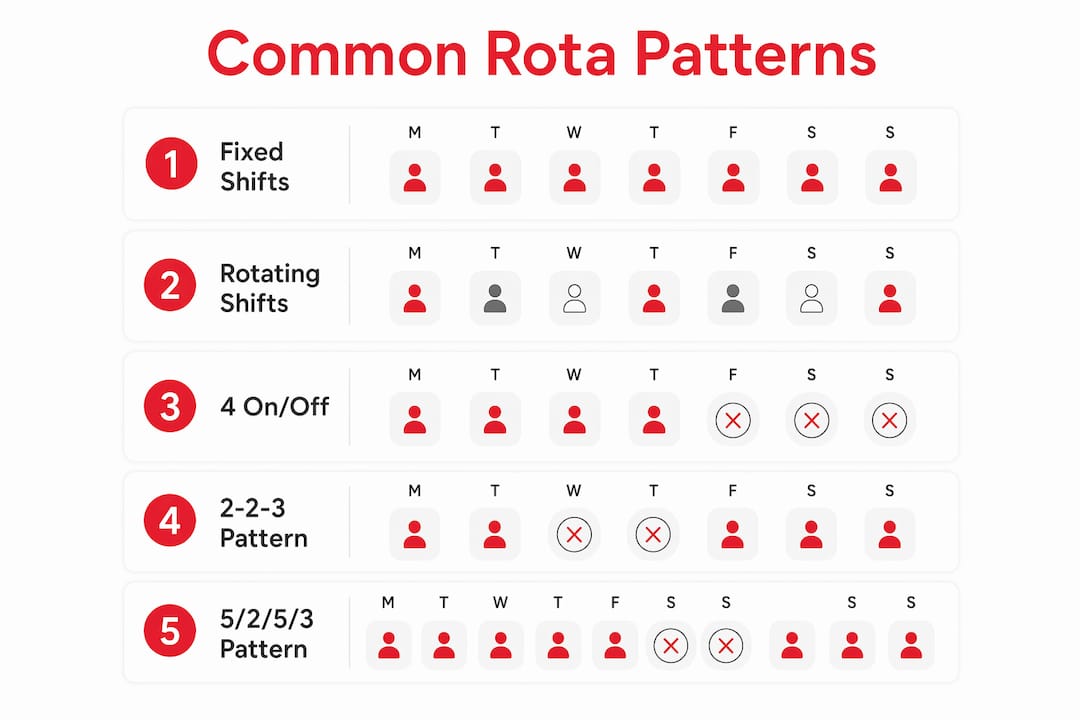
1. Fixed shifts Every employee works the same days and hours each week. Simple to administer, easy for staff to plan around. Works well in offices and retail with predictable demand. The downside: no built-in flexibility when demand spikes.
2. Rotating shifts Staff cycle through different shift types (day, evening, night) on a set schedule. Spreads the burden of unsociable hours fairly. Requires careful design to avoid fatigue.
3. 4 on / 4 off Four consecutive shifts followed by four days off. Common in security, care, and manufacturing. Ensure this aligns with contracted hours and complies with the Working Time Regulations limit on average weekly hours.
4. 2-2-3 (Panama pattern) Two days on, two off, three on — then the reverse. This pattern is popular in 24/7 operations and provides regular long weekends every other week.
5. 5/2/5/3 (Pitman pattern) A 28-day cycle: five days on, two off, five on, three off, then the same sequence on the opposite shift. Two teams cover 24/7 continuously. This cycle involves shifting off-days each time, so it is important to map it out clearly on a calendar.
Forward rotation matters. When you rotate staff through shifts, always move forward through the cycle (days to evenings to nights, never the reverse). Backward rotation forces the body clock to compress its rest window, which increases fatigue risk and is associated with poorer health outcomes for shift workers over time.
Frequent rota planning errors and how to avoid them
Most scheduling problems are predictable. The same mistakes appear across sectors, and most of them are avoidable with a simple process change.
Common errors:
- Ignoring availability data. Scheduling someone on a day they’ve flagged as unavailable creates immediate conflict and, if it breaches a contractual restriction, potential legal exposure.
- Filling open shifts before locking contracted hours. Placing guaranteed hours first is the single most important sequencing rule in rota building. Skipping it causes contract breaches and availability clashes.
- Informal shift swaps. When staff arrange swaps between themselves without manager approval, you lose visibility, audit trail, and control over whether the replacement is qualified for the role.
- Failing to rotate unpopular shifts. If the same people always work nights or bank holidays, you’ll see it in your absence data within a few months.
- No back-up list. Common shift planning mistakes include having no contingency pool when someone calls in sick. A short list of staff willing to pick up extra shifts at short notice is one of the cheapest operational safeguards you can build.
Pro Tip: Set up a formal shift-swap process with written requests, manager sign-off, and a record of who worked which shift. A structured swap process keeps approval visibility intact and gives you a clean audit trail if a dispute arises.
For a deeper look at the patterns behind these problems, the common staff scheduling challenges guide covers the most frequent operational traps and how to address them systematically.
UK legal requirements that affect every rota you publish
The Working Time Regulations 1998 set the statutory floor for every UK rota. Ignorance of them is not a defence in an employment tribunal.
| Requirement | Rule | Notes |
|---|---|---|
| Maximum average weekly hours | 48 hours (averaged over 17 weeks) | Can be exceeded with a signed opt-out agreement |
| Night worker limit | Average hours per 24-hour period | Averaged over a reference period |
| Daily rest | 11 consecutive hours between shifts | Applies to all workers |
| Weekly rest | 24 hours per 7-day period | Cannot be averaged away |
| Rest breaks | 20-minute break for shifts over 6 hours | Young workers get longer breaks |
| Young workers | Maximum hours per day and per week | No night work between 10pm–6am in most cases |
Pre-publication compliance checklist:
- Contracted hours are locked and visible before any open shifts are filled.
- Any employee working over 48 average hours has a signed opt-out on file.
- Night workers have been offered a health assessment.
- Daily rest of 11 hours is maintained between all consecutive shifts.
- Young workers’ separate rules have been applied where relevant.
- Records of hours worked are retained (the Regulations require adequate records; many employers keep at least two years).
On notice periods: there is no statutory minimum advance notice for rotas in general UK law, but tribunal precedent and sector practice favour at least two weeks. Many operations treat four weeks as the working standard. ACAS guidance supports giving as much notice as reasonably practicable. Check ACAS for the most current guidance on your sector.
How to create a rota: a step-by-step process with timings
A four-week planning cycle gives you enough horizon to spot problems before they become crises. Here is a practical sequence.
- Week minus four: gather demand data. Review your operational forecast — customer volumes, service requirements, known events. Identify minimum staffing levels per shift.
- Week minus three: lock contracted hours. Enter every employee’s guaranteed hours into your schedule template before touching anything else. This is non-negotiable.
- Week minus three: collect availability. Send your availability request. Give staff a firm deadline (48 hours works for most teams). Cross-reference with approved annual leave.
- Week minus two: assign skills to shifts. Match qualified staff to roles requiring specific competencies first. Fill general cover slots afterwards.
- Week minus two: fill remaining gaps. Use flexible workers, part-time staff, or approved overtime to cover what contracted hours don’t reach. Check your back-up list.
- Week minus one: run a compliance check. Verify rest periods, weekly hour averages, night-worker limits, and young worker rules before you publish.
- Week minus one: publish and communicate. Share the rota with your team, confirm receipt, and open a clear channel for queries.
On manager time: building a rota manually from a blank spreadsheet typically takes 2–4 hours per week for a team of 15–20 people, depending on complexity. Moving to stable, reusable base templates can cut that substantially. Digital tools reduce it further by automating availability collection, compliance checks, and gap-filling.
Metrics worth tracking: shift fill rate (percentage of shifts covered without last-minute changes), overtime hours per period, and shift-change frequency. These three numbers tell you whether your rota process is working before the problems become visible.
Pro Tip: Use a simple rota template to get started quickly. Even a basic spreadsheet template with contracted hours pre-loaded is faster and less error-prone than a blank grid.
What to look for in rota software: must-haves and nice-to-haves
Not all scheduling tools are built for UK compliance requirements. Use this checklist when evaluating platforms.
| Feature | Priority | Why it matters |
|---|---|---|
| Availability management | Must-have | Collects and stores staff availability as a data input, not an afterthought |
| Contracted-hours locking | Must-have | Prevents accidental contract breaches at the scheduling stage |
| Compliance checks | Must-have | Flags Working Time Regulations breaches before you publish |
| Audit trails | Must-have | Records who worked which shift and any changes made; essential for disputes |
| Mobile access | Must-have | Staff need to view and respond to rotas from their phones |
| Shift swapping with approvals | Must-have | Structured swap process with manager sign-off and visibility |
| Payroll / time-tracking integration | Must-have | Eliminates manual data re-entry and reduces payroll errors |
| AI-assisted gap filling | Nice-to-have | Suggests cover based on availability, skills, and fatigue rules |
| Demand forecasting | Nice-to-have | Aligns staffing levels with predicted operational demand |
| Geofenced clock-in | Nice-to-have | Verifies attendance at the right location in real time |
| Multi-site tenancy | Nice-to-have | Manages multiple locations from one dashboard |
| Advanced reporting | Nice-to-have | Labour cost analysis, absence trends, compliance summaries |
Good timekeeping and payroll integration is one of the most overlooked requirements in platform selection. When your rota tool and payroll system share data automatically, you eliminate a whole category of manual errors and the disputes they generate.
For a broader view of what to look for, the workforce management tools checklist covers the full feature set relevant to UK HR and operations teams.
Moving from spreadsheets to digital rota software without disruption
The biggest risk in any system migration is trying to change everything at once. A phased pilot approach reduces that risk significantly.
Pilot plan:
- Select one team or site with a manageable headcount (10–20 people works well).
- Run the new system in parallel with your existing spreadsheet for one full pay period.
- Measure three things: time spent building the rota, number of last-minute changes, and staff queries about their schedule.
- Review the results, address any friction points, then roll out to the next team.
Change management checklist:
- Get sign-off from your line manager or HR lead before the pilot starts.
- Brief your team clearly: explain what is changing, why, and what they need to do differently.
- Identify a go-to person for staff questions during the transition (this doesn’t have to be you).
- Set a clear escalation path for last-minute cover requests during the pilot period.
- Agree success criteria upfront: what does “working well” look like after four weeks?
Training:
- Managers need to understand availability collection, compliance checks, and shift-swap approvals in the new system.
- Frontline staff need to know how to view their rota, submit availability, and request or accept shift swaps on mobile.
- Keep training sessions short and task-focused. A 20-minute walkthrough beats a two-hour webinar for adoption.
The shift management system guide covers the practical steps for getting a new platform embedded into daily operations without losing momentum.
Real-world outcomes from better rota management
The evidence for investing in structured rota planning is consistent across sectors. Managers who treat availability as a data input rather than an afterthought report fewer last-minute gaps, lower absenteeism, and better staff retention. Fair rotation of unpopular shifts is directly correlated with reduced turnover in shift-based roles.

On the operational side, moving from a blank weekly slate to stable, reusable base templates can reduce administrative rota-building time by roughly 60–70% for many businesses. That is not a marginal saving. For a manager spending three hours a week on scheduling, it represents a meaningful return of time to higher-value work.
Compliance outcomes improve too. When rest periods, contracted hours, and opt-out records are built into the scheduling process rather than checked retrospectively, the rate of Working Time Regulations breaches drops sharply. Audit-ready records mean that if a dispute does arise, you have the evidence to resolve it quickly.
Data privacy and security when you use rota software
A rota contains personal data: names, working patterns, availability, location data from geofenced clock-ins, and sometimes health-related information such as night-work health assessments. Under UK GDPR, that data must be handled lawfully, transparently, and securely.
Before you adopt any rota platform, check these points:
- Data residency: Where is your staff data stored? UK or EEA hosting is preferable for compliance simplicity.
- Role-based access: Can you restrict who sees which data? Frontline staff should not have access to other employees’ personal details.
- Two-factor authentication: Is it available and enforced for manager accounts?
- Audit records: Does the system log who accessed or changed data, and when?
- Data retention and deletion: Can you delete a former employee’s data in line with your retention policy?
- Processor agreements: Does the vendor provide a Data Processing Agreement (DPA) as required under UK GDPR Article 28?
Staff self-service features add a layer of complexity. When employees can view and update their own availability, submit leave requests, and swap shifts through a mobile app, you need to be confident the platform’s access controls prevent one employee from seeing another’s personal data. Ask vendors for their security documentation and check whether they hold ISO 27001 certification or equivalent.
Key takeaways
Good rota planning requires contracted hours locked first, availability collected as structured data, and compliance checked before every rota is published.
| Point | Details |
|---|---|
| Lock contracted hours first | Always populate guaranteed hours before filling open shifts to prevent contract breaches. |
| Publish with enough notice | Tribunal precedent and sector practice favour at least two weeks; four weeks is the operational standard in many industries. |
| Rotate unpopular shifts fairly | Fair rotation of nights and weekends reduces absenteeism and builds long-term staff trust. |
| Run a compliance check before publishing | Verify Working Time Regulations rest periods, weekly hour averages, and night-worker limits every cycle. |
| Timeprof brings it all together | Timeprof automates availability collection, compliance checks, shift swaps, and audit trails in one mobile-friendly platform. |
The part of rota planning most managers underestimate
There is a tendency to treat rota planning as a logistics problem. Get the right number of people in the right slots, and the job is done. That framing misses the most consequential part of the process.
The rota is one of the most visible signals of how a manager treats their team. Staff notice immediately whether unpopular shifts are distributed fairly, whether their availability is genuinely respected, or whether the schedule is built around operational convenience with their preferences as an afterthought. Those perceptions accumulate. They show up in absence rates, in how quickly people respond when you need last-minute cover, and eventually in turnover.
The compliance dimension is equally underestimated. Most managers know the 48-hour weekly limit exists. Fewer have a clear process for checking rest periods between shifts, managing night-worker health assessments, or retaining adequate records. These are not bureaucratic niceties. They are the difference between a defensible position in a tribunal and an expensive one.
The practical implication is that the best rota processes are not just efficient. They are fair, transparent, and auditable. A digital system that automates the compliance checks and gives staff visibility of their own schedule does not replace good management judgement. It removes the friction that stops managers from exercising it.
Timeprof makes compliant, fair rota planning straightforward
Spreadsheets can build a rota. They cannot check compliance, manage shift swaps with approval trails, collect availability automatically, or give your team real-time visibility from their phones. That gap is where scheduling errors and disputes live.
Timeprof is built specifically to close it. The platform handles availability collection, contracted-hours locking, Working Time Regulations compliance checks, geofenced clock-in, shift-swap approvals, and audit-ready records in one place. Managers get a live view of their workforce across sites; staff get a mobile portal where they can see their schedule, submit availability, and request swaps without a phone call.

Timeprof runs on a per-staff-member subscription with tiered pricing and volume discounts, so the cost scales with your headcount rather than locking you into a fixed enterprise contract from day one. Custom integrations and dedicated account management are available for larger organisations.
If you’re ready to move beyond spreadsheets, book a demo with Timeprof and see how the platform fits your operation.
Useful sources for UK managers
- GOV.UK: Working Time Regulations — The primary statutory reference for maximum hours, rest breaks, night-worker rules, and opt-out requirements. Check here before publishing any rota.
- ACAS — Practical guidance on working hours, shift patterns, and employment disputes. The ACAS helpline is available for specific queries.
- CIPD — Research and practitioner resources on workforce planning, flexible working, and employee wellbeing in shift-based roles.
- Timeprof blog — Articles on rota planning, scheduling best practices, compliance, and workforce management for UK managers.
- Shift planning best practices guide — A manager-focused walkthrough of the processes and decisions that separate good rotas from reactive ones.
- Reduce scheduling errors guide — Practical techniques for cutting the most common sources of rota mistakes.
For a demo of Timeprof, visit timeprof.co.uk.