Reduce scheduling errors in your workforce: 2026 guide
Learn how to reduce scheduling errors in your workforce effectively. Discover key strategies and the benefits of automated scheduling.

Scheduling errors are defined as preventable mismatches between staffing supply and operational demand, and they cost businesses far more than a missed shift. For workforce managers and HR professionals, the drive to reduce scheduling errors across the workforce is not a minor administrative goal. It is a direct lever on compliance, staff retention, and service quality. Automated scheduling can save management teams up to 80% of the time spent on scheduling tasks. That figure signals how much capacity is currently lost to manual processes, repeated messages, and avoidable corrections. The good news is that the path to accurate, reliable rostering is well established.
What causes workforce scheduling errors and why do they matter?
Manual processes are the single largest source of scheduling mistakes. Spreadsheets, group chats, and disconnected systems all introduce the same failure modes: outdated availability data, version conflicts, and no audit trail when something goes wrong.
The root causes cluster into four categories:
- Manual data entry. Copying shift patterns by hand creates transcription errors. A single misread cell in a spreadsheet can leave a site understaffed for an entire shift.
- Ignoring demand signals. Schedules built on last week’s pattern rather than actual forecasted demand produce coverage gaps and unnecessary overtime.
- Incomplete employee records. Missing availability, expired certifications, or unrecorded leave requests all feed flawed schedules. Clean, standardised input data is a prerequisite for reliable scheduling. No automation can compensate for messy records.
- Undefined constraints. Labour laws, union agreements, and employee accommodations must be explicitly codified. Without them, a schedule can be technically filled but legally non-compliant.
The consequences extend well beyond a difficult morning for the operations team. Coverage gaps trigger compliance breaches. Repeated errors erode staff trust and accelerate turnover. Overtime costs compound quietly until they appear as a budget shock at month end. Scheduling is more than filling boxes. It balances service levels, compliance, skills’, and well-being simultaneously. Treat it as a box-filling exercise and you will generate churn and grievances alongside your rota.
How does automated scheduling software reduce scheduling errors?
Automation removes the human hand from the most error-prone steps in the scheduling process. The gains are measurable and consistent across industries.
- Time recovery. Automated labour planning platforms reduce planning time by 70%, cutting weekly scheduling work from more than 10 hours to 3–4 hours. That recovered time goes back into managing people, not managing spreadsheets.
- Validation rules. Good scheduling software rejects invalid inputs before they reach the published rota. A shift assigned to a worker without the required certification is flagged instantly, not discovered during an audit.
- Integrated data. When scheduling connects directly to attendance and payroll, discrepancies surface in real time. A manager does not need to cross-reference three separate systems to confirm whether a shift was actually worked.
- Demand forecasting. Automated scenario planning uses historical attendance, seasonal patterns, and live operational data to model staffing needs. This replaces guesswork with evidence, reducing both overstaffing and dangerous coverage gaps.
- Shift swap management. AI scheduling reduces overtime and agency spend by automating shift swaps with audited approvals, matching available staff to open shifts based on skills and availability rather than whoever answers a phone call first.
Pro Tip: Set validation rules before you go live. Define the hard constraints your system must enforce, such as maximum consecutive hours and mandatory rest periods, and test them with real historical data before the first automated rota runs.
The critical distinction between entry-level scheduling tools and more capable platforms is the depth of constraint handling. Basic tools fill gaps. More capable platforms account for fatigue risk, skills matrices, and compliance thresholds simultaneously.
What data management practices support accurate employee scheduling?
Automation is only as reliable as the data it runs on. Before deploying any scheduling system, workforce managers must address the quality of their underlying records.
The preparation steps that matter most are:
- Standardise input formats. Every site, department, and manager must record availability, leave, and skills in the same format. Inconsistent inputs produce inconsistent outputs.
- Audit attendance records. Gaps in historical attendance data skew demand forecasts. A complete, accurate attendance history is the foundation of credible shift planning.
- Codify all constraints explicitly. Scheduling is a complex optimisation problem that requires clear encoding of labour laws, union rules, and employee accommodations before automation begins. Hard constraints are non-negotiable rules. Soft constraints are preferences the system should respect where possible.
- Define success metrics before deployment. Cost reduction alone is a narrow target. A schedule that cuts labour costs by breaching rest requirements or ignoring employee preferences will generate grievances and legal exposure.
Organisations that fix data quality and codify constraints before choosing scheduling software consistently achieve better outcomes than those that buy first and configure later.
The metric question deserves particular attention. Defining success metrics clearly before automation deployment means balancing cost, employee preferences, schedule stability, and legal compliance. A manager who measures only cost will optimise for cost. A manager who measures fairness, compliance, and stability alongside cost will build a workforce that stays.
What step-by-step strategies help managers maintain error-free scheduling?
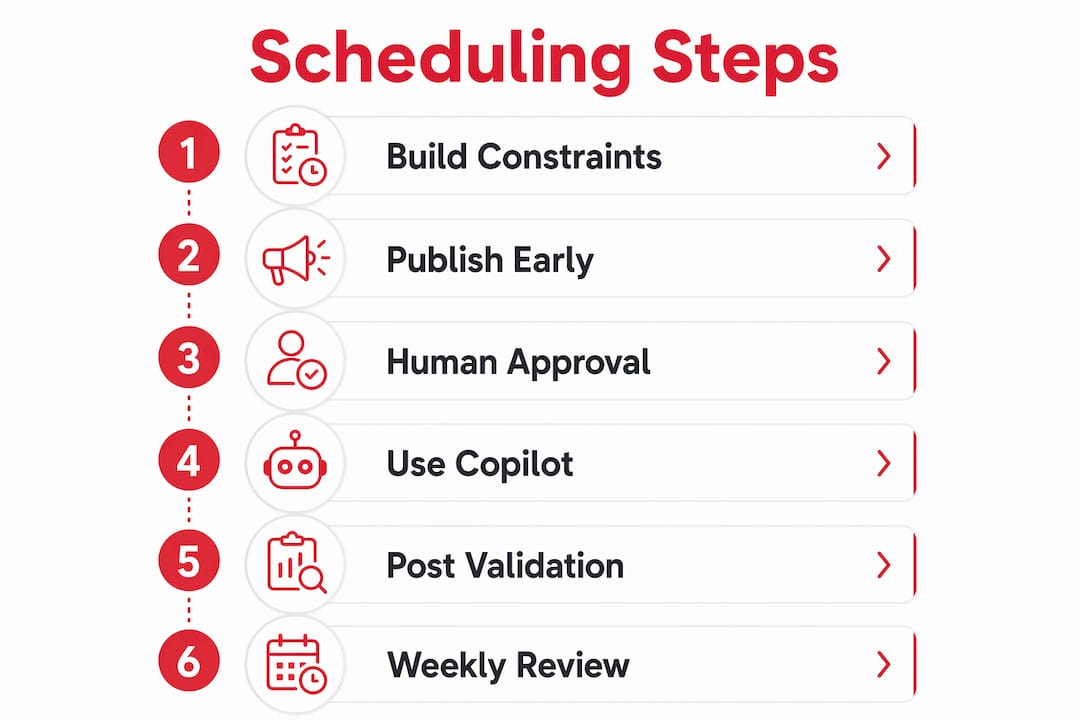
Reducing scheduling mistakes is not a one-time project. It requires a repeatable operating rhythm. The following sequence gives workforce managers a practical framework.

Step 1: Build constraint-first models. Start every scheduling cycle by confirming that all hard constraints are current. Labour law changes, new union agreements, and updated employee accommodations must be reflected before the system runs.
Step 2: Publish schedules 10–14 days ahead. Publishing schedules early enhances predictability and reduces avoidable disruptions. Staff who know their shifts in advance can arrange childcare, transport, and personal commitments. Last-minute changes drop sharply.
Step 3: Use human approval for high-risk changes. Automation is most effective when paired with human oversight via risk-based approvals. Not every schedule change carries the same risk. A swap between two equally qualified workers on the same site is low risk. A change that leaves a regulated role unfilled overnight is high risk and needs a manager’s sign-off.
Step 4: Treat the scheduling system as a copilot, not a black box. Scheduling software should show shift assignment reasons and summarise key changes for easy manager review. If a manager cannot explain why a shift was assigned a particular way, they cannot defend it to a worker, a union, or a regulator.
Step 5: Run automated post-run validations. Comparing scheduled versus actual time and payroll forecasts after each scheduling cycle identifies recurring discrepancies. Those discrepancies are the data that drives continuous improvement.
Step 6: Conduct weekly reconciliation. Set a fixed weekly review to compare planned versus actual coverage, flag constraint breaches, and update employee records. This prevents small errors from compounding into systemic problems.
| Practice | Frequency | Primary benefit |
|---|---|---|
| Constraint audit | Every scheduling cycle | Compliance and legal protection |
| Schedule publication | 10–14 days ahead | Reduced last-minute disruptions |
| High-risk change approval | As required | Human oversight on critical decisions |
| Post-run validation | After each rota run | Continuous error reduction |
| Weekly reconciliation | Weekly | Data quality and trend identification |
Pro Tip: Build an escalation playbook before you need it. Define in writing who approves what, how quickly, and what happens if a critical shift cannot be filled. A playbook used once a month saves hours of confusion when a genuine crisis hits.
Key takeaways
Accurate workforce scheduling requires clean data, codified constraints, and a repeatable review process working together, not any single tool or technique alone.
| Point | Details |
|---|---|
| Automation saves significant time | Automated scheduling cuts planning time by up to 70%, freeing managers for higher-value work. |
| Data quality comes first | Clean, standardised records are a prerequisite; no system compensates for incomplete or inconsistent inputs. |
| Constraints must be explicit | Codify labour laws, union rules, and employee preferences before any automation goes live. |
| Publish schedules early | Releasing rotas 10–14 days ahead reduces last-minute disruptions and missed shifts. |
| Human oversight remains essential | Risk-based approvals and post-run validations prevent automation from compounding errors at scale. |
Why I think most scheduling problems are actually data problems in disguise
After working closely with workforce managers across care, security, and hospitality, the pattern I see most often is this: organisations buy scheduling software expecting it to fix their rostering. It does not. What it does is make their existing data problems faster and more visible.
The managers who get the best results treat the scheduling system as the last step, not the first. They spend weeks before go-live cleaning availability records, standardising leave categories, and writing down constraints that previously lived only in a senior manager’s head. That groundwork is unglamorous. It does not appear in any vendor demonstration. But it is the difference between a system that saves 70% of planning time and one that generates a new category of error.
The other thing I would push back on is the instinct to remove human judgement entirely. The best scheduling operations I have seen use automation to handle the routine and use experienced managers to handle the edge cases. A worker with a caring responsibility, a site with an unusual skills requirement, a shift pattern that looks fine on paper but creates fatigue risk over six weeks. These are the decisions that need a human eye. The system flags them. The manager resolves them. That division of labour is where the real accuracy gains come from.
— Michael
How Timeprof supports accurate, error-free workforce scheduling
Timeprof is built specifically for workforce managers who need more than a digital rota.

The platform brings scheduling, attendance, leave management, and staff communication into one place, removing the fragmented spreadsheets and disconnected systems that generate most scheduling errors. Timeprof’s workforce intelligence tools include geofenced clock-in, real-time notifications, shift-linked tasks, skills and site matching, and audit-ready compliance reporting. Managers get a single, live view of their workforce across every site. Staff get transparency and self-service access through a mobile-first portal. For organisations in care, healthcare, security, hospitality, cleaning, and retail, Timeprof provides the data quality and operational control that accurate scheduling depends on.
FAQ
What is the fastest way to reduce scheduling errors?
Standardise your input data and codify all hard constraints before deploying any scheduling tool. Automation built on clean, consistent records eliminates the majority of recurring errors immediately.
How far ahead should workforce schedules be published?
Schedules published 10–14 days in advance reduce missed shifts and last-minute disruptions. Earlier publication gives staff time to plan and reduces the volume of swap requests managers must handle.
Can automation alone eliminate workforce scheduling mistakes?
Automation removes most manual errors but must be paired with human oversight. Risk-based approvals and post-run validations catch the edge cases that automated rules do not anticipate.
What data does a scheduling system need to work accurately?
Accurate scheduling requires complete attendance records, standardised availability data, up-to-date employee skills and certifications, and explicitly codified labour law and union constraints.
How do I measure whether my scheduling accuracy has improved?
Track scheduled versus actual hours worked, the frequency of last-minute changes, overtime spend, and compliance breach rates. Improvement across all four metrics confirms that scheduling accuracy is genuinely increasing, not just shifting problems between categories.