CT labor laws for rota compliance: what managers must enforce
Ensure your rota complies with Connecticut labor laws to avoid claims. Learn key requirements for managing working hours and employee rights.

If your rota does not respect a 48-hour average working week, 20-minute breaks over six hours, 11 hours’ rest between shifts, and 5.6 weeks’ paid annual leave, you are exposed to a claim, whatever your intentions were. These core requirements form the backbone of the Working Time Regulations 1998, and they apply whether your team works fixed shifts, irregular hours, or a mix of both.
Before anything else, run three checks on your current rota:
- Weekly-average exposure: does anyone regularly work hours exceeding the statutory weekly average limit across a rolling reference period without a signed opt-out?
- Rest gaps between shifts: does any employee have less than 11 consecutive hours off between a closing shift and the next opening one?
- Holiday accrual anomalies: are irregular-hours workers being paid holiday based on a flat rate rather than the required average pay method?
If any of those checks fail, the rest of this guide tells you exactly what to fix and how.
Key Takeaways
Compliant scheduling depends on enforcing the 48-hour average, 11-hour rest gaps, 20-minute breaks, and 5.6 weeks’ holiday entitlement, backed by defensible records.
| Point | Details |
|---|---|
| Check the 17-week average | Review rolling weekly hours, not single weeks, to catch 48-hour breaches before they compound. |
| Block clopening manually or automatically | No shift pairing should leave under 11 hours’ rest without documented agreement. |
| Retain records for six years | Holiday- and pay-related evidence must be kept for six years; some working-time records need only two. |
| Calculate holiday pay on 52 weeks | Irregular-hours workers’ holiday pay must reflect an average of the previous 52 weeks worked. |
| Automate the obvious rules | Time Prof enforces rest gaps and shift blocks at the point of rota creation, with geofenced clocking and audit-ready reports. |
Table of Contents
- Understanding the working time rules behind CT labor laws
- A practical rota checklist to stop clopening and rest breaches
- Record-keeping standards that hold up under scrutiny
- How workforce software closes the compliance gap
- Getting your rotas compliant this week and next quarter
- Sources
Understanding the working time rules behind CT labor laws
Employment law affecting scheduling is less about knowing every clause and more about knowing which three or four rules actually bite. The Working Time Regulations 1998 cap average weekly hours at 48, calculated over a rolling 17-week reference period rather than any single week. That distinction matters for rota design: a punishing fortnight is fine if the surrounding weeks are light enough to bring the average down. Workers can opt out of the 48-hour limit voluntarily, but you must keep an up-to-date, signed record of every opt-out, and a worker can revoke it with notice.
Rest entitlements sit alongside the weekly cap. Anyone working more than six hours a day is entitled to an uninterrupted 20-minute break, and every worker needs at least 11 consecutive hours’ rest in any 24-hour period, plus either 24 hours’ rest each week or 48 hours every fortnight. Night workers face an additional layer: their normal hours should not exceed an average of eight in 24, and employers must offer health assessments before someone starts night work and periodically afterwards.
The four numbers to know:
- 48 hours: maximum average weekly hours (17-week reference period)
- 20 minutes: minimum uninterrupted break after 6 hours worked
- 11 hours: minimum rest between shifts
- 5.6 weeks: statutory paid annual leave entitlement
Annual leave rounds out the framework. Full-time workers accrue 5.6 weeks of paid leave a year, and for anyone with genuinely irregular hours, holiday pay must now be calculated using an average of the previous 52 weeks of pay, not a crude estimate.
A practical rota checklist to stop clopening and rest breaches
“Clopening”, closing one shift and opening the next with barely any gap, is the single most common way rotas quietly breach the rules. It rarely happens through carelessness; it happens because a manager swaps two shifts on a Thursday afternoon without checking what that does to Friday morning. The fix has to be built into how you build rotas, not left to memory.
- Block any shift pairing that leaves under 11 hours’ rest, and treat exceptions as requiring documented, individual agreement, not a routine workaround.
- Schedule the 20-minute break as part of the shift, not around it. ACAS is explicit that rest breaks have to be genuinely available in practice, not just written into a policy nobody enforces.
- Count on-call and standby time correctly. Time spent at the workplace on call generally counts as working time even if the worker is resting, whereas time spent on call away from the workplace often does not, so check which applies before you calculate weekly totals.
- Treat unpaid breaks as time excluded from the working-time count, but confirm the break was actually uninterrupted and long enough to qualify.
- Flag any rota where two consecutive weeks push the 17-week rolling average above 48 hours, and adjust the following weeks to compensate.
Pro Tip: Run your rest-gap check before you publish the rota, not after. Retrofitting compliance once shifts are live nearly always means either a last-minute reshuffle or a breach that has already happened.
Manual spreadsheets make every one of these checks a judgement call. A scheduling system built to flag these patterns automatically removes the guesswork before a shift ever goes live.

Record-keeping standards that hold up under scrutiny
Adequate records mean more than a spreadsheet of clock-in times. To demonstrate compliance with the Working Time Regulations and holiday-pay rules, you need signed opt-out agreements, the calculations behind each holiday-pay figure, and a trail showing any revocations. Retention periods differ by record type: some working-time records need keeping for two years, while holiday- and pay-related records must be retained for six years.
A defensible record is not a log of hours worked. It is a trail that shows the calculation behind every figure, the agreement behind every opt-out, and the date behind every change.
What to store, at minimum:
- Signed opt-out agreements, with dates and any subsequent revocation
- The 52-week pay data used to calculate holiday pay for irregular-hours staff
- Daily and weekly hours actually worked, not just scheduled
- A timestamped audit trail of rota changes and who approved them
How workforce software closes the compliance gap
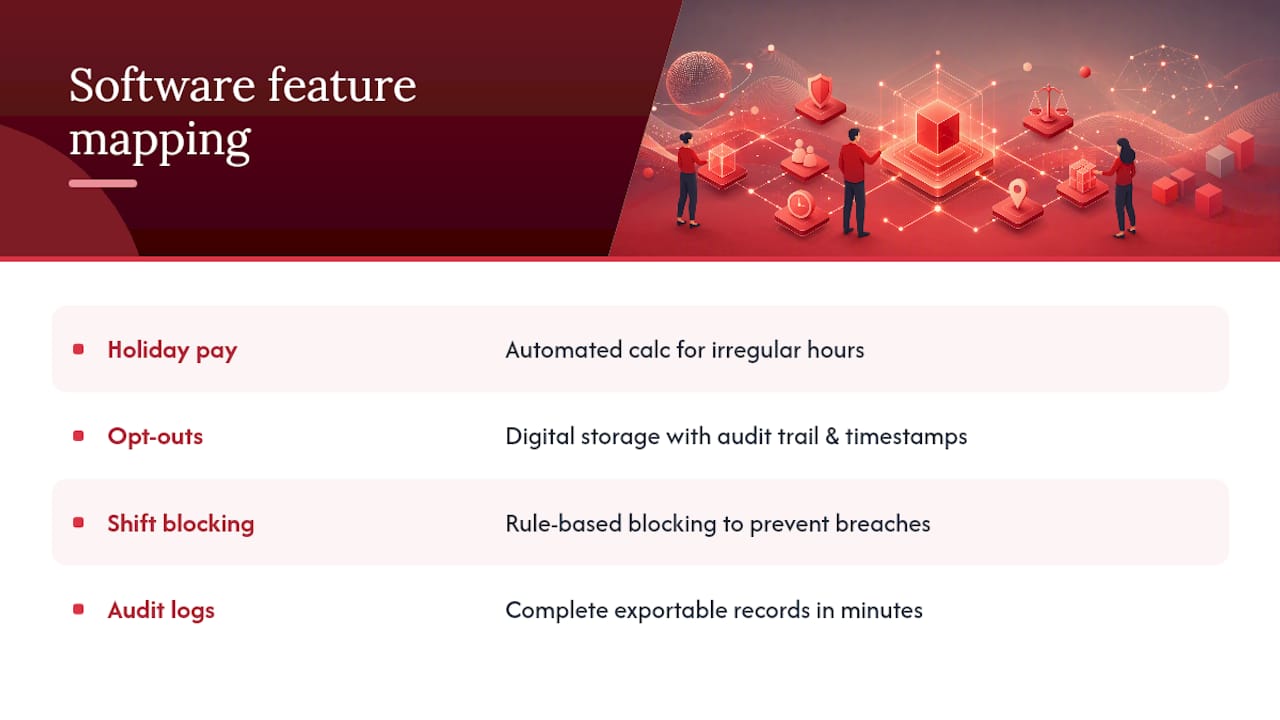
Every rule above maps to a specific software function, and that mapping is worth putting in front of any vendor before you sign a contract.
Automated holiday-pay calculation for irregular-hours workers | | Signed opt-outs and revocations | Digital opt-out storage with audit trail and timestamped changes |
Automated shift-blocking rules stop a breach before it happens rather than flagging it after the fact, which is the practical difference between prevention and damage control. Audit-ready logs matter just as much when something does go wrong: instead of reconstructing weeks of shift history from memory and paper timesheets, a manager can pull a complete record in minutes, which speeds up internal investigations and strengthens your position if a case reaches a tribunal.
Time Prof was built around this exact mapping. Its rolling-average reporting, rule-based scheduling, and geofenced clocking give managers the same audit trail an investigator would ask for, generated automatically rather than assembled under pressure. When evaluating any platform, including Time Prof, ask specifically to see the configuration checks HR teams should verify during a demo.
Getting your rotas compliant this week and next quarter
Fixing this does not require a system overhaul overnight. It requires a short, deliberate sequence.
- This week: run the three BLUF checks (weekly-average exposure, rest gaps, holiday accrual anomalies) across your current live rota and your last attendance export.
- Before your next rota goes live: apply shift blocks manually if your software does not do it automatically, confirm every 20-minute break is scheduled rather than assumed, and chase down any missing opt-out signatures.
- Next quarter: configure your workforce software’s rule-based scheduling and reporting, brief managers on what “adequate rest” actually looks like in practice, and document exactly how long each record type gets retained.
Pro Tip: Assign one person to own the opt-out register. When these agreements sit scattered across email threads and paper files, nobody notices when one lapses or gets revoked until it becomes a problem.
Longer term, this is as much a training issue as a systems one. Managers who understand where scheduling errors typically creep in catch far more problems before they reach a live rota.
Why automated compliance beats manual vigilance
Most compliance failures I have seen were not caused by bad intent. They came from a manager swapping shifts under pressure and not seeing the knock-on effect three days later. Compliance is not a one-off audit; it is a rolling check, week after week. Automating the obvious rules frees managers to focus on the judgement calls software cannot make, but when a case is genuinely ambiguous, involve HR or legal counsel before you decide.
Put audit-ready compliance on autopilot with Time Prof
Timeprof is the alternative to chasing rest gaps and opt-out forms across three spreadsheets. It builds shift-blocking rules directly into rota creation, so an 11-hour rest breach or a clopening pairing gets stopped before publication rather than discovered after a complaint. Geofenced clock-in confirms attendance actually happened where it was scheduled, and rolling-average reporting keeps your 17-week working-time exposure visible at a glance rather than buried in a monthly reconciliation.

If your rota checks flagged even one issue earlier in this article, that is worth acting on now rather than at your next audit. Book a demo of Time Prof and ask to see the holiday-pay averaging and audit trail features in action against your own shift patterns.