Rule-based scheduling explained for UK managers
Explore how rule-based scheduling helps UK managers automate compliant shift planning, ensuring legal regulations are met and conflicts are flagged.

Rule-based scheduling is automated rota generation that applies explicit business and legal rules — availability, skills, maximum hours, rest periods, site requirements and contractual terms — to produce compliant shift plans without manual calculation. For UK managers, that means Working Time Regulations checks, National Minimum Wage verification and certification requirements all run at roster time, not after the fact. Platforms like Timeprof embed these rule engines directly into the rota workflow, flagging conflicts before a schedule is published and generating audit trails that hold up to scrutiny.
Three signals tell you a platform genuinely runs rule-based scheduling rather than just automating copy-paste:
- Audit trails that log every rule applied, every conflict flagged and every manager override
- Compliance reporting tied to specific regulations (Working Time Regulations, sector licences)
- Geofenced clock-in and role-based access so the rules extend from roster creation through to live attendance
Key takeaways
Rule-based scheduling enforces legal and contractual constraints at roster time and typically delivers measurable results within 4–12 weeks when piloted on a single site with clear KPIs.
| Point | Details |
|---|---|
| Definition | Automated rota generation that applies explicit rules — availability, skills, hours limits, rest periods — to produce compliant shifts. |
| Prioritise rule order | Encode legal and safety rules first; add contractual and convenience rules after the pilot proves the foundation. |
| Pilot on one site | Run parallel rosters for 2–6 pay cycles, track coverage rate and compliance violations, then refine before scaling. |
| Hybrid path | Use rules-first for governance and audits; add AI scheduling when you have three or more months of reliable demand data. |
| Timeprof | Offers a rules engine with audit trails, geofenced clock-in and compliance reporting built for UK workforce management. |
Table of Contents
- How does rule-based scheduling work inside a workforce platform?
- What rules should you encode in a UK rota?
- What are the real business benefits for UK employers?
- What are the limitations and how do you mitigate them?
- UK implementation checklist: from pilot to full deployment
- Which KPIs should you track to prove value?
- Rule-based, AI-driven or hybrid: which approach fits your business?
- What the pilot actually teaches you
- Timeprof makes rule-based scheduling practical from day one
- Sources
How does rule-based scheduling work inside a workforce platform?
Personnel scheduling is the process of building staff timetables to meet service demand while observing workplace constraints — and decision-support tools typically combine demand modelling, constraint handling and reporting to make that tractable at scale.
In practice, the flow runs in four stages:
- Inputs: shift templates or demand forecasts, employee availability windows, qualifications and site assignments, contract terms and regulatory constraints
- Rule engine: deterministic if/then logic — for example, do not assign more than 48 hours average per week; only assign SIA-licensed staff to door supervisor roles
- Solver: the engine attempts to fill every shift within the rules, flags any conflicts it cannot resolve and produces an audit log of decisions
- Artefacts managers see: conflict alerts, compliance warnings, alternative schedule suggestions and a rule-exemption log for any approved overrides
Integrations matter here. The rule engine needs live contract data from your HR system, pay-rule verification from payroll and real-time adherence from time-and-attendance. Without those feeds, the rules run on stale data and the outputs degrade quickly.
Pro Tip: Set up your HR and payroll integrations before you configure a single rule. A rule engine running on accurate contract data delivers reliable outputs from day one; one running on spreadsheet exports from three months ago will produce conflicts that erode manager trust fast.
What rules should you encode in a UK rota?
The table below maps rule categories to practical examples and their UK regulatory basis. These are the rules worth configuring first.
| Rule category | Example rule | UK basis |
|---|---|---|
| Availability | Block shifts during employee-declared unavailable windows; require notice for changes | Contract / staff agreement |
| Weekly hours | Average working week ≤ 48 hours over 17-week reference period | Working Time Regulations 1998 |
| Rest periods | Minimum hours between shifts; break for shifts longer than 6 hours | Working Time Regulations 1998 |
| Night work | Maximum average hours per day for night workers | Working Time Regulations 1998 |
| Skills and certification | Only assign CQC-regulated care tasks to staff with current care certificates; SIA licence required for security roles | Sector regulation |
| Site and location | Restrict assignments to contracted site; flag if travel time between consecutive shifts is short | Operational policy |
| Pay triggers | Flag shifts that cross overtime or weekend-premium thresholds for payroll review | Contract / National Minimum Wage Act 1998 |
| Emergency overrides | Allow manager-approved exception with mandatory log entry and reason code | Internal governance |
A few points worth noting. Zero-hours contracts need their own rule layer: guaranteed-hours clauses, where they exist, must be honoured before open shifts are offered to other staff. Night-premium and overtime triggers are best expressed as flags to payroll rather than hard rates inside the scheduler — rates change, and a rule that hard-codes a pay rate will drift out of date.
Embedding compliance checks into scheduling prevents many breaches at roster publication and lets managers focus on operational decisions rather than manual law-checking.
What are the real business benefits for UK employers?
The advantages of rule-based scheduling cluster around four areas that managers consistently cite when they move away from spreadsheet rotas:
- Time saved on roster-building: rules eliminate the repetitive checking that consumes hours each week, particularly across multi-site operations
- Fewer compliance errors at publication: legal and contractual constraints are checked before the rota goes live, not discovered during a payroll audit
- Consistent fairness: the same rules apply to every employee, every cycle — reducing the perception of favouritism that manual scheduling often generates
- Cost control: enforced maximum hours and smarter coverage reduce unnecessary overtime spend
Staff retention is the less-discussed benefit. Predictable rotas, transparent swap processes and preference-handling that staff can see and trust all contribute to lower turnover. AI-driven scheduling research finds that perceived scheduling fairness improves when the logic behind assignments is visible and consistent — and rules-based systems are inherently more explainable than black-box optimisers.
What are the limitations and how do you mitigate them?
Rules-based scheduling has real constraints. Knowing them upfront saves a failed pilot.
- Rigidity under demand spikes: a strict rule set can leave shifts unfilled when demand changes suddenly. Mitigate with well-designed exception workflows and temporary rule overrides that require a log entry
- Data quality dependency: inaccurate availability records or outdated contract data produce bad rosters. Accurate input data and staff training are the most frequent determinants of whether auto-scheduling succeeds or fails
- Complex multi-contract staff: employees working across sites or on split contracts need layered rules with clear precedence — test these edge cases before go-live
- Staff distrust: if rules appear arbitrary, staff disengage. Transparent rule descriptions and a short briefing on how preferences are used resolve most of this
- Scalability ceiling: rules work best for stable, explicit constraints. Where demand patterns are highly variable and you have reliable historical data, a hybrid AI approach captures gains that rules alone cannot
Pro Tip: Start with three rule categories only: legal compliance, safety certification and guaranteed-hours obligations. Get those running cleanly, measure the results, then add convenience rules in the next iteration. Trying to encode every policy at once is the most common reason pilots stall.
UK implementation checklist: from pilot to full deployment
Follow this sequence to run a clean pilot and scale without disruption.
- Preflight audit: verify every employee’s contract fields, skill records and site assignments; confirm payroll integration for pay-rule verification
- Define the priority ruleset: legal rules first (Working Time Regulations, minimum rest), then safety and certification, then contractual obligations, then convenience preferences
- Pilot design: select one site or team; define measurable KPIs; run parallel rosters for 2–6 pay cycles; collect manager and staff feedback at each cycle
- Training and communications: manager sessions covering overrides and audit trail expectations (approximately two hours) and short staff briefings on preferences and swap processes (approximately 30 minutes)
- Exception playbooks: document when managers may override a rule, what reason codes are required and how exceptions feed back into rule refinement
- Compliance mapping: map each rule to its UK legal or contractual basis — Working Time Regulations, National Minimum Wage Act, sector-specific regulation — and keep the mapping in an auditable document
- Scale: refine rules from pilot data, run a phased roll-out by site, assign a rule governance owner and schedule quarterly rule reviews
Rules-based scheduling typically delivers time-to-value in 4–12 weeks, making it the fastest path to governance and legal guardrails before any AI pilot begins.
For a broader vendor evaluation, the workforce management tools checklist covers the integration and feature questions worth asking any platform.
Which KPIs should you track to prove value?
| KPI | What to measure | Target direction |
|---|---|---|
| Coverage rate | % of shifts staffed to required skill level | Increase toward full compliance |
| Compliance violations | Count of rule breaches flagged at publication | Decrease to zero |
| Overstaffing hours | Hours scheduled above demand, with cost | Decrease |
| Understaffing hours | Hours below required coverage, with cost | Decrease |
| Overtime spend | Premium hours triggered per pay cycle | Decrease |
| Manual interventions | Schedule edits made after publish | Decrease |
| Staff satisfaction | Swap request rate or fairness score from pulse surveys | Improve |
Track these weekly during the pilot and monthly after go-live. A rising manual-intervention count after the first few cycles usually signals a rule that is too rigid or input data that needs cleaning — both are fixable before they become embedded problems.
Rule-based, AI-driven or hybrid: which approach fits your business?
The right choice depends on your data maturity, demand variability and compliance exposure — not on which approach sounds most advanced.
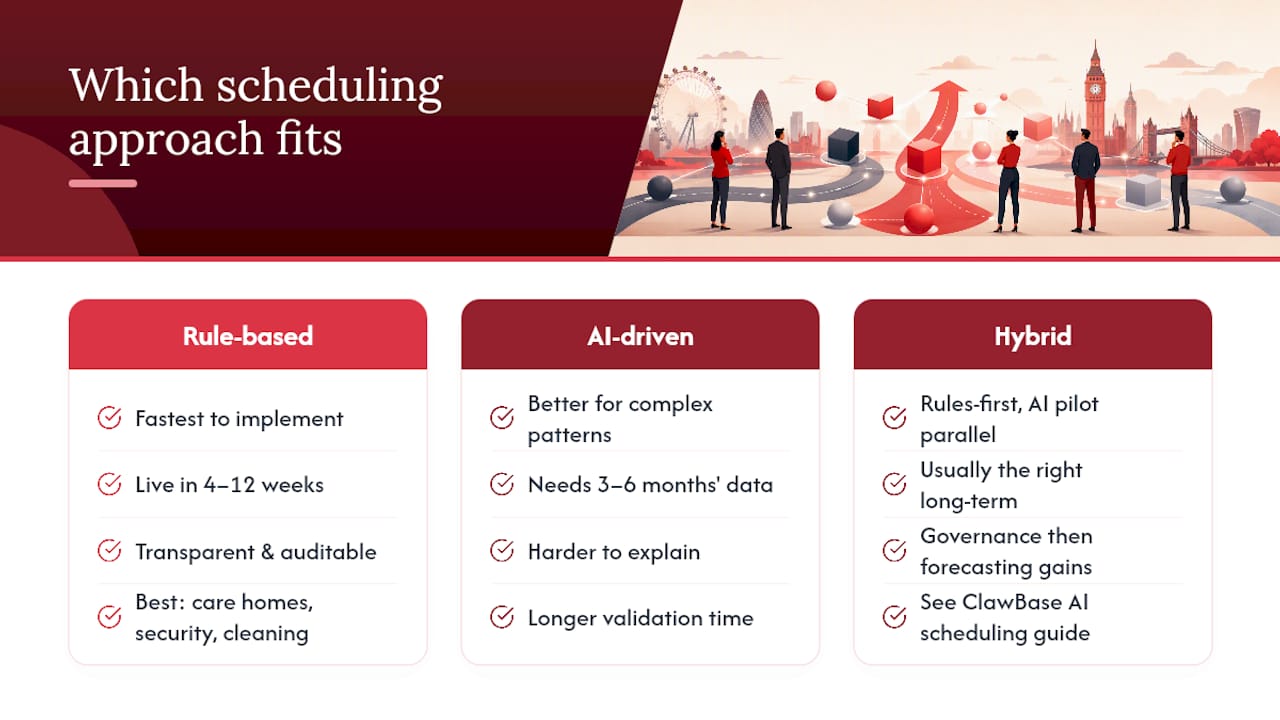
Rule-based scheduling is the fastest to implement and the most transparent. It suits organisations where legal and certification constraints dominate and demand patterns are relatively stable: care homes, security firms, cleaning contracts and similar environments. The deterministic if/then logic is auditable, explainable and typically live within 4–12 weeks.
AI-driven scheduling performs better where demand has complex, learnable patterns and you have at least three to six months of reliable historical data. It can surface shift combinations a rules engine would never generate, but it requires more validation time and the outputs are harder to explain to staff or auditors. AI scheduling analyses transaction patterns and demand trends to match staff to tasks — useful in high-footfall retail or hospitality, less so in fixed-contract care.
The hybrid path is usually the right long-term answer: deploy rules-first to get governance in place, then run an AI pilot in parallel to capture forecasting gains. For AI task scheduling concepts, the ClawBase guide to AI scheduling covers the automation mechanics worth understanding before a vendor conversation.
When evaluating vendors, ask specifically about explainability, override logging, audit trail depth, integration ease with your HR and payroll systems, and whether the platform supports UK compliance mapping out of the box.
What the pilot actually teaches you
The thing most managers underestimate before a rules-based pilot is how much the data clean-up matters. You will almost certainly discover contract records that are incomplete, availability windows that were never formally captured and skill certifications that expired without anyone updating the system. That discovery feels like a problem. It is actually the point — the rules engine surfaces data gaps that spreadsheet rotas simply absorbed silently, producing errors no one could trace.

Start small and guard the pilot with clear exception rules. A single site, a handful of KPIs and a committed two-cycle review cadence will tell you more than a six-month enterprise rollout with no baseline. Keep staff informed about how their preferences are being used — not as a courtesy, but because distrust of the system is the fastest route to exception churn that overwhelms the manager doing the overrides.
The managers who get the most from rules-based scheduling are the ones who treat the pilot as a data-quality audit as much as a scheduling experiment.
Timeprof makes rule-based scheduling practical from day one
Fewer scheduling errors, cleaner compliance records and rotas that actually reflect your contracts — that is what a rules engine delivers when it is built into the workflow rather than bolted on. Timeprof codifies your contracts, skills, site requirements and UK labour constraints directly inside the rota, so compliance checks run at publication rather than after a payroll query.

The platform gives managers readable override logs for audits, geofenced clock-in to confirm attendance against the published rota, and compliance reports that map directly to Working Time Regulations. Staff get a mobile-first portal where they can submit availability, claim open shifts and see their upcoming schedule — reducing the back-and-forth that consumes manager time every week.
If you are ready to move from spreadsheet rotas to a rules-driven workflow, book a demo with Timeprof to see the rules engine, audit trails and compliance reporting in a live environment.
Sources
- ScienceDirect — personnel scheduling / rostering review
- How to Use AI for Employee Scheduling: UK 2026 Guide | SeptemAI
- AI forecasting vs rules-based scheduling: Choosing the right labour planning method | JitBase
- Auto-scheduling – Zelos Team Management
- AI scheduling in retail: Addressing efficiency, compliance and employee satisfaction challenges in the UK | Retail Gazette
Consult the Working Time Regulations 1998 directly when mapping rest and hours rules, and involve your payroll team before encoding any pay-premium triggers to confirm current contractual rates.
This article is general information, not a substitute for advice from a qualified lawyer. Consult a qualified legal professional about your own circumstances before acting on anything here.