Start Today: HR System Integration Playbook for HR Teams
Start today with a playbook HR teams use to cut payroll errors, clean employee records, run a pay cycle pilot, and choose APIs or middleware.

HR system integration connects your HR tools so employee data flows between them automatically, cutting manual re-entry, reducing payroll errors, and speeding up onboarding. It’s the difference between a manager typing the same starter details into four separate systems and having those details land where they’re needed the moment a contract is signed. This guide walks through what it means in practice, the payoffs worth putting in a business case, and a step-by-step plan for getting your first integration live.
TL;DR:
- Most impactful HR integrations focus on payroll accuracy and onboarding automation, which deliver rapid error reduction and efficiency gains.
- A successful integration depends on cleaning data, choosing the right technical approach, and conducting full-cycle pilot testing with clear success metrics.
- API-based connections are preferred for real-time syncing, but middleware and file exports serve as alternatives depending on system capabilities and complexity.
- Ongoing monitoring, vendor updates, and clear ownership are essential to maintaining integration health and preventing silent failures.
- Effective HR system integration is a process that requires careful planning, standardization, and phased rollout to avoid common pitfalls and build trust.
Table of Contents
- What does HR system integration actually mean?
- Why HR teams build a business case around this
- What are the most common HR integrations to prioritise?
- How do you actually get started with integration?
- APIs, middleware, or files: which approach fits?
- What security and governance standards matter here?
- How do you measure whether the integration worked?
- Keeping an integration healthy after launch
- How do you test an integration before going live?
- Who owns what in an integration project?
- What does a real HR integration rollout look like?
- Why integration is a process problem before it’s a technical one
- See how Time Prof handles the integration work for you
- Sources
What does HR system integration actually mean?
HR system integration is the process of connecting separate HR applications, an applicant tracking system (ATS), your HRIS, payroll, and benefits platforms, so data moves between them without a human copying it across. An HRIS, by contrast, is just one piece of software: the system that stores core employee records. Integration is what makes several of those systems talk to each other.
There are two directions this takes. Vertical integration links systems along one process, say ATS feeding straight into your HRIS when a candidate becomes an employee. Horizontal integration connects systems across different functions at the same stage, like time and attendance data reaching payroll every pay cycle. HR integration works by connecting HR applications so information flows automatically, typically through APIs or middleware, rather than through spreadsheets passed between departments.
Why HR teams build a business case around this
The clearest argument for integration is arithmetic: every manual handoff between systems is a chance for a typo, a missed update, or a payslip that’s wrong. Connected systems close that gap. When time and attendance data feeds payroll directly, pay discrepancies caused by manually transferring hours largely disappear.
The practical gains HR teams tend to cite when asking for budget include:
- Fewer payroll errors because hours, rates, and deductions sync automatically instead of being retyped.
- Faster onboarding and offboarding, since a new starter’s record only needs entering once.
- Hours back for HR admin, freed up from chasing data across systems.
- Better employee self-service, because staff see accurate, current information without asking HR to check.
- Stronger audit readiness, with a traceable record of who changed what and when.
Pro Tip: When pitching integration internally, lead with payroll accuracy rather than “efficiency.” Finance and leadership respond to error reduction faster than they respond to time-saving claims.
On engagement, the link is well established: removing repetitive admin and giving staff reliable self-service tools tends to improve engagement, because people spend less time chasing HR for basic answers.
What are the most common HR integrations to prioritise?
Most organisations don’t need to connect everything at once. A handful of integrations account for most of the value, and they tend to follow a predictable order:
- ATS to HRIS to onboarding automation. The moment a candidate accepts an offer, their details flow into the HRIS and trigger onboarding tasks, contracts, equipment requests, welcome messages, without anyone re-entering a name or address.
- Time and attendance to payroll. Clock-in data and approved shifts feed straight into pay runs, so hourly staff get paid for what they actually worked, not what someone estimated.
- HRIS to directory and single sign-on. New starters get system access and leavers lose it automatically, closing a common security gap.
- Performance management to learning platforms. A skills gap flagged in a review can auto-assign relevant training, rather than sitting in a manager’s notes.
- Communications tools for HR events. Birthdays, work anniversaries, and policy updates get pushed to the right channel without manual scheduling.
Payroll and onboarding integrations usually deliver value fastest, which is why most guidance on scaling HR integration suggests starting there rather than attempting a full tech stack overhaul on day one.
How do you actually get started with integration?
Getting from “we should connect our systems” to a working integration follows a fairly consistent path, regardless of company size.
- Inventory what you have. List every HR-adjacent system, its data owner, and what data lives where. Most teams are surprised how many systems have overlapping employee records.
- Prioritise by impact and feasibility. Score each potential integration on how much manual work it removes versus how hard it is to build. Payroll and onboarding usually score highest on both counts.
- Clean your data first. Standardise employee IDs, job titles, and department names before connecting anything; inconsistent data breaks integrations faster than any technical issue.
- Choose your technical approach. Decide between a direct API connection, a middleware platform, or a vendor-supported connector based on what your systems support.
- Run a pilot. Pick one integration, one site or team, and define success metrics and a rollback plan before switching it on.
- Roll out in phases. Expand site by site or department by department, with training at each stage rather than one company-wide switch.
Pro Tip: Build your canonical employee record before you build anything else. A minimal field set, employee ID, legal name, tax reference, bank token, gives every future integration one consistent source to map against instead of reconciling formats system by system.
Piloting with clearly defined success metrics before wider rollout is the single most repeated piece of advice across vendor guidance, and for good reason: it catches mapping errors while the blast radius is still small.
APIs, middleware, or files: which approach fits?
Not every system offers the same technical options, so the right approach depends on what you’re connecting.
- API-first integration is generally preferred when both systems support it, because data moves in near real time and changes sync without a scheduled job. Industry reviews of integration platforms consistently rate API-first approaches as the most resilient against the errors that batch processes tend to introduce.
- Middleware, or an integration platform as a service (iPaaS), earns its cost when you’re connecting five or more systems and don’t want to build and maintain point-to-point links between every pair.
- File-based exports or legacy connectors remain the fallback for older systems with no API, though they introduce lag and need careful scheduling to avoid stale data.
Whichever route you pick, insist on a canonical data model, a single agreed structure that every system maps to, so a change on one side doesn’t cascade into broken fields elsewhere. Version control on that mapping, plus automated monitoring that flags failed syncs, is what keeps an integration reliable months after launch rather than just on day one.
What security and governance standards matter here?
Employee data is some of the most sensitive information a company holds, so governance can’t be an afterthought bolted on after the technical build. Rationalising the number of tools that touch employee data reduces the attack surface and the redundancy that causes inefficiency in the first place.
The non-negotiables: role-based access so only the right people see salary or health data, encryption in transit and at rest, and audit trails that log every change. Add clear retention and deletion policies, and make sure any vendor contract includes a data processing agreement and defined service levels. IT and legal should sign off before data starts flowing, not after. Our guide to data security in workforce apps covers the practical checklist most managers miss.
How do you measure whether the integration worked?
Track a handful of numbers before and after your pilot: onboarding time from offer to first day, payroll error rate per pay run, HR admin hours spent on manual data entry, and time to productivity for new starters.
- Capture a baseline for each metric for at least one full pay cycle before switching anything on.
- Compare the pilot team or site against a non-integrated group over the same period.
- Build a simple dashboard tracking error rate, admin hours saved, and onboarding speed side by side.
Around 40% of organisations report having a defined integration strategy, meaning most teams that measure properly are already ahead of the pack. Our workforce tools checklist has a template for this baseline tracking.
Keeping an integration healthy after launch
Integration isn’t a one-time project you finish and file away. Systems update, vendors change their APIs, and a mapping that worked in January can quietly break by June because a field was renamed on one side.
Assign clear ownership for monitoring once the pilot goes live, someone needs to check sync logs, not just build the connection. Most integration platforms and middleware tools offer automated alerts when a data transfer fails or a field mismatch appears; turn these on from day one rather than waiting for a payroll error to surface the problem. Schedule a monthly review of sync logs even when nothing appears to be wrong, because silent failures, where data quietly stops updating without an error, are more common than loud ones.
Vendor updates are the other recurring maintenance cost. When a connected system pushes a new version, test the integration in a sandbox environment before it hits production, particularly if the vendor has changed field names or authentication methods. Keep a simple change log noting when each integration was last tested and by whom, so troubleshooting doesn’t start from zero when something breaks six months after the person who built it has moved on.
Budget for this ongoing work explicitly rather than treating it as free maintenance. A realistic support plan includes a named owner, a monthly log review, a quarterly test of critical paths like payroll, and a documented rollback procedure if a vendor update breaks something mid-cycle. Teams that skip this step are the ones who end up firefighting a payroll failure the week before payday.
How do you test an integration before going live?
Testing an HR integration properly means checking three things separately: does the data map correctly, does it move on schedule, and does it fail safely when something goes wrong.
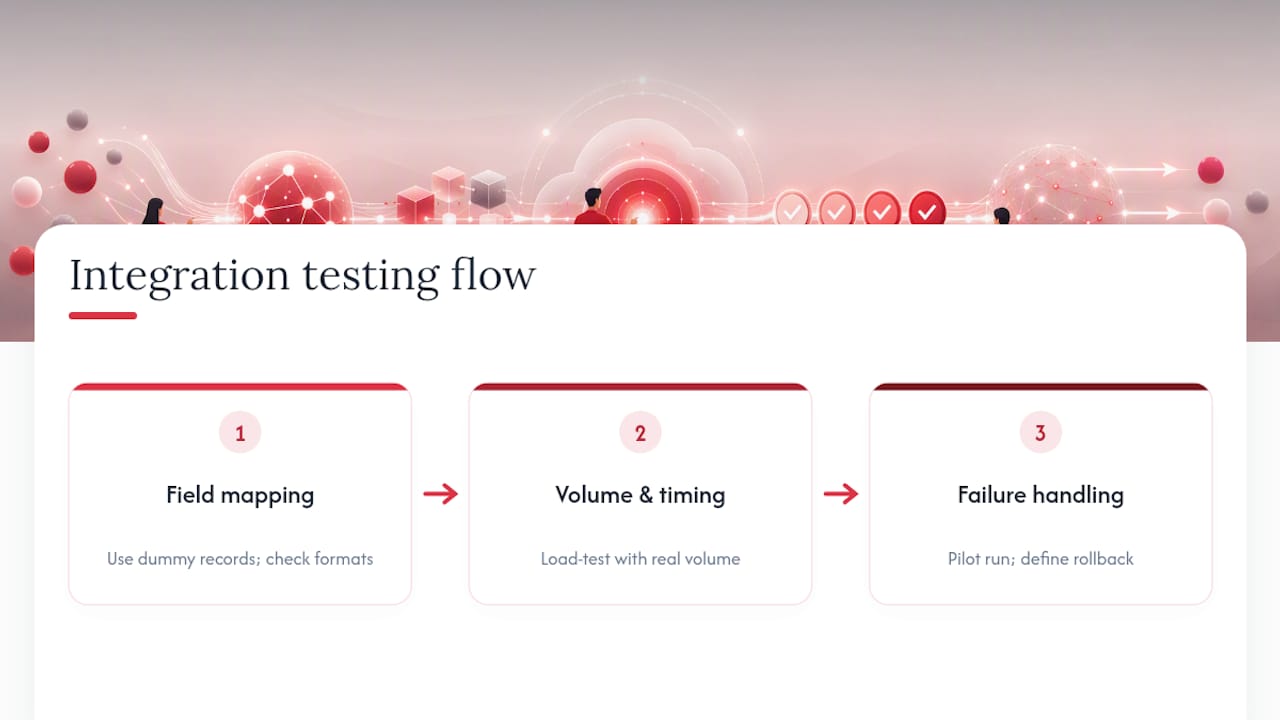
Start with field-level testing using dummy records, confirming that a name, start date, or pay rate entered in the source system lands correctly and in the right format in the destination system. Date formats and currency fields are where most mapping errors hide, particularly when connecting systems built for different markets.
Next, test volume and timing. A sync that works fine with ten test records can behave differently with two thousand real employee records processed at month-end, so load testing before full deployment matters more than most teams expect. Check what happens when the sync runs during a scheduled system outage or a slow network period; a well-built integration should queue and retry rather than silently drop records.
Finally, test failure scenarios deliberately. Submit a record with a missing mandatory field or a duplicate employee ID and confirm the system flags it rather than importing bad data or crashing silently. This is where the pilot group earns its value: running the integration with one real team for a full pay cycle, watching what breaks, and fixing it before scaling exposes problems that no amount of sandbox testing catches. Define your rollback criteria before this stage starts, so everyone agrees in advance what “this pilot has failed” looks like, rather than debating it mid-crisis.
Who owns what in an integration project?
HR system integration projects fail more often from unclear ownership than from bad technology, so assigning roles early matters as much as picking the right tools.
HR typically owns the data mapping and the process logic, deciding what “onboarding complete” actually triggers and which fields are mandatory. HR needs to lead on mapping data and owners for the technical work to succeed, because nobody in IT can define what a clean employee record looks like from an HR perspective.
IT owns the technical build, security review, and ongoing monitoring, working closely with whichever vendor or middleware platform is involved. Vendors, meanwhile, own their own API documentation, uptime, and support response times, which should be written into the contract rather than assumed.
A cross-functional data governance step benefits from clear accountability across all three groups, particularly around access controls and what happens if a sync introduces incorrect data into payroll. Where HR data is feeding broader business systems, such as a CRM used by client-facing teams tracking staff assignments, a dedicated integration and CRM partner can help bridge that handoff without HR or IT needing to build a custom connector from scratch.
Set a realistic project timeline with named owners for each phase, discovery, build, pilot, rollout, and build in regular checkpoints where HR, IT, and the vendor review progress together rather than only speaking when something breaks.
What does a real HR integration rollout look like?
A useful pattern shows up across most successful mid-size rollouts: start narrow, prove value, then expand.
A typical sequence looks like this. First, the HR and IT teams inventory systems and agree that payroll and time-and-attendance are the highest-impact, lowest-risk starting point, since the data is structured and the error cost of getting it wrong is immediately visible. Second, they clean up employee ID formats across both systems, a step that usually takes longer than the technical build itself. Third, they run a pilot with one site or department for a full pay cycle, comparing payroll error rates and admin hours against a non-integrated control group. Fourth, once the pilot clears its predefined success criteria, cutover to a second site happens with a documented rollback plan still in place in case something in the new environment behaves differently.
The pattern holds because starting with a few high-impact integrations rather than connecting every system at once tends to prove value faster and builds the internal confidence needed to fund the next phase. Organisations that try to connect everything simultaneously more often stall midway, with half-finished integrations nobody trusts enough to rely on. Our shift management system explainer walks through how this staged approach plays out specifically for attendance-to-payroll connections.
Why integration is a process problem before it’s a technical one
Most failed HR integrations aren’t failed technology projects. They’re failed process projects wearing a technical disguise. The API worked fine; nobody agreed in advance what “employee start date” actually meant across three systems that each defined it slightly differently.
What gets underestimated consistently is how much the data clean-up step matters compared with the connector itself. Teams want to jump straight to picking a middleware platform, when the harder, less glamorous work is standardising job titles, employee IDs, and department codes so the systems being connected are actually describing the same thing. Skip that step and you’ve built a fast, reliable pipeline for moving inconsistent data around, which is arguably worse than the manual process it replaced.

The other pattern worth naming: pilots get treated as a formality rather than a genuine test. A pilot that runs for three days with five friendly users tells you almost nothing about what happens at month-end payroll with two thousand records and someone on annual leave. A pilot needs to run a full business cycle, with a real rollback plan, or it isn’t really a pilot. It’s a demo.
None of this argues against integration. It argues for doing it properly rather than quickly, because a rushed integration that mishandles payroll data does more damage to trust in HR technology than the fragmented spreadsheets it was meant to replace.
— Michael
See how Time Prof handles the integration work for you
If the audit, mapping, and pilot planning above sounds like a lot to coordinate on top of everyday HR work, that’s exactly the gap Time Prof is built to close. Rather than stitching together separate scheduling, attendance, and payroll-adjacent tools, The platform brings rota planning, clock-in with geofencing, leave management, and reporting into one platform, so the data that would normally need integrating between systems is already in one place.

Users get live dashboards across sites, audit trails that log every change, and role-based access controls built in from the start, the same governance principles covered above, without a separate integration project to build them. Our audit trail guide shows exactly what that looks like in practice for compliance-heavy sectors like care and security. If you’re weighing up whether to integrate several point solutions or consolidate onto one platform, book a Time Prof demo and see how much of that integration work disappears entirely.
Sources
For deeper technical detail on connection patterns, see Workato’s guide to HR integration workflows. For UK-specific planning advice aimed at smaller teams, Sage’s HR integration guide is a solid starting point, and Jitterbit’s integration guide covers pilot design and strategy readiness in more depth.
- The Ultimate Guide to HR System Integration and Workflows — Workato
- HR integration: How to streamline processes and stay ahead — Sage Advice UK