Why data security matters in workforce apps: a manager's guide
Data security is crucial for workforce apps, protecting sensitive information and ensuring compliance with UK GDPR. Find out why it matters.

Workforce apps hold some of the most sensitive data your organisation processes: payroll details, health records, shift patterns, geolocation logs and access credentials. A breach does not just embarrass your IT team. It triggers ICO notification duties, exposes you to fines under the UK GDPR, disrupts operations and, in sectors like care or security, can put people at risk. The practical verdict for any procurement brief: require evidence of RBAC, MFA, encryption at rest and in transit, audit trails, and a signed Data Processing Agreement before any pilot goes live.
- Workforce apps are data-rich targets, not just scheduling tools.
- UK employers remain the data controller regardless of which vendor processes the data.
- The ICO requires appropriate security measures for all worker personal data, including limited access, recoverability and demonstrable accountability.
- Security controls are operational features, not optional extras.
Key takeaways
Data security in workforce apps is a legal obligation under UK GDPR, an operational necessity and a direct factor in employee trust — managers must verify vendor controls contractually, not just take them on faith.
| Point | Details |
|---|---|
| You are the data controller | UK employers retain legal accountability for worker data regardless of which vendor processes it. |
| Require the core five controls | RBAC, MFA, encryption, audit trails and a signed DPA are the minimum before any pilot goes live. |
| Mobile apps carry hidden risk | Workplace apps collect an average of 19 data points per app; verify telemetry and third-party sharing in the DPA. |
| Breach notification SLA is non-negotiable | Your vendor must contractually notify you well within the ICO’s 72-hour reporting window. |
| Timeprof maps controls to operations | Timeprof provides MFA, RBAC, geofenced clock-in, audit logs and retention controls in one UK-focused platform. |
Table of Contents
- Why data security matters in workforce apps
- What are the real business impacts of a workforce app breach?
- Where do attacks on workforce apps actually come from?
- What security controls should you require from a vendor?
- How do you verify that a vendor actually delivers on security?
- What should you expect from a vendor during a security incident?
- How Timeprof maps security controls to everyday operations
- Security is a procurement requirement, not a vendor promise
- Timeprof gives you a secure workforce platform built for UK operations
- Sources
Why data security matters in workforce apps
The phrase “workforce app” undersells what these platforms actually hold. A typical rota and time-and-attendance system touches far more than shift times. Research summarised by Help Net Security found that workplace apps collect an average of 19 data points per app, with many sharing data with third parties. That figure should give any procurement lead pause.
Here is what is commonly stored across rota, HR, time and operational modules:
- Personal identifiers: full names, addresses, National Insurance numbers, dates of birth, contact details.
- Payroll and banking data: salary bands, bank account details, pay history, expense claims.
- Health and absence records: sick leave, disability adjustments, fit notes — all classified as special category data under UK GDPR.
- Shift patterns and availability: who works where, when and with whom, which is commercially sensitive and useful for targeted social engineering.
- Geolocation and device metadata: clock-in coordinates, device IDs, IP addresses and session tokens collected by mobile apps.
- Access credentials and audit logs: admin tokens, API keys, login histories and permission records.
Each category attracts a different type of attacker. Banking details enable direct financial fraud. Health records command a premium on criminal markets and can be used for extortion. Shift patterns reveal staffing gaps that competitors or bad actors can exploit. Geolocation data, combined with personal identifiers, creates a surveillance-grade profile of individual employees.
A payroll export emailed as an unencrypted spreadsheet to a line manager’s personal inbox is not a hypothetical. Lock in HR and payroll SaaS environments — and it bypasses every server-side control the vendor has built.
What are the real business impacts of a workforce app breach?
The direct costs of a breach are visible quickly. Remediation — forensic investigation, legal advice, staff notification, credit monitoring for affected employees — runs into tens of thousands of pounds even for a mid-sized organisation. Operational downtime while a compromised system is taken offline can mean rotas cannot be published, shifts go uncovered and payroll is delayed.
The indirect costs take longer to surface but cut deeper:
- Employee trust: staff who discover their health records or bank details were exposed rarely forget it. Retention and recruitment suffer.
- Client and commissioner confidence: in care, healthcare and security, commissioners and regulators expect evidence that data is handled properly. A breach can trigger contract reviews.
- Compliance evidence loss: if audit logs are corrupted or deleted during an incident, you lose the ability to demonstrate regulatory compliance, which compounds the ICO’s assessment of your response.
- Safety risk: in care and healthcare settings, tampered shift records or deleted availability data can result in unsafe staffing levels. That is not a reputational problem — it is a patient safety problem.
IBM frames data security as a continuity and trust enabler, not a defensive cost. That framing matters when you are making the case to a board or a finance director who sees security spend as overhead. A breach that takes your scheduling system offline for 48 hours costs far more than the annual licence fee for a platform with proper controls.
For UK managers in regulated sectors, the ICO’s guidance on employment records is unambiguous: you are the data controller, and you cannot delegate that responsibility to a vendor. You can delegate processing, but the legal accountability stays with you. Understanding shift scheduling compliance obligations is part of that picture.
Where do attacks on workforce apps actually come from?
Mobile is the primary entry point for most workforce app risk, and it is the one managers most consistently underestimate. Staff use personal devices, switch between apps, and install tools outside any IT-approved list. Security Boulevard documents that malicious and poorly coded mobile apps create large enterprise-facing attack surfaces, and that signature-based defences are often too slow to catch them. Behaviour-based analysis — watching what an app actually does at runtime — provides visibility that static scanning misses.
The specific vectors worth understanding:
- Malicious apps and sideloading: an employee installs an app from outside the official app store; it requests permissions to contacts, storage or location and silently exfiltrates data.
- Compromised third-party libraries: even a legitimate workforce app can include a dependency with a known vulnerability. Supply-chain attacks via open-source libraries have increased sharply.
- Permissions and telemetry leakage: as the Help Net Security research shows, workplace apps collect far more metadata than managers expect, including routine sharing with advertising or analytics partners.
- Shadow IT: employees use consumer file-sharing tools (personal Google Drive, WhatsApp) to distribute rota exports or absence records outside any controlled environment.
- Internal apps built without governance: quickly built internal tools often escape security review, creating access-control drift and audit gaps that increase compliance liability.
The cloud security risks that apply to SaaS workforce platforms — misconfiguration, inadequate access controls, supply-chain vulnerabilities and data residency uncertainty — compound the mobile threat picture.
Pro Tip: During a pilot or procurement evaluation, ask the vendor for a list of all third-party SDKs and libraries embedded in their mobile app, and request their most recent mobile app penetration test report. Vague answers here are a red flag.

What security controls should you require from a vendor?
IBM’s data security framework identifies role-based access control, multi-factor authentication and audit trails as foundational. They are the floor, not the ceiling. Here is what to require, and why each control matters in plain terms:
- Role-based access control (RBAC): limits who can see and do what. A shift supervisor should not have access to payroll exports. RBAC prevents lateral movement after a credential is compromised.
- Multi-factor authentication (MFA): a stolen password alone cannot open an admin account. LOCK.PUB identifies MFA on admin accounts as one of the highest-impact controls for HR and payroll platforms.
- Encryption in transit and at rest: data moving between the app and server should use TLS 1.2 or higher; stored data should be encrypted with AES-256 or equivalent. This limits the value of stolen data even when a breach occurs.
- Audit trails and tamper-evident logs: every access, export and change should be logged with a timestamp and user identity. Without this, you cannot investigate an incident or demonstrate compliance to the ICO.
- Least-privilege APIs: integrations with payroll, HR or scheduling systems should use scoped tokens that access only what they need, not master credentials.
- Secure key management: encryption is only as strong as the key management behind it. Ask whether the vendor uses a dedicated key management service or stores keys alongside the data.
- Data minimisation and retention controls: the vendor should collect only what is necessary and delete it on a defined schedule. Special category data (health, disability) requires particular care.
- Secure development lifecycle and penetration testing: ask for evidence of annual pen tests by an independent third party and a documented secure development process.
- Backup and restore SLAs: know how frequently data is backed up, where backups are stored, and what the recovery time objective is if the platform goes down.
For workforce compliance reporting, audit trails and retention controls are not just security features — they are the evidence base for regulatory inspections.
How do you verify that a vendor actually delivers on security?
Vendor security claims are easy to make and hard to verify without a structured approach. Use this checklist before signing any contract:
- Ask for the vendor’s current ISO 27001 certificate (or Cyber Essentials Plus for smaller UK suppliers). Check the certificate scope covers the product you are buying.
- Request the most recent penetration test summary and ask who conducted it. An internal test or a test by the vendor’s own parent company is not independent.
- Confirm data residency. UK organisations processing special category data should understand where data is stored and whether it leaves the UK or EEA.
- Review the Data Processing Agreement (DPA). It must name you as data controller and the vendor as processor, specify the purposes of processing, and include deletion guarantees.
- Ask for the sub-processor list. Every third party the vendor shares data with must be named, and you must be notified of changes.
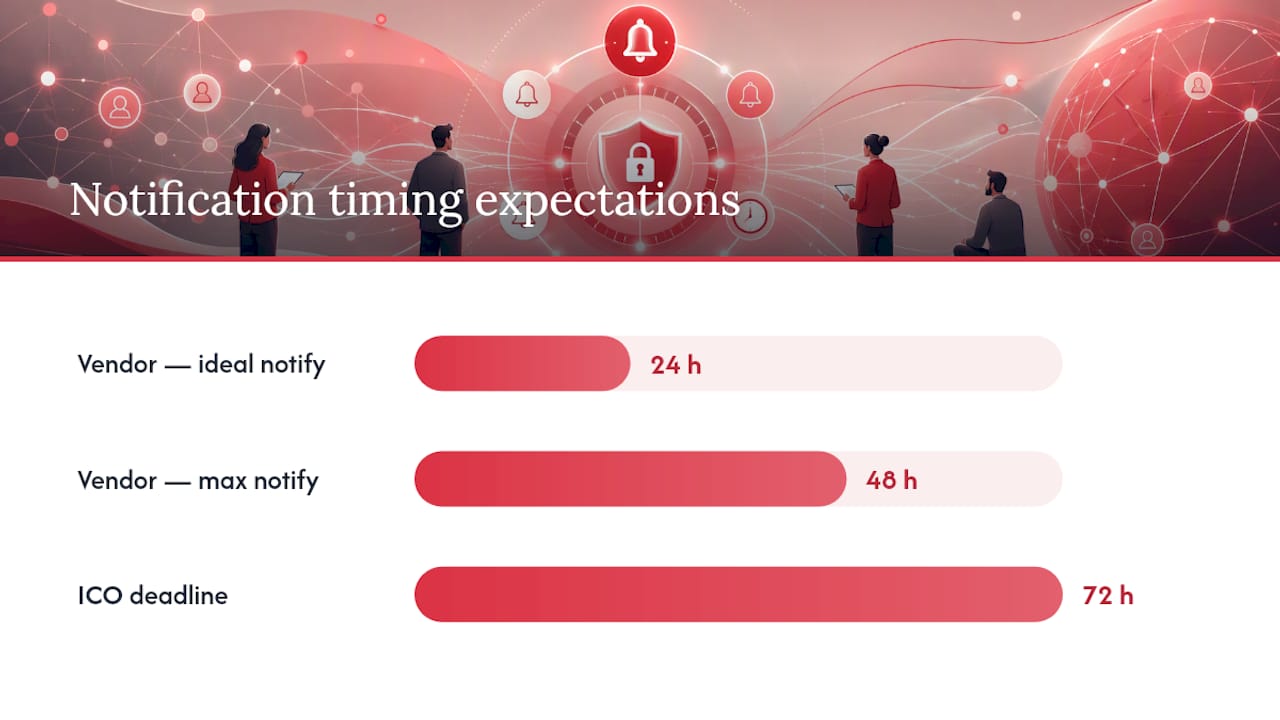
- Confirm the breach notification SLA. Under UK GDPR, you have 72 hours to notify the ICO after becoming aware of a notifiable breach. Your vendor must contractually commit to notifying you well within that window.
- Check retention and deletion policy. What happens to employee data when a staff member leaves? When you cancel the contract? Get deletion timelines in writing.
- Verify support and recovery SLAs. What is the guaranteed uptime? What is the recovery time objective after an incident?
Questions to ask in a demo or procurement meeting:
- “Can you show us a sample audit log and explain what events are captured?”
- “Which sub-processors handle our data, and where are they based?”
- “What is your contractual commitment for notifying us of a breach?”
- “How do you handle deletion requests for individual employees under UK GDPR?”
- “Has your mobile app been independently tested for permissions and telemetry leakage?”
Red flags: vague answers about sub-processors (“we use some third-party services”), no written deletion guarantee, pen test reports older than 18 months, or a DPA that names the vendor as data controller rather than processor. A workforce management tools checklist can help structure these conversations before a procurement decision.
What should you expect from a vendor during a security incident?
Detection speed matters as much as prevention. In many breaches, data is exfiltrated within hours of initial access, which means a vendor’s monitoring and alerting capability directly affects how much damage is done before anyone knows there is a problem.
Vendor responsibilities you should confirm contractually:
- Continuous monitoring of platform infrastructure with documented alerting thresholds.
- A defined incident response plan that includes forensic investigation support.
- Contractual notification to you within a specified window (ideally 24 hours, never more than 48 hours, to give you time to meet the ICO’s 72-hour clock).
- Documented backup frequency and a tested restore process with a stated recovery time objective.
- Audit log retention for a minimum period (12 months is a reasonable baseline; regulated sectors may require longer).
Your organisation’s responsibilities run in parallel:
- Maintain an internal incident response plan that names who is responsible for ICO notification, employee communication and evidence preservation.
- Know your ICO notification triggers. Not every breach requires notification, but any breach involving special category data or likely to cause harm to individuals almost certainly does.
- Communicate with affected employees promptly and honestly. Staff who hear about a breach from a news report rather than their employer lose trust that is very difficult to rebuild.
- Preserve evidence. Do not wipe or reconfigure affected systems before forensic review.
Pro Tip: Insist on a contractual right to audit the vendor’s security controls annually, and include a clause requiring them to provide evidence of their most recent pen test on request. Vendors who resist this clause are telling you something important.
How Timeprof maps security controls to everyday operations
Security controls only protect you if they are built into the platform’s normal workflows, not bolted on as an afterthought. Timeprof is designed so that the controls managers need for compliance are the same features that make daily operations run reliably.
Here is how the controls from earlier sections map to Timeprof’s platform:
- RBAC: managers, supervisors and staff each operate within defined permission boundaries. A care worker can view their own rota and submit availability; only authorised managers can publish shifts or access absence records.
- MFA: two-factor authentication is available for all accounts, with admin accounts able to enforce it across the tenant.
- Geofenced clock-in: attendance is verified against a defined location boundary, reducing the risk of fraudulent clock-ins and providing a tamper-resistant attendance record.
- Audit trails: every action — shift publication, leave approval, clock-in, message sent — is logged with a timestamp and user identity, giving managers an evidence trail for compliance inspections.
- Tenant isolation: each organisation’s data is held in a separate tenant environment, so a security event affecting one customer cannot propagate to another.
- Data retention controls: managers can configure retention periods aligned with their legal obligations, and the platform supports deletion requests for individual staff records.
- Structured onboarding and deprovisioning: new staff are added through a controlled process; when someone leaves, access is revoked through the same system, addressing the deprovisioning gap that LOCK.PUB identifies as a common exposure pathway.
Consider a practical scenario: a payroll manager exports a shift report for a bank holiday period. In a platform with proper controls, that export is logged (who ran it, when, what data was included), the file is encrypted, and only users with the payroll export permission can generate it. Without those controls, the same export might be emailed unencrypted to a personal inbox and forwarded without anyone knowing. The difference is not technical sophistication — it is whether security is built into the workflow or left to individual judgement. Workforce visibility best practices depend on exactly this kind of structural control.
Security is a procurement requirement, not a vendor promise
Most managers I speak with treat security as something they check once, at the start of a procurement process, and then assume the vendor handles. That assumption is where the risk lives.
The ICO does not accept “our vendor said it was secure” as a defence. You are the data controller. That means the contractual terms, the DPA, the deletion guarantees and the breach notification SLA are your responsibility to negotiate and verify — before you go live, not after something goes wrong.
There is also a subtler point worth making. Security controls and operational reliability are the same thing, viewed from different angles. Audit trails that satisfy a regulator are the same logs that help you investigate a disputed shift claim. RBAC that limits data exposure is the same permission structure that stops a junior supervisor accidentally publishing a rota they should not have touched. MFA that protects admin accounts is the same authentication layer that keeps your scheduling system available when credential-stuffing attacks run against your industry.
Treating security as an operational feature rather than a compliance checkbox changes how you evaluate vendors. You stop asking “are you secure?” — a question that always gets a yes — and start asking “show me your audit logs, your DPA, your pen test, and your breach notification SLA.” Those questions have answers that are either satisfactory or they are not.
Timeprof gives you a secure workforce platform built for UK operations
Managers who have worked through this checklist often find that most workforce apps cover the basics but fall short on the specifics that matter for regulated UK sectors: documented data residency, special category data handling, audit-ready compliance reports and a DPA that actually names deletion timelines.

Timeprof is built for exactly this environment. The platform combines MFA, RBAC, geofenced clock-in, tamper-evident audit logs and configurable data retention in a single mobile-first system designed for care, healthcare, security, hospitality and cleaning operations across the UK. Every feature on the security checklist above has a corresponding control in the platform, and the DPA is available before you sign anything.
If you want to see how Timeprof maps to your specific compliance requirements, request a demo or review the platform — the security documentation is part of the conversation, not a post-sale afterthought.
Sources
The sources below back the claims in this article and are worth bookmarking for procurement conversations and compliance reviews:
- Collecting and keeping employment records | ICO
- The growing risk of malicious apps in a mobile‑first workplace - Security Boulevard
- Data security | IBM
- Lock