How to run workforce compliance reports in 2026
Learn how to run workforce compliance reports effectively in 2026. Ensure legal adherence and protect your organization from penalties.

Workforce compliance reporting is the process of generating structured, timestamped documents that prove your organisation meets its legal and regulatory employment obligations. Unlike dashboards or informal summaries, a defensible compliance report captures completion status, due dates, policy acknowledgements, certificate data, and version history as audit evidence. Regulatory bodies including the EEOC, OSHA, and the IRS each require specific data formats and filing timelines. When you run workforce compliance reports correctly, you protect your organisation from daily compounding penalties, failed audits, and enforcement actions that carry significant financial and reputational consequences.
How to run workforce compliance reports: core requirements
Running workforce compliance reports means more than exporting a spreadsheet. The process requires a repeatable, auditable methodology that produces legally defensible records, not just performance snapshots. Compliance reporting is defensive proof of lawful employment practice, and it demands a structured approach distinct from general HR analytics.
The regulatory landscape in 2026 adds further complexity. New mandates covering pay transparency, AI hiring regulations, and expanded paid leave now sit alongside existing federal requirements, and state laws frequently override federal minimums. Remote staff require compliance with the mandates of every jurisdiction in which they work, not just the employer’s home state. That reality makes structured, repeatable report generation a non-negotiable operational discipline.

Two federal filing obligations illustrate the stakes clearly. Employers with 100 or more employees must file the annual EEO-1 Component 1 report, and all employers must report new hires within 20 days under 42 U.S.C. § 653a. Missing either deadline triggers penalties that compound daily. Getting the data right before the deadline, not after, is the only viable approach.
What data must a workforce compliance report include?
The fields you include determine whether a report survives an audit. Generic HR exports routinely omit the specific data points that auditors request first.
Every employee-level compliance record should contain:
- Training completion status with a pass or fail result and the date of completion
- Certificate expiry dates and the version of the policy or course the employee completed
- Policy acknowledgement timestamps showing when each employee confirmed they had read and accepted a document
- Due dates for outstanding or upcoming requirements, so gaps are visible before they become violations
- Passing scores where assessments are used, to demonstrate competency rather than mere participation
Organisational fields matter equally. Filtering by location, department, and role lets you answer jurisdiction-specific questions without rebuilding the report from scratch each time. A multi-site care provider, for example, needs to separate compliance data by registered site to satisfy Care Quality Commission requirements at the site level, not just at the group level.
Pro Tip: Always capture the document version number alongside the acknowledgement timestamp. Auditors frequently ask whether employees acknowledged the current version of a policy, not a superseded one. Without version history, you cannot answer that question.
The fields most commonly omitted in generic reports are certificate expiration tracking and version history for policies. Audit-ready reports must capture both to serve as genuine evidence rather than a summary of activity.
How often should you generate and review compliance reports?
Monthly reporting is the minimum viable cycle for most organisations. Running reports less frequently creates blind spots that only become visible when an audit or enforcement action is already under way.
Four specific triggers should prompt an ad-hoc report outside the regular cycle:
- Before any scheduled audit — internal or external. Generate a fresh report no more than five working days before the audit date to reflect the most current data.
- After a regulatory change — new state or federal requirements take effect on fixed dates. A report run immediately after the effective date confirms whether your workforce is already compliant or whether a gap exists.
- During onboarding surges — high-volume hiring periods create compliance backlogs. A targeted report on new starters within their first 30 days catches incomplete training before it compounds.
- Before open enrolment periods — benefits compliance requires accurate eligibility data. A report run before enrolment opens prevents errors that trigger IRS penalties.
Missed reporting deadlines incur daily penalties across hiring, payroll, benefits, leave, safety, records, and data privacy obligations. That breadth means a single missed cycle can expose multiple penalty streams simultaneously.
Quarterly trend reviews add a layer of oversight that monthly snapshots cannot provide. Quarterly manual reviews detect data anomalies that automated report thresholds miss, improving oversight beyond automation alone. Assign a named owner to each report type, with a documented review sign-off, so accountability is clear when an auditor asks who validated the data.
What tools and prerequisites do you need for accurate reporting?
A centralised platform is the single most important prerequisite for accurate workforce compliance reporting. Manual spreadsheets held across departments create the most common and most damaging failure mode in compliance reporting. Shadow data in manual spreadsheets causes incomplete audit trails, and disparate manual sources introduce both risk and delays that a centralised system eliminates.
The table below shows the feature categories a compliance reporting platform must cover.
| Feature category | What it must do |
|---|---|
| Data integration | Connect HRIS, payroll, and training management in real time |
| Scheduled delivery | Send reports automatically to named stakeholders on a set cycle |
| Audit trail | Log every data change with a timestamp and user attribution |
| Role-based access | Restrict report access by department, site, or seniority |
| Alerting | Flag expiring certificates and overdue completions before they breach |
Integrating your LMS with HRIS and payroll ensures real-time updates for workforce compliance reports and removes the need for manual data merges. Automated report delivery keeps compliance data visible and flags gaps immediately, rather than waiting for a scheduled review to surface a problem.
Pro Tip: Before selecting a platform, map every data source your organisation currently uses for compliance data. Include informal sources such as shared drives, email chains, and site-level spreadsheets. Any source not connected to your central platform is a shadow data risk.
Timeprof addresses this directly. The platform consolidates attendance, shift records, skills, and onboarding data into a single source, with audit records and role-based access built in. Compliance officers using Timeprof can generate operational reports from live data rather than manually assembling figures from disconnected systems.
Step-by-step process for generating workforce compliance reports
A structured workflow produces consistent, defensible reports. Ad-hoc approaches produce inconsistent ones.
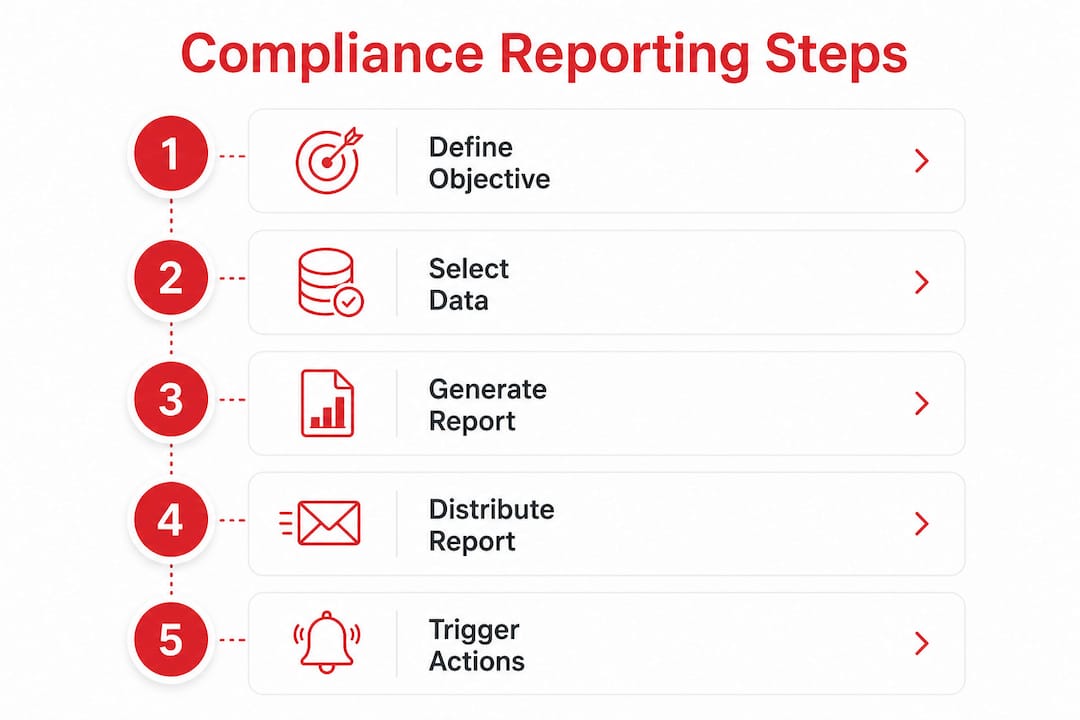
Step 1: Define the report objective. Decide what compliance question the report must answer before selecting any data fields. “Are all employees in our London sites current on their mandatory fire safety training?” is a specific, answerable objective. “Show me compliance data” is not.
Step 2: Select and filter your data fields. Choose the employee-level and organisational fields that answer the objective. Apply filters for jurisdiction, role, department, and site. For EEO-1 filings, correct role mapping to EEOC categories is critical to avoid inaccurate submissions.
Step 3: Configure the report layout for its audience. Leadership needs a summary view showing overall completion rates and the number of employees at risk. Auditors need a detailed view showing individual records, timestamps, and version numbers. Build both from the same data source to avoid discrepancies.
Step 4: Run a manual sanity check. Automated reports do not catch every anomaly. Scan for:
- Employees with completion dates that predate their hire date
- Certificates showing as valid beyond their stated expiry period
- Departments with 100% completion rates that had no training activity in the reporting period
Step 5: Distribute to named stakeholders. Set up scheduled, automated delivery so the right people receive the report without manual intervention. Document who receives each report type and why.
Step 6: Use the report to trigger remediation. A compliance report that identifies gaps but prompts no action is a liability, not an asset. Assign each gap to a named owner with a resolution deadline, and track closure in the next reporting cycle.
Common pitfalls in workforce compliance report generation
The most expensive compliance reporting errors are structural, not technical. They persist because they are invisible until an auditor finds them.
- Shadow data sources. Manual spreadsheets maintained by individual managers sit outside the central system. They create gaps in the audit trail that cannot be retrospectively filled.
- Missing version history. Reporting that an employee acknowledged a policy is insufficient if you cannot prove they acknowledged the current version. Audit-ready reports must capture version data alongside acknowledgement timestamps.
- Ignoring jurisdiction-specific requirements. Multi-state and remote employees require compliance with the mandates of every jurisdiction in which they work. A single report template built for your headquarters state will miss obligations in other locations.
- Misclassifying roles in segmented reports. EEO-1 filings require employees to be mapped to specific EEOC job categories. Errors in that mapping produce inaccurate federal filings, which carry their own penalty exposure.
- Overreliance on automation. Automated reports run on the data they receive. If the underlying data is wrong, the report is wrong. Periodic manual review is the only check on systematic data errors.
Ranking compliance gaps by penalty exposure, rather than by how easy they are to fix, is the most effective way to prioritise remediation. A gap that carries a daily compounding penalty must be resolved before a gap that carries a one-time administrative fee, regardless of how much effort each requires.
Self-audits that prioritise by penalty exposure consistently produce better outcomes than those that prioritise by fix difficulty. Low-risk gaps can be deferred. High-penalty defects cannot.
Key takeaways
Accurate workforce compliance reporting requires a centralised data source, a structured workflow, and a monthly minimum reporting cycle backed by named ownership and manual review.
| Point | Details |
|---|---|
| Define the report objective first | A specific compliance question produces a defensible report; a vague brief produces an unusable one. |
| Capture version history and timestamps | Auditors require proof that employees acknowledged the current version of each policy, not a superseded one. |
| Report at least monthly | Monthly cycles are the minimum; add ad-hoc reports before audits, after regulatory changes, and during onboarding surges. |
| Integrate your data sources | Shadow spreadsheets create incomplete audit trails; a single centralised platform eliminates that risk. |
| Prioritise gaps by penalty exposure | Fix high-penalty defects first, regardless of effort, to reduce legal risk most effectively. |
What I have learned from watching compliance reporting go wrong
The compliance officers I respect most share one habit: they treat their reporting process as a product, not a task. They document it, version it, and review it on a schedule, just as they would any other controlled process.
The most common failure I observe is not a missing field or a wrong date. It is the absence of ownership. When no named individual is responsible for a specific report, that report drifts. Frequencies slip. Fields get dropped. And when an auditor asks who validated the data, the answer is silence.
The 2026 regulatory environment makes this worse, not better. Multi-state law complexity is the primary cause of compliance failure, and the number of jurisdictions that compliance officers must track has grown materially over the past three years. Automation helps, but it does not replace judgement. A platform that sends a scheduled report to the wrong stakeholder, or that flags a gap without triggering a remediation workflow, has not solved the problem. It has just moved it.
My honest view is that the organisations that handle compliance reporting well are the ones that have built it into their operational rhythm rather than treating it as a quarterly fire drill. They run reports on a fixed cycle, assign clear ownership, and review trends rather than just snapshots. That discipline is not glamorous. It is, however, the difference between an audit that takes two days and one that takes two months.
— Michael
Timeprof and workforce compliance reporting
Compliance officers managing multi-site or multi-jurisdiction workforces need a single platform that holds all the relevant data in one place. Timeprof brings attendance records, shift history, skills data, onboarding documentation, and audit logs into one system, so you are not assembling reports from disconnected sources under deadline pressure.

Timeprof’s workforce intelligence platform supports scheduled report delivery, role-based access, and real-time data visibility across sites. Compliance gaps surface automatically rather than waiting for a manual review cycle to catch them. For HR managers and compliance officers who need audit-ready documentation without the manual overhead, Timeprof provides the operational foundation that accurate reporting requires.
FAQ
What is workforce compliance reporting?
Workforce compliance reporting is the process of generating structured, timestamped records that prove an organisation meets its legal and regulatory employment obligations. These reports are audit evidence, not performance summaries.
How often should I run workforce compliance reports?
Run core reports at least monthly, with additional reports triggered before audits, after regulatory changes, during onboarding surges, and before open enrolment periods.
What fields must a workforce compliance report include?
A compliant report must include training completion status, certificate expiry dates, policy acknowledgement timestamps, document version numbers, due dates, and passing scores where assessments apply.
What causes most workforce compliance reporting failures?
Shadow data in manual spreadsheets and the absence of named report ownership are the two most common causes. Both create incomplete audit trails that cannot be retrospectively corrected.
Do remote employees require separate compliance reports?
Remote employees require compliance with the mandates of every jurisdiction in which they work. A single report template built for one state or region will miss obligations in other locations.