Managers: Match 3 Time Theft Prevention Layers to the Frauds They Stop
Operational checklist for managers to stop time theft: three proven layers, a 90 day rollout, privacy guidance, and a compact Time Prof case study.

Prevent most time theft with three reinforcing layers: a clear written policy, accurate digital time capture, and identity verification plus routine audits. The single most urgent action is to publish (or dust off) your time and attendance policy and audit last month’s timesheets before the next payroll run. Everything else in a solid time theft prevention plan builds on those two moves.
TL;DR:
- Employee clock-ins and timesheet adjustments are best monitored through exception reports highlighting anomalies like identical timestamps and manual edits.
- Implementing digital time tracking systems that reliably record work hours reduces casual padding, rounding abuse, and ghost shifts, especially when combined with manager approvals.
- Location verification via GPS or geofencing at clock-in points effectively prevents buddy punching but should be used with transparency to avoid privacy concerns.
- A phased rollout lasting around 90 days, beginning with policy drafting and staff training, helps ensure acceptance and effective detection of irregularities across all sites.
- Combining clear policies, digital tracking, identity verification, and routine audits forms a comprehensive approach that reduces time theft while maintaining staff trust.
Table of Contents
- What is time theft, and what does it actually look like?
- How do you detect time theft before it hits payroll?
- Which prevention layer stops which type of time theft?
- How do you roll out time theft prevention without disrupting operations?
- How Time Prof applies this layered model in practice
- What are the legal and privacy considerations here?
- How much does time theft actually cost a business?
- Why do time tracking systems still get this wrong?
- Why the balance between verification and trust matters more than the technology
- Ready to put the layered approach into practice?
- Sources
- FAQ
What is time theft, and what does it actually look like?
Time theft happens whenever an employee gets paid for hours they did not genuinely work. It sounds abstract until you put numbers on it: a handful of minutes padded onto a shift, multiplied across a workforce, over a year, turns into a real payroll leak. It also creates a fairness problem, because staff who clock in honestly end up subsidising those who do not.
The behaviours are usually mundane rather than dramatic.
- Buddy punching: one employee clocks in or out for an absent colleague.
- Padding and rounding abuse: rounding a 7:52am start to 8:00am might be harmless once, but repeated daily rounding in one direction adds up.
- Extended personal breaks: a 15-minute break that regularly stretches to 25.
- Ghost shifts: hours logged for work that was never actually carried out.
- Deliberately slow work: stretching a two-hour task across a full shift to avoid being given more.
Treat every one of these as a misconduct issue, not a private grievance to sort out informally. Employers must not attempt to unilaterally deduct wages to “recover” suspected stolen time. Follow proper HR procedures, gather evidence first, and take legal advice before adjusting anyone’s pay.
How do you detect time theft before it hits payroll?
Detection works best as triage, not detective work. You are looking for a handful of signals that flag the highest-risk cases fast, so you can investigate the two or three timesheets that matter rather than scrutinise every clock event on the payroll.
- Compare hours to measurable output where you can. If a call centre agent logs a full eight-hour shift but handled a third of the calls their peers did, that gap is worth a conversation. The same logic applies to units produced, jobs completed, or deliveries made.
- Review the audit trail, not just the final numbers. Look at who edited a timesheet, when, and how often. A consistent pattern of edits by the same manager or employee, reviewed against approval history, tells you more than any single flagged shift.
- Use GPS or geofence logs for mobile and field staff, but only at clock events. Continuous tracking creates a privacy problem you do not need; a location check at clock-in and clock-out is enough to verify buddy punching for a mobile team.
Pro Tip: Sort your exception report by payroll value, not by frequency. Ten small five-minute discrepancies matter less than one employee whose logged hours have crept up by three hours a week for a month.
The most reliable investigations rarely rely on a single data source. Cross-referencing the audit trail against location logs, the published rota, and a manager’s own recollection of who was actually on site is what separates a genuine fraud case from an honest clock-in mistake.
Which prevention layer stops which type of time theft?
Each layer of a time theft policy solves a different problem, and none of them works well alone. A biometric scanner without a written policy has no consequence attached to it. A written policy with no digital tracking behind it is unenforceable, because you have no reliable record to point to.
Written policy. This is the foundation everything else sits on. State clearly what counts as time theft, how clocking works, what happens during breaks, and what the disciplinary process looks like. Get every employee to sign an acknowledgement. A documented policy does two jobs at once: it deters casual abuse, and it gives you a paper trail if you ever need to discipline or dismiss someone over it.
Digital time capture. Replacing paper timesheets or verbal reporting with a digital system removes the opportunity for casual rounding and after the fact “adjustments”. Automated digital tracking is one of the most effective single changes a business can make, because it closes the gap between what someone claims they worked and what actually happened.
Identity verification. This is specifically what stops buddy punching. Individual logins are the minimum. Photo capture at clock-in adds a visual check a supervisor can review later. Biometric options such as fingerprint or face verification go further still, and identity checks at the point of clocking in are consistently the most effective control against one person clocking in for another. The trade-off is cost and, for biometrics, staff comfort. Weigh that against the size of your buddy punching risk before jumping straight to fingerprint scanners.
Location tools for field teams. GPS and geofencing verify that someone was physically where they claimed to be at the moment they clocked in. Used well, this is a light-touch control. Used badly, it becomes constant tracking that damages trust. The difference between the two usually comes down to one setting: capture location only at clock events, never continuously through the shift.
Automated audits and exception alerts. Configure the system to flag issues and route them to a manager for approval before payroll runs, not after. This is where alerts and approvals actually earn their keep, turning a monthly scramble into a routine five-minute check.
Engagement and training. A surprising amount of time theft is not calculated fraud. It is drift, boredom, or staff who genuinely do not know where the line sits. Explaining why accurate time recording matters, and rewarding honest reporting, reduces intentional theft in a way no scanner ever will.
- Written policy: sets the rule and the consequence
- Digital tracking: removes casual padding and rounding
- Identity verification: stops buddy punching specifically
- Geofencing: verifies location for mobile and field staff
- Audits and alerts: catches what slips through before payroll
How do you roll out time theft prevention without disrupting operations?
Trying to launch every control at once, across every site, tends to backfire. Staff feel ambushed, managers get overwhelmed with exception reports they don’t yet know how to read, and the whole thing loses credibility in week one. A phased rollout over roughly 90 days avoids that.
- Weeks 1 to 2: draft and sign off the policy. Write it in plain English, cover every scenario from buddy punching to break length, and run a short staff Q&A so people can ask questions before it goes live.
- Weeks 3 to 6: pilot on one team or site. Choose a group with a mix of office-based and mobile staff if you can. Run it for two full pay cycles and track anomaly trends week on week.
- Weeks 5 to 8: configure exception reports and approval gates. Set up your digital timesheet checks so nothing reaches payroll without a manager’s sign-off, and make sure edits are logged in an audit trail.
- Weeks 7 to 10: train managers and staff, and open a reporting channel. Managers need to know how to read an exception report and how to have the conversation when one flags. An anonymous channel lets staff report suspected abuse without becoming the office informant.
- Weeks 10 to 12: schedule recurring audits and roll out wider. Once the pilot site shows a stable drop in flagged anomalies, extend the same configuration to the rest of the business.
| Rollout stage | Main action | Who owns it |
|---|---|---|
| Weeks 1 to 2 | Draft policy, staff Q&A | HR / owner |
| Weeks 3 to 6 | Pilot on one site, two pay cycles | Site manager |
| Weeks 5 to 8 | Configure exception reports and approvals | Payroll / systems admin |
| Weeks 7 to 10 | Train managers, open reporting channel | HR / line managers |
| Weeks 10 to 12 | Recurring audits, wider rollout | Senior management |
How Time Prof applies this layered model in practice
Time Prof was built around the same policy, tracking, verification, audit sequence this article has walked through, rather than treating any one feature as a silver bullet. Rota planning sets the expected shift pattern, so recorded hours have something to be measured against from day one. Clocking in and out comes with optional geofence verification, which businesses can switch on for mobile or multi-site teams and leave off for fixed-location staff.
Every clock event, edit, and approval sits in an audit-ready log, and manager approvals act as the gate before anything reaches payroll. Real-time notifications flag exceptions as they happen instead of surfacing them weeks later.
- Care providers typically use geofenced clock-in across multiple client sites, paired with manager approval before payroll.
- Hospitality businesses lean on shift-linked clocking and exception reports to catch padded breaks during busy service periods.
- Security firms combine individual logins with audit trails to verify lone workers were on site at the correct times.
The practical result reported across these setups tends to be the same: fewer disputed timesheet edits and faster payroll sign-off, because managers are reviewing exceptions instead of re-checking every line.
What are the legal and privacy considerations here?
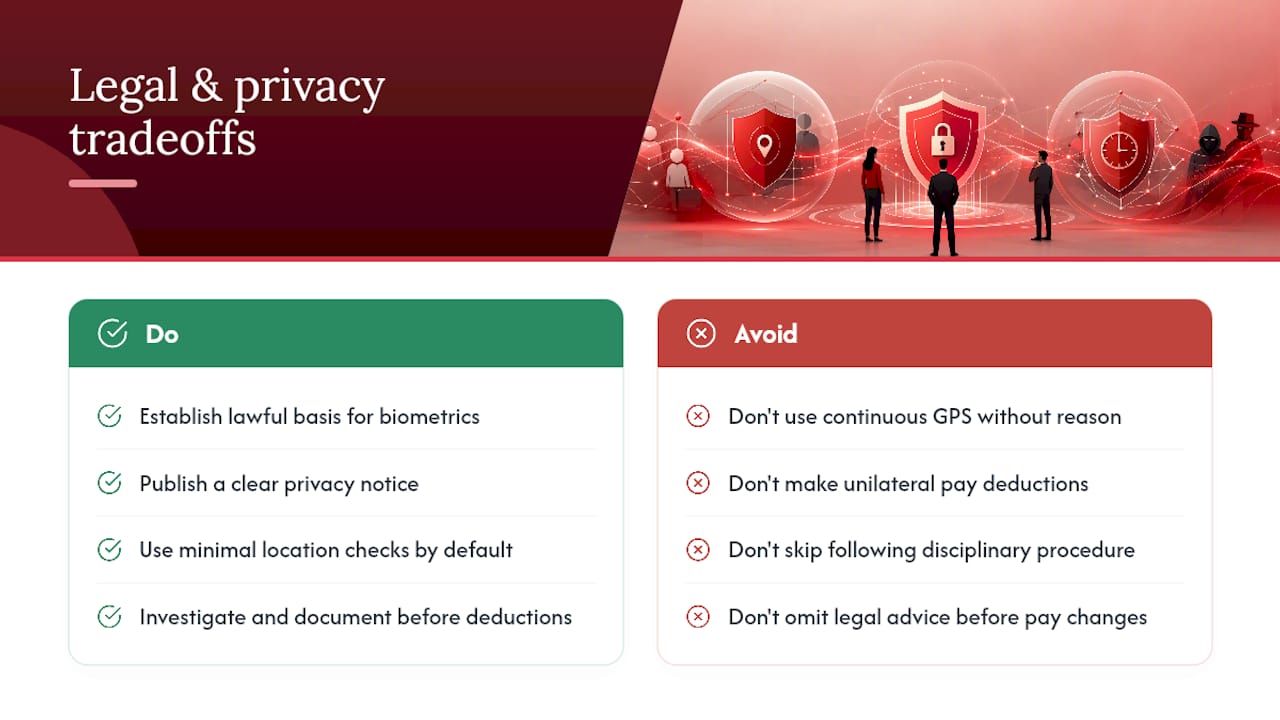
Any time theft policy touches employment law and data protection at the same time, and the two do not always pull in the same direction. Verification tools that help you catch buddy punching, such as photo capture or biometric scanning, involve processing personal data, so they need a lawful basis, a clear privacy notice, and proportionate safeguards.
Location data deserves particular care. Continuous GPS tracking through a shift is a much heavier intrusion than checking location at the moment of clock-in, and the less invasive option is usually the right default unless there is a specific operational reason to do more.
On the employment side, never treat suspected time theft as grounds for an immediate, unilateral pay deduction. That route risks a claim for unlawful deduction of wages. Investigate first, document the evidence, follow your disciplinary procedure, and take legal advice before any pay adjustment. A well-drafted, signed-off policy matters here too: it is both a deterrent and the documented evidence you will rely on if a case ever ends up at a tribunal.
If you deploy tracking software or clock-in apps, a clear privacy notice covering what data is collected and why is worth putting in writing, alongside standard cookie and consent practices if any part of the system runs through a web portal staff log into.
How much does time theft actually cost a business?
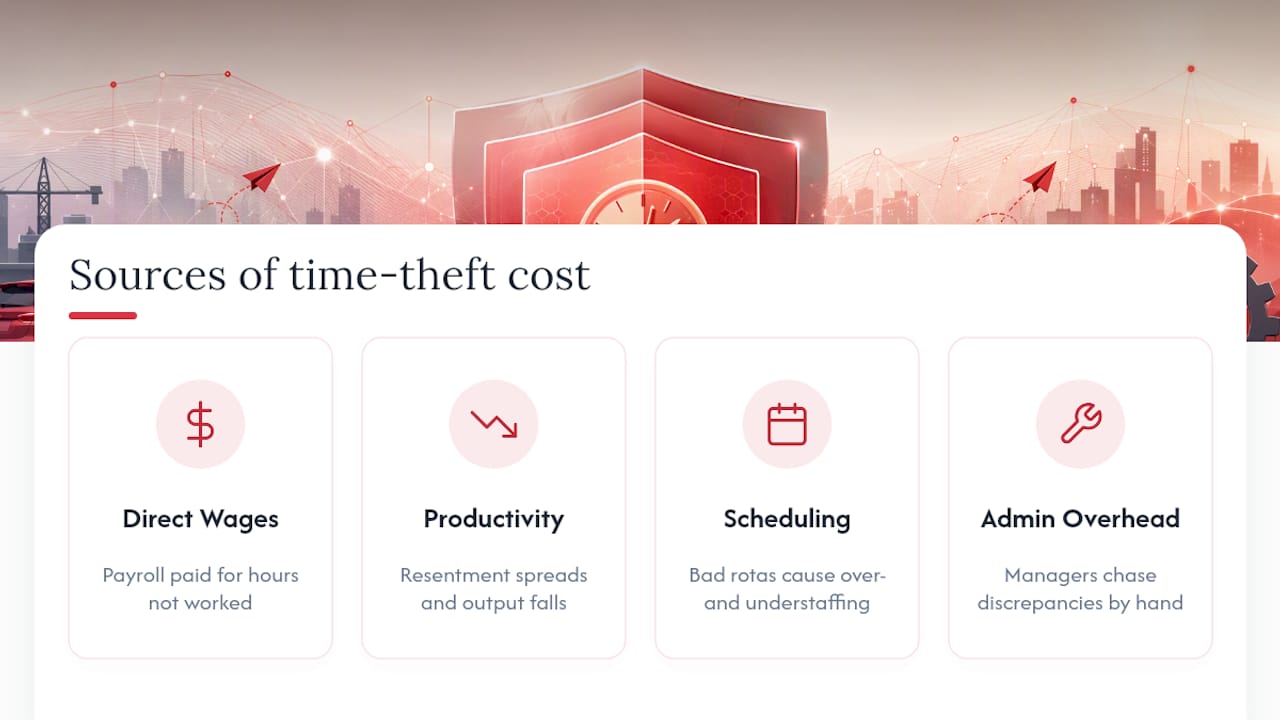
The direct cost is payroll paid for hours not genuinely worked, but that is rarely the largest cost. The bigger drag is on productivity and morale. When padded timesheets go unchecked, the honest majority notices, and resentment tends to spread faster than the theft itself.
There is a scheduling cost too. If recorded hours do not reflect real attendance, rota planning for the next period is built on bad data, which cascades into overstaffing on some shifts and gaps on others. Payroll teams also lose time manually chasing down discrepancies that a cleaner system would have flagged automatically, which is its own hidden overhead on top of the wages paid out.
Published estimates on the scale of buddy punching and time card fraud circulate widely, mostly drawn from US workplace surveys. Treat those figures as background context rather than a UK benchmark. The number that actually matters for your business is the one you find in your own exception reports once you start running them, because prevalence varies enormously by sector, shift pattern, and how much oversight already exists.
Cutting time theft rarely means firing your way to a cleaner payroll. Most of the saving comes from removing the ambiguity that let small abuses go unnoticed in the first place, and from managers spending less time reconciling timesheets by hand.
Why do time tracking systems still get this wrong?
No time tracking system closes every gap, and it is worth being honest about where the limits sit. Biometric scanners can fail on manual workers with worn fingerprints, and photo capture depends on someone actually reviewing the image rather than rubber-stamping it. GPS accuracy drops indoors and in dense urban areas, which can produce false flags for staff working exactly where they should be.
Connectivity is another practical limit. Mobile clocking apps that rely on a live signal will struggle in basement plant rooms, rural sites, or during a network outage, leaving managers to reconcile a gap manually afterwards. Staff turnover adds friction too: every new starter needs onboarding onto the system, and a rushed onboarding process is where individual logins get shared informally, quietly reopening the door to buddy punching.
None of this is a reason to skip digital tracking. It is a reason to keep a human review step in the loop rather than trusting automated flags blindly, and to accept that the technology reduces time theft substantially without claiming it eliminates it outright.
Why the balance between verification and trust matters more than the technology
The temptation, once you start looking at time theft seriously, is to over-correct into constant surveillance. That is a mistake. Continuous location tracking, screenshot monitoring, or keystroke logging tends to erode trust faster than it saves money, and it can push good staff to leave for an employer who treats them like an adult.
The principles that hold up in practice are simple: capture location only at clock events, be upfront with staff about what is tracked and why, and apply the same rules to everyone regardless of seniority. A policy enforced selectively is worse than no policy at all, because it teaches staff that the rules are negotiable.
Go back to the rollout plan. None of it works if staff feel ambushed by tools they were never told about. Communicate first, pilot second, enforce consistently, and the technology becomes a background safeguard rather than a daily source of resentment.
— Michael
Ready to put the layered approach into practice?
This three-layer model can be run in a single platform, rather than stitching together a clocking app, a separate rota tool, and a spreadsheet for audits. Rota planning, clocking with optional geofence verification, audit-ready logs, and manager approvals all sit together, so an exception gets flagged and resolved before payroll runs rather than after.

Setup is configurable by sector: a care provider running multiple client sites may need a different geofence setup to a hospitality business managing one location with variable shift patterns, and some platforms can adjust to both without extra tools bolted on. If the checklist in this article looks like a lot to manage manually, that is precisely the gap the platform closes.
The practical next step is to see it against your own rota and current timesheets rather than take it on description alone. Book a demo of Time Prof and run a short pilot on one site, the same way the 90 day plan above recommends, before rolling it out further.
Sources
- How to Prevent Time Theft and Buddy Punching - The Data Scientist
- Prevent buddy punching | QuickBooks
- What Is Buddy Punching and How Can You Prevent It? | Hubstaff
FAQ
What are some examples of time theft?
Common examples include buddy punching, padding or rounding hours in your own favour, extended breaks, ghost shifts logged for work never done, and deliberately stretching a task to fill a shift.
Will I get fired for time theft?
It depends on the severity and your employer’s disciplinary policy, but time theft is usually treated as misconduct and can lead to disciplinary action up to and including dismissal, particularly if it is repeated or deliberate.
What is the 6 hour rule for working time regulations?
Under UK working time rules, workers are generally entitled to an uninterrupted rest break if their working day exceeds six hours; this is separate from time theft policy but often gets confused with break-length disputes that time tracking can help clarify.
How do you deal with an employee stealing time?
Gather evidence from exception reports, audit trails, and location logs where relevant, follow your written disciplinary procedure, and never make a unilateral wage deduction. A platform like Timeprof can surface the audit trail and approval history you need before that conversation happens.