How to reduce no-shows in shift management
Discover effective strategies to reduce no-shows in shift management. Improve workforce reliability and streamline attendance management today!

Reducing no-shows in shift management is the single most controllable driver of workforce reliability, and automated systems cut no-shows by up to 78% when implemented correctly. The industry term for the broader discipline is attendance management, and it covers everything from schedule design to confirmation workflows and real-time escalation. Shift managers in care, security, hospitality, and retail face the same core problem: a gap on the rota costs far more than filling it does. The strategies in this article are drawn from current shift management best practices and apply across industries regardless of team size.
What tools and systems do you need to reduce no-shows?
The foundation of any no-show prevention strategy is an integrated shift management platform that replaces disconnected spreadsheets, phone calls, and group messages. Without a single source of truth, managers spend their time chasing confirmations rather than running operations. Automated reminders sent 12–24 hours before a shift cut no-shows by roughly 20% on their own. That figure rises sharply when reminders are combined with two-way confirmation and escalation workflows.
Multi-channel notification is not optional. Workers respond best to SMS confirmations sent 24 hours before a shift, supported by email and same-day push alerts. Different staff members check different channels, so relying on a single method guarantees some messages go unseen. The table below shows how timing and channel affect response rates in practice.

| Notification method | Timing | Typical outcome |
|---|---|---|
| SMS confirmation request | 48–72 hours before shift | High open rate, early intent signal |
| Email reminder | 48 hours before shift | Good for detail-heavy shift information |
| Push notification (app) | 24 hours before shift | Fast response, suits mobile-first staff |
| Same-day SMS alert | Morning of shift | Last-resort prompt for non-responders |
Key prerequisites for effective no-show prevention:
- A platform that logs shift confirmations and flags non-responses automatically
- Role-based access so managers see coverage gaps in real time
- Geofenced clock-in to verify attendance at the right location
- Audit records of all schedule changes and communications
- Mobile access for staff to confirm, decline, or flag availability without calling in
Pro Tip: Set your confirmation deadline at 48 hours before the shift, not the morning of. This gives you enough time to reassign the shift before it becomes a crisis.
Timeprof brings all of these features into one platform, including real-time notifications, shift management tools for multi-site operations, and a mobile staff portal that removes the need for phone-based chasing.
How does schedule design affect employee attendance?
Schedules that employees helped shape consistently outperform those imposed without their input. This is not a soft HR principle. Employee selection from management-approved shift options produces measurably higher acceptance rates and lower no-show figures than top-down rostering. The reason is straightforward: when staff choose a shift, they feel ownership of it.
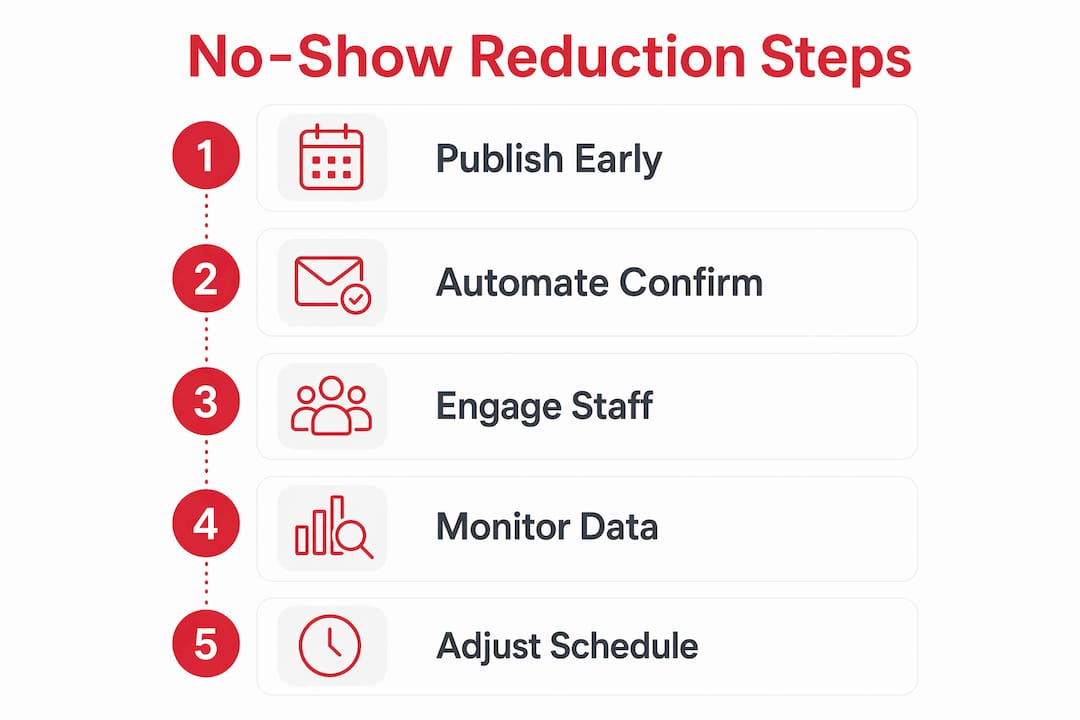
Structured input does not mean giving staff unlimited control. The most effective approach is to define the shifts you need operationally, then allow employees to select from that approved pool. Surveys and brief focus groups help managers understand which shift patterns create the most conflict with personal commitments. Acting on that information costs little but pays back in attendance.
Advance notice is equally important. Publishing rotas at least two weeks ahead significantly reduces last-minute conflicts and call-outs. Staff who know their schedule in advance can arrange childcare, transport, and personal appointments without resorting to a same-day absence. Managers who publish late create the very problem they are trying to prevent.
Practical principles for schedule design that reduces cancellations:
- Build rotas around confirmed availability, not assumed availability
- Honour at least one personal scheduling preference per employee each month
- Avoid back-to-back closing and opening shifts, which drive fatigue-related absences
- Flag staff who regularly decline specific shift types and adjust their patterns accordingly
- Use skills and site requirements data to match the right person to each role from the start
Pro Tip: Run a short quarterly survey asking staff which shift patterns they find hardest to commit to. The answers are almost always actionable and the process itself builds goodwill.
Effective shift scheduling also reduces the downstream errors that cause confusion and last-minute drop-outs. When the rota is accurate from the start, staff trust it and show up.
How do you implement a confirmation workflow step by step?
A confirmation workflow is the structured process by which managers verify that each scheduled employee intends to attend their shift. Setting confirmation cutoffs 48–72 hours before a shift reduces confusion and gives managers time to act on gaps. Without a defined cutoff, the process becomes informal and unreliable.
Follow these steps to build a confirmation workflow that actually works:
- Set the confirmation deadline. Define 48–72 hours before each shift as the point by which staff must confirm or decline. Communicate this policy clearly during onboarding and in your staff handbook.
- Send an automated confirmation request. Use SMS as the primary channel, with email as a secondary. The message should include shift date, time, location, and a simple one-tap confirm or decline option.
- Log all responses immediately. Every confirmation, decline, or non-response should be recorded automatically in your shift management platform. This creates an audit trail and flags risk early.
- Escalate non-responses. If a staff member has not responded within 24 hours of the initial request, trigger a follow-up message. If there is still no response 12 hours before the shift, escalate to the line manager.
- Reassign promptly. Automated shift confirmations allow early intervention so that open shifts can be offered to available staff before a gap becomes critical. Do not wait until the day of the shift to act.
- Analyse the data. Track which staff members consistently fail to confirm, which shifts attract the most declines, and which sites have the highest no-show rates. This data drives your next scheduling cycle.
The table below maps each workflow stage to the responsible action and the system feature that supports it.
| Workflow stage | Manager action | Platform feature required |
|---|---|---|
| Confirmation request sent | Review pending responses | Automated messaging with read receipts |
| Response received | Log and update rota | Two-way messaging and shift status update |
| Non-response flagged | Trigger escalation | Automated escalation rules |
| Shift declined | Open shift to available staff | Open shift claims and notifications |
| No-show recorded | Log reason and update records | Attendance tracking and audit log |
Real-time workforce visibility is what makes this workflow function under pressure. Without it, managers are reacting to gaps rather than preventing them.
How do you troubleshoot persistent no-shows and improve over time?
Persistent no-shows almost always indicate a system failure, not a staff reliability problem. High no-show rates signal operational deficiencies in shift design, communication, or process. Treating each absence as an individual disciplinary matter misses the point entirely and does nothing to fix the underlying cause.
Start by categorising your no-shows. Use your attendance tracking data to separate absences caused by scheduling conflicts, communication failures, fatigue patterns, and personal circumstances. Each category points to a different fix. A cluster of no-shows on early Monday shifts, for example, suggests a pattern worth addressing in the rota design rather than in individual performance reviews.
Reporting tools are the most underused asset in shift management. Effective shift management reduces unplanned overtime by up to 30% when managers use attendance data to adjust rotas proactively. Most platforms generate reports on coverage gaps, overtime usage, and attendance trends. The managers who read those reports weekly outperform those who only look at them when something goes wrong.
Continuous improvement actions that reduce no-shows over time:
- Review attendance data monthly and identify the top three recurring patterns
- Adjust confirmation deadlines and escalation triggers based on what the data shows
- Collect staff feedback after periods of high absence and act on at least one suggestion
- Monitor overtime costs as a proxy for coverage reliability. Understaffing costs are often 10x higher than overtime premiums, so budget for controlled overtime rather than chronic gaps
- Update your scheduling policy annually to reflect changes in team size, site requirements, and staff preferences
Common scheduling pitfalls that lead to no-shows are well documented and largely preventable. The managers who close the loop between attendance data and schedule design see the most sustained improvement.
Key takeaways
Reducing no-shows requires a combination of automated confirmation workflows, employee-involved schedule design, and consistent use of attendance data to drive ongoing improvement.
| Point | Details |
|---|---|
| Automate confirmation workflows | Send SMS and email confirmations 48–72 hours before shifts to verify intent and enable early reassignment. |
| Involve staff in schedule design | Schedules employees helped shape produce higher attendance and fewer last-minute cancellations. |
| Publish rotas two weeks ahead | Advance notice reduces last-minute conflicts and gives staff time to plan around their shifts. |
| Use data to find root causes | Categorise no-shows by type to identify system failures rather than blaming individual staff members. |
| Budget for controlled overtime | Understaffing costs far exceed overtime premiums, so prioritise coverage reliability in your budget. |
No-shows are a system problem, not a people problem
After years of working with shift managers across care, security, and hospitality, the pattern I see most often is this: the managers who struggle most with no-shows are the ones who treat each absence as an individual failure. They issue warnings, hold difficult conversations, and then face the same gap the following week. The system has not changed, so the outcome does not change either.
The managers who genuinely reduce no-shows do something different. They look at the rota itself and ask why staff are declining or simply not showing up. Nine times out of ten, the answer is in the schedule design, the communication process, or the lack of advance notice. Fix those, and the individual behaviour shifts without a single disciplinary conversation.
I have also seen the cost argument used to resist automation. Managers worry about the investment in a proper platform when spreadsheets are “working fine.” Spreadsheets are not working fine. They just hide the cost of the problem in overtime, agency fees, and manager time spent on the phone at 6:00 AM. The moment you put a number on that hidden cost, the case for a proper system becomes obvious.
The other thing I would say is this: transparency builds commitment. When staff can see their rota clearly, confirm their shifts easily, and trust that their preferences are being considered, they show up. That is not idealism. It is what the data consistently shows.
— Michael
How Timeprof helps you cut no-shows across your sites
Timeprof is built for exactly the challenge this article describes. The platform brings automated shift confirmations, real-time notifications, open shift claims, and attendance tracking into one mobile-friendly system. Managers get live visibility across every site. Staff get a clear, accessible portal where they can confirm shifts, flag availability, and receive instant updates without a single phone call.

Timeprof’s reporting tools track attendance trends, overtime usage, and coverage gaps so you can act on data rather than instinct. The geofenced clock-in feature verifies that staff are where they need to be, and the audit log keeps every confirmation and change on record. If you are ready to move from reactive gap-filling to a planned, reliable workforce operation, explore Timeprof’s platform and see how it fits your sites.
FAQ
What is the fastest way to reduce no-shows in shift management?
Automated confirmation requests sent 48–72 hours before each shift produce the fastest results. Combined with real-time escalation for non-responses, this approach can cut no-shows by up to 78% within 60–90 days.
How far in advance should I publish shift rotas?
Publishing rotas at least two weeks in advance significantly reduces last-minute conflicts and call-outs. Staff who know their schedule early can plan personal commitments without resorting to same-day absences.
Why do employees keep missing shifts even with reminders?
Persistent no-shows usually indicate a problem with the schedule design or communication process, not individual unreliability. Categorise absences by type to identify whether the issue is fatigue patterns, shift timing, or a breakdown in your confirmation workflow.
Does involving staff in scheduling actually reduce no-shows?
Yes. Schedules that employees helped design consistently produce higher attendance rates than those imposed without input. Allowing staff to select from management-approved shift options gives them ownership and reduces last-minute cancellations.
How does overtime budgeting relate to no-show management?
Understaffing costs are typically far higher than overtime premiums. Budgeting for controlled overtime as a coverage buffer reduces the operational damage caused by no-shows while you work on the underlying scheduling and communication improvements.