Stop payroll errors: 6 time and attendance tracking criteria for HR
Turn clock data into payroll-ready hours and actionable staffing insight. Learn six criteria to choose and pilot time and attendance tracking that cuts...

Time and attendance tracking gives HR and operations managers accurate, payroll-ready hours, defensible compliance evidence and a live read on where staffing is going wrong. It works by combining a clocking method (mobile, kiosk, biometric or geofence) with automated timesheets, approvals and reporting. Systems built on audit logs and geofenced clock-in, such as Timeprof, turn raw clock data into hours that payroll can trust and decisions managers can act on.
TL;DR:
- Mobile clocking paired with geofencing is now the standard for dispersed workforces, ensuring accurate timestamps and preventing buddy punching.
- Systems should automatically apply overtime rules, holiday accruals, and align pay periods with payroll cycles for reliable, error-free payroll processing.
- Regular reconciliation during pilot phases reduces payroll errors and builds staff trust by resolving issues promptly before full deployment.
- Biometric and geofence methods improve record integrity but require clear policies and staff consent to mitigate data protection concerns.
- AI-driven scheduling, predictive overtime alerts, and mobile staff self-service are shaping the future of workforce management, making attendance data more strategic.
Table of Contents
- Core features and clocking methods for time and attendance tracking
- How time and attendance tracking supports payroll accuracy and compliance
- Turning attendance reports into staffing decisions
- How to choose the right attendance system
- Rolling out attendance tracking without losing staff goodwill
- Common challenges with time and attendance tracking (and how to fix them)
- Where time and attendance tracking is heading next
- Timeprof’s perspective on making attendance data work for you
- Get started with attendance tracking that actually reduces admin
- Sources
Core features and clocking methods for time and attendance tracking
Most credible systems share the same backbone: clock-in and clock-out capture, digital timesheets, leave and PTO requests, manager approvals, shift claims for open cover, and a direct link back into the rota and payroll run. The differences that matter sit in how staff actually clock in, and in how much you can trust the record afterwards.
- Mobile app clocking suits field teams and multi-site staff who move between locations during a shift.
- Kiosk (tablet or fixed device) works well for office or site receptions where several staff clock in at one entrance.
- Biometric (fingerprint or facial) removes buddy punching but raises data protection questions you need to resolve before rollout.
- Card or fob is cheap and familiar but easy to lend to a colleague, which weakens the record’s integrity.
- Geofence verification confirms a phone was physically inside a site boundary when the clock event fired, which is particularly useful for teams working unsupervised.
Mobile clocking paired with geofencing has become the default for dispersed workforces, while kiosks and biometrics still dominate single-site operations with fixed shift patterns, according to product guidance from Hubstaff. Whichever method you pick, the record only holds up under scrutiny if it is timestamped automatically, logged in an audit trail, and only editable by managers with the right role-based access. Without that layer, a “digital” timesheet is really just a spreadsheet with extra steps.
How time and attendance tracking supports payroll accuracy and compliance
Attendance data earns its keep the moment it stops requiring someone to retype hours into payroll software. Native payroll connectors, scheduled exports, or an API feed all achieve the same thing: hours worked flow straight from the clock record into the pay run, with far less manual entry and fewer transcription errors, a pattern QuickBooks Time confirms across its own payroll integrations.
Before you trust that flow, check three things:
- Does the system apply your overtime rules automatically, including any daily or weekly thresholds?
- Does it correctly calculate statutory and contractual holiday accrual against hours actually worked?
- Does its pay-period cycle line up with your payroll calendar, so nothing falls between two runs?
Audit-readiness is the part managers underestimate until a dispute lands on their desk. A signed timesheet, an exception log showing why a shift was edited, and a retained record of who approved what turn a “he said, she said” argument into a five-minute lookup. Systems with genuine audit logs and role-based access, the kind ADP points to as a baseline trust signal, hold up when an employment tribunal or HMRC review asks for evidence.
Pro Tip: Keep exception logs switched on even during a quiet pilot. The first genuine dispute you face will almost always concern a shift edited weeks earlier, and you’ll want the trail ready.
Turning attendance reports into staffing decisions
Raw clock data is only useful once it becomes a report someone actually reads. The reports that matter most are hours by employee and by site, overtime alerts against a threshold, absence summaries by team, and utilisation or project time for anyone billing hours to a client.
- Weekly reports catch a shift pattern going wrong before it becomes an expensive habit.
- Monthly reports reveal chronic issues, such as one site consistently running 15% over its rota budget.
- Overtime alerts let a manager step in before a threshold is breached, rather than discovering it on the payroll invoice.
Operational leaders increasingly treat this data as strategic input rather than an administrative record, using it to catch overtime and budget overruns while they’re still small, according to SAP’s guidance on time tracking. A care provider spotting one site’s weekend shifts consistently running long, for example, can reassign a float worker before the pattern repeats for a third month. Workforce reporting case examples show the same pattern playing out across sectors: reports surface understaffing or billing leakage that nobody would have noticed from a spreadsheet alone.
How to choose the right attendance system
Start with what the system needs to do for your workforce, not with a features checklist a salesperson hands you. Six criteria decide whether a tool earns its subscription:
- Accuracy of the clocking method against your actual shift patterns and site layout.
- Adoption friction, meaning how quickly staff genuinely use it without constant chasing.
- Integrations with your existing rota and payroll software.
- Security, covering encryption, role-based access and two-factor authentication.
- Data ownership, meaning you can export everything if you ever leave.
- Pricing model and scalability, so cost per user stays sane as headcount grows.
Ask any vendor these questions directly before you sign anything:
- Can we export raw timesheet and audit-log data in a standard format, on demand?
- What’s included in the support SLA, and what hours does support actually cover?
- Where is our data hosted, and does that meet our data residency requirements?
- Can we assign different permission levels per site or per role?
Treat two things as red flags: geofence or biometric tracking with no written staff policy behind it, and any vendor who won’t confirm you own your exported data. Geofencing and audit logging build confidence in attendance records, but only when staff understand the policy and have genuinely consented to it, a balance Hubstaff’s own guidance flags as essential rather than optional.
Rolling out attendance tracking without losing staff goodwill
A rushed rollout is the single biggest reason attendance systems get quietly abandoned six months in. Run it in this order:
- Pilot one site or team first, and set a measurable target: minutes saved per timesheet, or the number of payroll queries raised before and after.
- Communicate the policy before launch, covering exactly what’s tracked, why, and how staff can query a disputed shift.
- Train supervisors properly, since they field the questions staff won’t ask HR directly.
- Reconcile daily for the first month, catching clock errors while they’re still one day old rather than a payroll cycle old.
- Name an exceptions owner per site, so edited shifts always have a clear accountable approver.
- Review the pilot’s numbers after four to six weeks, then decide whether to extend the rollout.
A pilot running six to eight weeks, with daily reconciliation for the first month and a named exceptions owner at each site, consistently produces fewer post-launch corrections than a big-bang rollout across every location at once, according to Timeprof’s own guide to reducing scheduling errors. Clear communication, a genuine pilot phase and a defined exceptions process are the three factors that separate rollouts staff accept from ones they resent, a pattern Timeprof’s workforce management checklist sets out in more detail.
Pro Tip: Publish the exception-handling process before launch, not after the first complaint. Staff tolerate a new system far better when they already know how to challenge a mistake.
Common challenges with time and attendance tracking (and how to fix them)
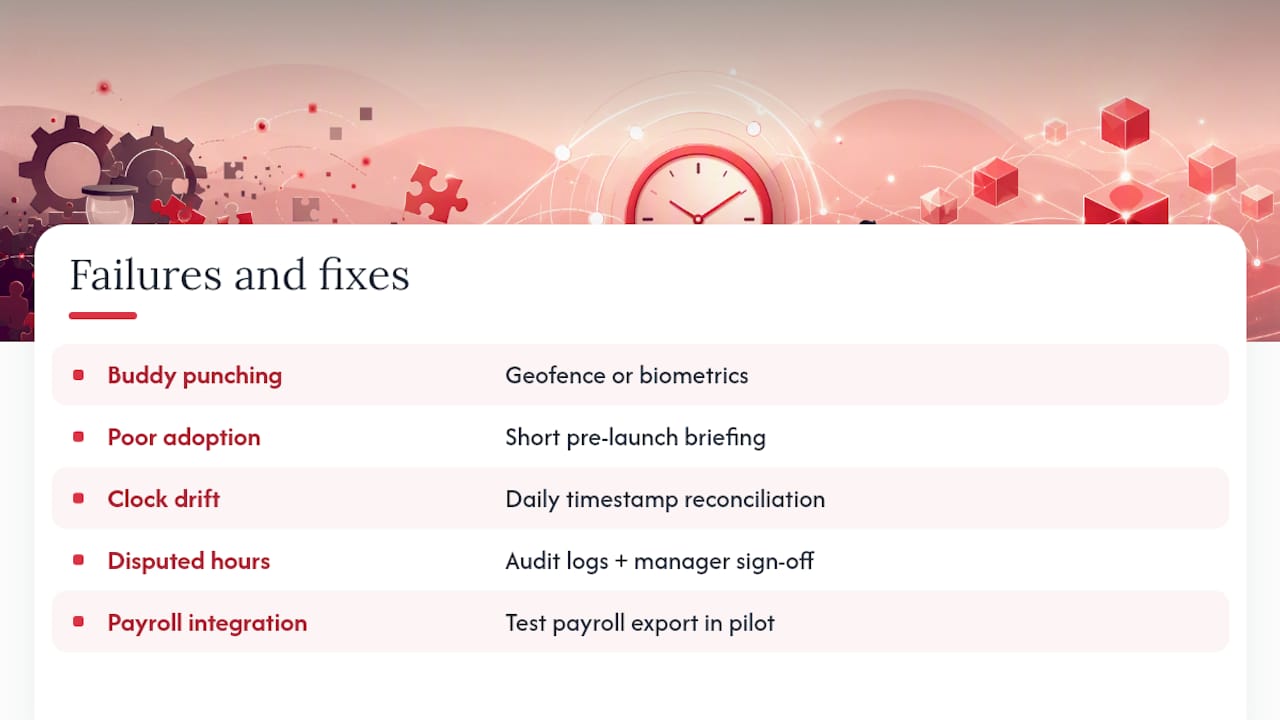
Buddy punching, where one employee clocks in for another, remains the most common integrity problem with card, fob or PIN-based systems. Geofenced mobile clocking or biometrics close this gap directly, though biometrics need a clear data protection notice before you switch anyone over.
Poor adoption is the second recurring issue, usually because staff were never told why the system exists or what happens to their data. A short briefing before launch, covering what’s tracked and what isn’t, solves most of this before it becomes resistance.
Clock drift and time zone mismatches cause quiet payroll errors, particularly across multi-site operations spanning different working patterns. Reconciling timestamps daily during the first month catches this before it compounds into a pay dispute.
Disputed hours are inevitable in any organisation with variable shifts. The fix isn’t avoiding disputes, it’s making them cheap to resolve: a timestamped, audit-logged record with manager sign-off turns a ten-minute conversation into the end of the argument, rather than a drawn-out grievance. Finally, integration gaps between the clocking system and payroll software cause the most expensive failures, because they surface weeks later as a payroll correction rather than immediately. Test the payroll export thoroughly during the pilot, not after go-live.
Where time and attendance tracking is heading next
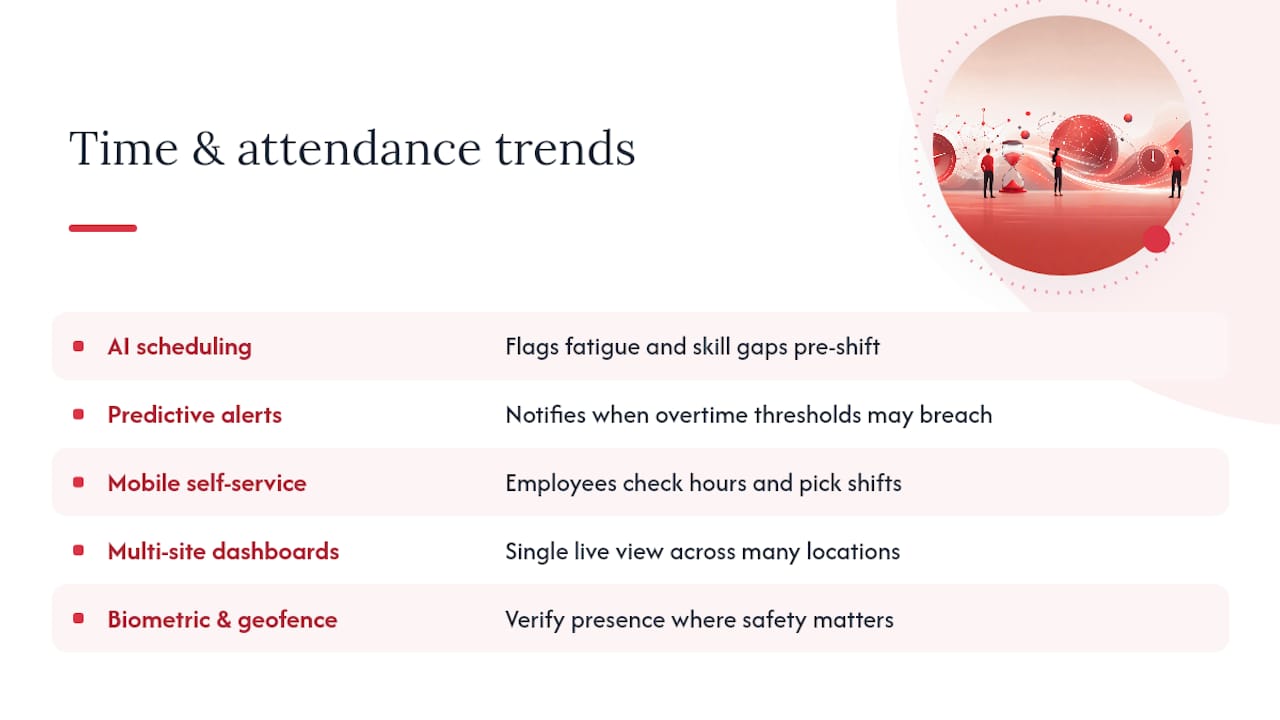
AI-assisted scheduling is the clearest shift underway, with systems now flagging fatigue risk and skill gaps before a rota is even published, rather than after a shift falls apart. This moves attendance tracking from a record of what happened to a tool that shapes what happens next.
Predictive overtime alerts are becoming standard rather than a premium add-on. Instead of a manager discovering an overtime problem on the monthly report, the system flags it the moment a threshold is likely to be breached, which lets managers redistribute workload before the cost lands, an approach SAP’s own guidance recommends as best practice for proactive workforce management.
Mobile-first staff self-service continues to expand, with employees checking their own hours, requesting leave and picking up open shifts directly from a phone, cutting the volume of queries landing on HR’s desk. Multi-tenant, multi-site dashboards are also maturing quickly, giving operations directors a single live view across dozens of locations instead of stitching together separate spreadsheets per site.
Expect biometric and geofence verification to keep spreading into sectors like care and security, where physical presence genuinely matters for safety and compliance, provided the policy and consent work happens alongside the technology rather than after it.
Timeprof’s perspective on making attendance data work for you
Some platforms combine rota planning, geofenced clock-in, audit logs and operational reporting in one platform, precisely because attendance data only pays off when it’s connected to the rest of your workforce operation, not sitting in an isolated app. For step-by-step guides on reducing scheduling errors and cutting overtime, see Timeprof’s blog.
— Michael
Get started with attendance tracking that actually reduces admin
Spreadsheets and disconnected clocking apps solve one problem in isolation. Some platforms solve the whole chain instead: rota, clock-in, leave, approvals and payroll-ready reporting sitting in one system, so a manager isn’t reconciling three tools before running payroll.

If you’re weighing up geofenced clocking, audit-ready reporting and role-based access against building that stack from separate tools, Some platforms connect these features and integrate with payroll partners such as payroll processing services, for businesses that need dedicated payroll support alongside their attendance data. Book a walkthrough of Timeprof to see how a pilot at one site could look for your own rota before committing further.