How to automate overtime calculation for your workforce
Discover how to automate overtime calculation for your workforce, cut payroll errors by 70%, and save managers time each pay period.

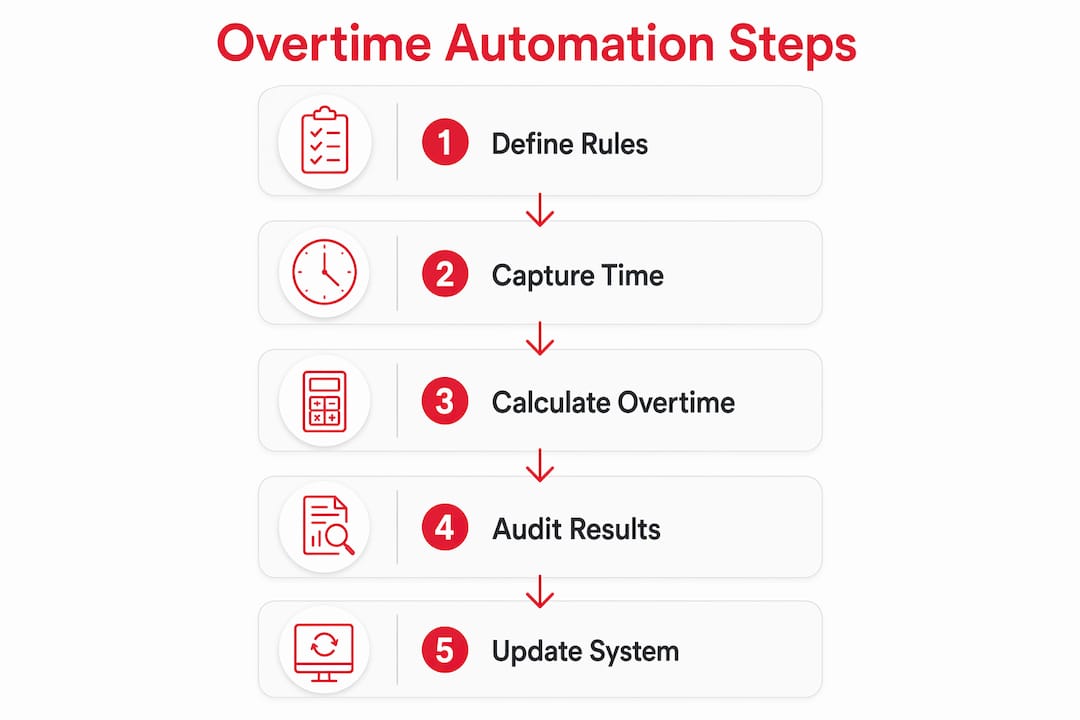
Automating overtime calculation is the single most effective step you can take to cut payroll errors, stay compliant with UK law, and free your managers from hours of manual number-crunching each pay period. The core mechanism is straightforward: digital time and attendance tracking feeds precise clock-in and clock-out data into a configurable rule engine, which applies your overtime thresholds automatically and passes the results directly to payroll. Done well, this approach can reduce payroll errors by up to 70% and cut unnecessary overtime costs substantially.
The key building blocks of a working automation setup are:
- Accurate time capture via geofenced clock-ins, biometric readers, or mobile apps, so every minute worked is recorded without manual input
- A configurable rule engine that handles daily overtime, weekly overtime, double-time thresholds, and shift differentials without requiring a payroll specialist to recalculate each scenario by hand
- Real-time alerts that notify managers when an employee is approaching their overtime limit, before the cost is incurred
- Direct integration between your attendance system and payroll software, removing the manual transfer step where most errors occur
- Audit trails and reporting that satisfy the record-keeping requirements under the Working Time Regulations and give you a defensible paper trail if HMRC or an employment tribunal ever comes calling
- Structured onboarding and staff training so that the rules your system enforces are understood by the people working within them
Practical tips to simplify automated overtime tracking
Getting the technology in place is only half the job. The other half is configuring it correctly and making sure your team actually uses it.
Start with clean employee data. Every misconfigured pay rate, wrong contract type, or missing site assignment creates a downstream error in overtime calculations. Structured onboarding, where each new starter’s role, pay rate, and working pattern are verified before their first shift, prevents the kind of data drift that makes audits painful. Timeprof’s onboarding module enforces this at the point of entry, so managers cannot publish a rota for a worker whose profile is incomplete.
Use geofenced clock-ins to eliminate buddy punching and time rounding. When a member of staff clocks in via a mobile app that verifies their GPS location, you get a timestamp accurate to the second rather than a rounded estimate. That precision matters when you are calculating daily overtime thresholds. Timeprof’s optional geofence verification ties each clock-in to a specific site, which is particularly useful for multi-site operators in care, security, and cleaning.
- Set overtime threshold alerts so managers receive a notification when an employee is within 30 minutes of triggering an overtime rate. Automated alerts prevent unauthorised overtime and cost overruns before they appear on the payroll run.
- Define a clear exception-handling procedure for manual adjustments. Every override should require a reason code and a manager sign-off, and the system should log both automatically.
- Choose payroll software with a built-in overtime calculation engine rather than bolting a separate time-tracking tool onto a basic payroll package. The fewer manual data transfers, the fewer opportunities for error.
- Verify that your attendance and payroll systems share a single source of truth, syncing in real time rather than via a nightly batch export that can fall out of step.
Pro Tip: Run a parallel calculation manually for the first two pay periods after go-live. Compare the automated output against your previous spreadsheet figures line by line. Discrepancies almost always point to a misconfigured rule rather than a system fault, and catching them early costs far less than correcting a month of wrong payments.
For a broader look at how technology reduces scheduling errors, the workforce scheduling guide on the Timeprof blog covers the most common failure points in detail.
What UK overtime rules does your system need to handle?
The Working Time Regulations 1998 set the primary framework for working hours in the UK. The 48-hour average weekly limit applies to most workers, though individuals can opt out in writing. Unlike the US Fair Labor Standards Act, UK law does not mandate a specific overtime pay rate. What it does mandate is that total pay, when divided by hours worked, never falls below the National Minimum Wage or National Living Wage for the worker’s age band.
That distinction catches many HR managers off guard. You can legally pay a flat rate for overtime in the UK, but only if the resulting hourly rate still meets the minimum wage floor. Automated payroll solutions need to check this calculation on every pay run, not just flag hours above a threshold.
- Daily and weekly overtime thresholds vary by sector and contract. Your rule engine must support both, and handle scenarios where an employee qualifies for daily overtime on a given day but has not yet crossed the weekly threshold.
- Double-time rules apply in some contracts and sectors. The system should support a tiered rate structure, for example 150% of base pay beyond eight hours in a day, rising to 200% beyond twelve hours.
- Multi-rate pay calculations arise when a worker covers shifts at different pay rates within the same week. The two standard methods are the weighted average of all rates worked, and the highest rate worked during the period. Your software should support both and let you set a default per contract type.
- Exempt versus non-exempt classification determines which workers are entitled to overtime pay at all. Salaried workers above certain thresholds may be exempt; misclassifying them is a compliance risk in either direction.
- Record-keeping obligations under the Working Time Regulations require employers to retain working time records. The gov.uk guidance on maximum weekly working hours sets out what must be kept and for how long.
- Data protection under UK GDPR applies to all payroll data. Your workforce management platform must store time and pay records securely, with access restricted to authorised users and a clear data retention policy.
The HMRC enforcement approach to National Minimum Wage breaches makes clear that underpayment resulting from miscalculated overtime is treated as a compliance failure, not an administrative oversight. Penalties and public naming are both on the table.
What features should you look for in overtime calculation software?
Not all workforce management tools handle overtime with the same depth. Here is what separates a system that genuinely automates the calculation from one that merely records hours and leaves the maths to you.

Automated time and attendance capture is the foundation. Look for geofenced mobile clock-ins, optional biometric verification, and the ability to define site-specific clock-in windows. Without accurate raw data, no rule engine produces reliable output.
A configurable overtime rule engine should support daily overtime, weekly overtime, double-time tiers, consecutive-day rules, and shift differentials out of the box. The ability to create custom compliance rule groups, so that different rules apply to different employee categories, is worth paying for if your workforce spans multiple contract types or sites.
Real-time labour cost tracking lets managers see the cost implication of a shift before it is published, not after the payroll run. This is the feature that turns overtime management from reactive to genuinely preventive.
- Integration with your existing HR and payroll systems via API or direct connector, so that approved timesheets flow into payroll without a manual export step
- Compliance modules that update when legislation changes, rather than requiring you to reconfigure rules manually after every statutory change
- Audit logs that record every clock-in, every rule application, every manual override, and every approval, with timestamps and user IDs
- Reporting tools that let you filter by site, role, or individual to spot patterns before they become problems
- Role-based access control so that a site supervisor can approve timesheets for their team but cannot alter pay rates or override compliance rules
- Two-factor authentication for all administrative accounts, given that payroll data is among the most sensitive personal data your organisation holds
Timeprof covers all of these requirements within a single platform, including geofenced clock-in, audit records, role-based access, and two-factor authentication. For organisations in equipment-intensive sectors, payroll export and timesheet tools that integrate with specialist dealer management systems can extend the same principles into more complex operational environments.
The Timeprof workforce management blog has further guidance on evaluating platforms against these criteria, including how to assess total cost of ownership rather than just licence fees.
How to audit and maintain your automated overtime system over time
Automation is not a one-time configuration. Labour law changes, your workforce changes, and the rules you set up eighteen months ago may no longer reflect either your contracts or your legal obligations.

Payroll experts advise regular audits of automated overtime systems to keep pace with evolving legislation and avoid enforcement action. In practice, that means a scheduled review at least twice a year, timed to coincide with the april uprating of National Minimum Wage rates and any mid-year changes to your employment contracts.
Beyond simple overtime thresholds, your rule engine needs periodic attention to shift differentials, grace periods, and multi-rate pay scenarios. A grace period that was set at five minutes when your system went live may no longer match your operational reality if shift patterns have changed. Weighted average calculations for workers covering multiple roles need to be tested against real payslip data, not just theoretical examples.
- Use your system’s anomaly reports to flag employees whose overtime hours spike unexpectedly. A sudden increase often points to a scheduling error or a rule misconfiguration rather than genuine demand.
- Train managers and payroll staff on how the rule engine works, not just how to approve timesheets. When a manager understands why the system flags a particular shift, they make better decisions about overrides and exceptions.
- Retain audit trail data for at least the period required by the Working Time Regulations. In practice, most employment lawyers recommend keeping payroll records for six years to cover potential tribunal claims.
- Test your integration after every payroll software update. Vendors occasionally change data formats or API behaviour, and a silent integration failure can mean a full pay period of hours that never reach the payroll run.
Pro Tip: Assign a named owner for your overtime rule configuration, someone who is responsible for reviewing it after every legislative change and after any significant change to your workforce structure. Without a named owner, rule maintenance falls through the gap between HR and payroll.
Integrated platforms that combine attendance data and payroll calculations into a single source of truth eliminate the manual syncing step that causes most audit failures. When every clock-in, rule application, and payroll output lives in one system, the audit trail is complete by design rather than assembled after the fact.
Try Timeprof for automated overtime and workforce management

Timeprof brings together rota planning, geofenced attendance, overtime tracking, and compliance reporting in one platform built for UK businesses. Whether you manage a single site or a complex multi-site operation across care, hospitality, or security, Timeprof gives you the real-time visibility and audit-ready records you need to stay compliant and in control.
Start managing overtime accurately with Timeprof and replace your spreadsheets with a system that works as hard as your team does.
Key takeaways
Automating overtime calculation with integrated workforce management software reduces payroll errors, cuts unnecessary overtime costs, and keeps UK employers compliant with the Working Time Regulations and National Minimum Wage obligations.
| Point | Details |
|---|---|
| Error reduction through automation | Automated overtime calculation can reduce payroll errors by up to 70%, cutting financial and legal risk. |
| Cost savings on overtime spend | Effective automation decreases payroll discrepancies and unnecessary overtime costs by 30–40%. |
| UK compliance requirements | The Working Time Regulations and National Minimum Wage rules require accurate hour records and correct rate calculations on every pay run. |
| Integration is the critical link | A single source of truth between attendance and payroll systems eliminates manual transfer errors and audit gaps. |
| Ongoing governance matters | Regular audits of your rule configuration, at minimum twice yearly, keep your system aligned with changing legislation and contracts. |