How task checklists support care workers: a manager's guide
Discover how task checklists support care workers by reducing missed duties, enhancing compliance, and boosting staff morale in care settings.

Shift-linked digital task checklists, embedded within an integrated workforce management platform, are the most reliable way to reduce missed duties, generate audit-ready evidence and free care staff from paperwork. Three things follow from that:
- Operational impact: tasks tied to specific shifts and workers produce real-time alerts when duties are overdue, preventing gaps before the shift ends.
- Compliance impact: timestamped, evidence-linked records satisfy Regulation 17 governance requirements and support closed-loop Quality Improvement Plans (QIPs) with named owners and verified resolutions.
- Staff impact: removing administration-only work and redeploying that time into direct care improves both morale and retention.
The sections below cover integration with rotas and attendance, compliance evidence, a staged rollout plan, KPI measurement, adoption pitfalls and a practical sources list.
Table of Contents
- Why do shift-linked digital checklists matter for managers and residents?
- How do checklists connect to your rota, attendance and shift records?
- How do digital checklists meet CQC evidence requirements?
- How do you roll out digital checklists without disrupting care delivery?
- What KPIs tell you whether checklists are actually working?
- How do you get staff to use checklists without creating a surveillance culture?
- Key takeaways
- The case for treating checklists as workforce controls, not admin tools
- Timeprof gives you shift-linked checklists, geofencing and audit reports in one place
- Useful sources for UK care managers
Why do shift-linked digital checklists matter for managers and residents?
The benefits are clearest when you look at what paper cannot do. Digital Social Care Records have demonstrably freed up millions of admin hours across the sector, with care plans completed and signed off faster than previously. That time goes back to residents.
Each group in your organisation benefits differently:
- Care staff — receive clear, shift-specific duties on their mobile device, removing the ambiguity of handwritten task sheets and reducing end-of-shift paperwork.
Statutory expectations reinforce the case. Regulation 17 of the Health and Social Care Act 2008 requires providers to maintain accurate, contemporaneous records and demonstrate governance that catches and corrects risks. Workforce management software that integrates scheduling, attendance and tasks addresses that requirement directly, rather than leaving managers to assemble evidence from three separate systems the night before an inspection.
How do checklists connect to your rota, attendance and shift records?
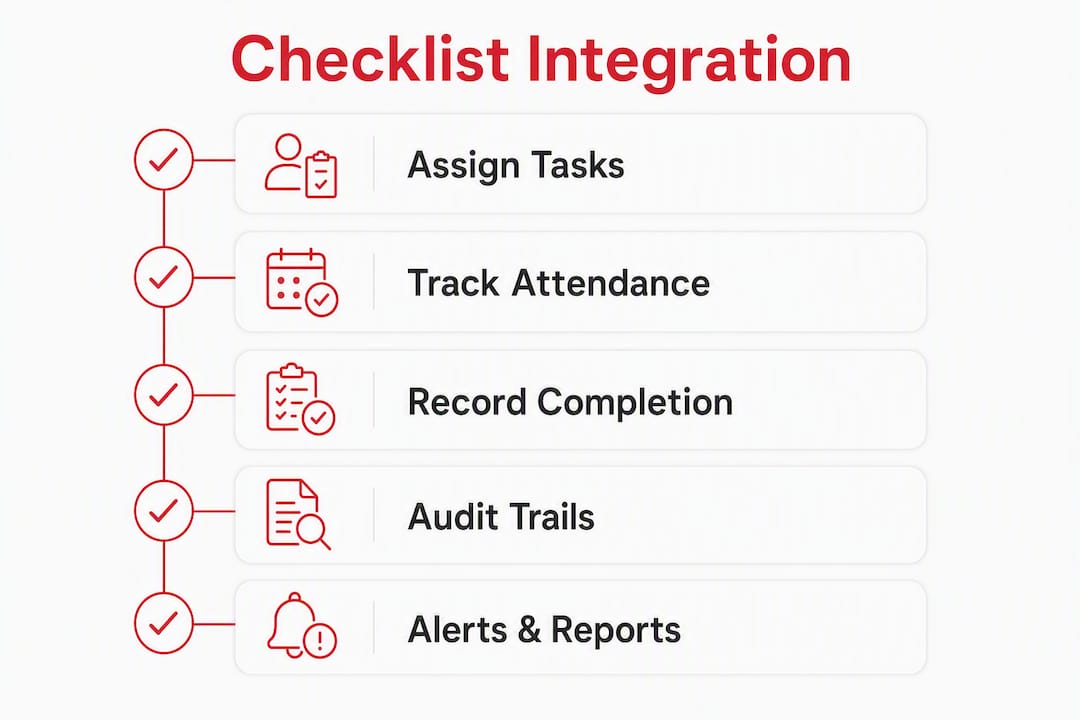
Shift-linking means every task is assigned to a specific rostered shift and recorded with a timestamp, user identity and location at the point of completion. The data flow works like this:

Rota → assigned task → geofence or clock-in → completion record → audit trail.
Each node must capture: who completed the action, when, where (site or location), and any attached evidence such as a photo or note. Digital checklists record who completed each action and when; a blank paper form is simply ambiguous, and inspectors know it.
The technical features that make this work reliably:
- Geofence clock-ins confirm a worker is physically on site before tasks can be marked complete, preventing remote sign-offs.
- Role-based access restricts which tasks each user sees and can edit, protecting data integrity.
- Automatic assignment from the rota means tasks populate the right worker’s queue the moment a shift is confirmed, with no manual re-entry.
- Offline caching keeps the app functional in areas with poor connectivity, syncing records when signal returns.
The operational outcome is a shift from reactive to proactive management. Rather than discovering a missed medication prompt at handover, a manager receives an alert mid-shift and can reassign the task before the resident is affected. Centralised platforms give managers instant cross-site oversight and automated reminders, removing the manual searching that consumes hours before every inspection.
Pro Tip: Set overdue-task alerts to trigger at 75% of the way through a shift, not at shift end. That window gives a colleague or supervisor enough time to step in without disrupting handover.
How do digital checklists meet CQC evidence requirements?
Digital checklists become auditable evidence when they provide timestamped actions, evidence attachments and closed-loop corrective actions with named owners and due dates. A completed form is not enough. Regulation 17 requires audits that catch risks, escalate them and demonstrably lead to verified action, not just a ticked box.
What inspectors look for in practice:
- Contemporaneous records with timestamps, not retrospective entries.
- Evidence-linked scoring: a failed task should carry a photo, note or escalation record, not just a red flag.
- Ownership of corrective actions: a named person, a deadline, and a verified resolution before the item closes.
- A retrievable audit trail that can be filtered by date, site, worker or task category and exported within minutes.
Pro Tip: Build a standard inspection pack template in your platform: a 90-day filtered export of completed tasks, overdue alerts, QIP closures and verification records. Exporting this in under ten minutes during an inspection visit demonstrates governance confidence far more effectively than a folder of paper.
How do you roll out digital checklists without disrupting care delivery?
A staged rollout reduces risk and preserves staff confidence. The recommended sequence is: design → pilot/parallel run → iterate → scale.
Suggested timeline:
- Design phase (weeks 1–2): Map existing paper tasks to digital templates. Assign task ownership by role, not individual. Define mandatory fields carefully — fewer is better at this stage.
- Pilot/parallel run (weeks 3–6): Run paper and digital simultaneously on one unit or site. A short parallel run builds staff confidence and helps managers fix workflow bugs before fully decommissioning paper records.
- Training (weeks 4–5, overlapping pilot): Deliver role-specific sessions of no more than 30 minutes. Focus on daily task flow, not every platform feature.
- Go-live (week 7): Decommission paper on the pilot unit. Keep a named go-to person on each shift for the first two weeks.
- Review and scale (weeks 8–12): Measure pilot KPIs, address gaps, then roll out to remaining sites.
Implementation checklist for managers:
- Confirm which roles have task-creation versus task-completion permissions.
- Set data retention policy before go-live (minimum seven years for adult social care records in England).
- Enable two-factor authentication for all manager and administrator accounts.
- Assign a named QIP owner for each service area.
- Communicate the purpose of checklists to staff in writing before the pilot begins.
Cost considerations to budget for:
- Licence model: per-staff-member pricing is common; confirm whether bank and agency workers are included.
- Setup and configuration fees, particularly for multi-site deployments.
- Device or BYOD policy: personal smartphones reduce hardware cost but require a mobile data or Wi-Fi policy.
- Training time as a soft cost: factor in two to four hours per staff member across the pilot cohort.
A workforce management tools checklist helps HR leads compare platforms against these criteria before committing to a contract.
What KPIs tell you whether checklists are actually working?
Track a compact set of operational metrics rather than trying to measure everything at once. The five that matter most:
| Metric | Why it matters | Short-term target |
|---|---|---|
| Missed tasks rate | Direct measure of care delivery gaps | Reduce by 30% within weeks of go-live |
| Admin hours saved per week | Quantifies time redeployed to care | Measurable reduction by end of pilot |
| Time to close QIPs (days) | Governance health indicator | Under two weeks for non-urgent items |
| Audit verification rate | Proportion of flagged items with verified resolution | 90%+ before any inspection |
| Staff satisfaction score | Proxy for adoption and morale | Stable or improving at 30-day check-in |
Measure baseline figures during the parallel run, before digital goes live. Without a baseline, early improvements are invisible. Allow at least six weeks before calling a trend — seasonal staffing fluctuations (summer holidays, winter pressures) can distort short windows. Workforce data becomes genuinely useful when it is tracked consistently over time, not sampled once.
Pro Tip: If you operate more than one site, run the pilot on your most stable unit rather than your busiest. A clean baseline from a low-complexity site gives you a credible before/after comparison that is easier to present to your board or commissioners.
How do you get staff to use checklists without creating a surveillance culture?
Adoption succeeds when checklists are framed as tools to reduce admin and support care delivery, not to monitor individuals. The framing matters as much as the technology.
Common pitfalls and how to avoid them:
- Poor communication before launch: staff who hear about the system from a colleague rather than management will assume the worst. Send a written briefing before the pilot begins.
- No parallel run: removing paper immediately creates anxiety and resistance. Run both systems together for at least four weeks.
- Excessive mandatory fields: if every task requires a photo, a note and a supervisor sign-off, staff will find workarounds. Start with minimal required fields and add them based on audit feedback.
- No closed-loop actions: if staff flag issues that are never visibly resolved, trust in the system collapses quickly. Every QIP must have a named owner and a visible resolution.
Practitioners emphasise redeploying admin-only shifts into care roles as the most effective way to demonstrate that digital recording benefits staff, not just management. Make that redeployment visible and name it explicitly in your communications.
Pro Tip: When announcing the change, use language like: “We are moving to digital task recording so that less of your shift is spent on paperwork and more of it is spent with residents. The system records what you complete, not how long each task takes.” That distinction reduces anxiety about performance monitoring significantly.
For further guidance on mobile scheduling adoption and how frontline staff respond to digital tools, the Timeprof blog covers practical rollout approaches in detail.
Key takeaways
Shift-linked digital task checklists, integrated with rotas and attendance records, are the most effective way for UK care managers to reduce missed duties, satisfy Regulation 17 governance requirements and redeploy admin time into direct care.
| Point | Details |
|---|---|
| Link checklists to the rota | Every task must carry a shift, worker identity, timestamp and location to count as audit evidence. |
| Run a parallel pilot | Four to six weeks of paper-plus-digital reduces resistance and surfaces workflow gaps before go-live. |
| Measure a small KPI set | Track missed tasks rate, QIP closure time and audit verification rate from day one of the pilot. |
| Close every QIP loop | Named owners, deadlines and verified resolutions are what Regulation 17 governance actually requires. |
| Timeprof as your platform | Timeprof links rotas, geofence clock-ins, shift-linked tasks and audit-ready reporting in one platform. |
In the next 7 days: identify one unit for a pilot and map your current paper tasks to digital categories. In the next 30 days: complete the parallel run and measure your baseline KPIs. In the next 90 days: scale to remaining sites and present your first QIP verification report to your governance lead.
The case for treating checklists as workforce controls, not admin tools
Most of the resistance to digital checklists in care comes from a category error: managers introduce them as a compliance fix rather than a workforce control. The distinction matters. A compliance fix gets bolted onto existing workflows and creates extra work. A workforce control replaces a fragmented process with a single, reliable one.
The evidence from providers who have made this shift is consistent. Time redeployed from administration into direct care is not a marginal gain. When Treherne Care Group removed administration-only shifts, more than 25 hours per day were redeployed across services—equating to over 9,000+ hours per year and the equivalent of four to five full-time staff roles moved back to residents. That is not a reporting improvement; it is a change in the staffing model.
The surveillance concern is real but manageable. Staff who understand that the system records task completion, not task duration or personal movement, tend to accept it quickly. The managers who struggle with adoption are usually the ones who skipped the communication step or launched without a parallel run. Neither is a technology problem.
The KPI that most managers overlook is QIP closure time. Missed tasks and admin hours are visible and easy to track. But a governance system where findings sit open for months, unverified and unresolved, is a far greater inspection risk than an occasional missed task. Close the loop, name the owner, verify the resolution. That is what Regulation 17 actually asks for.
Timeprof gives you shift-linked checklists, geofencing and audit reports in one place
Care managers who have read this far are typically managing three separate systems: a rota tool, a paper or basic digital task list, and a separate compliance folder. Timeprof replaces all three.

The platform links rotas directly to task checklists, so the right duties appear on the right worker’s device the moment a shift is confirmed. Geofence clock-ins verify on-site presence before tasks can be marked complete. Role-based access and two-factor authentication protect record integrity. Every completed task, overdue alert and QIP resolution feeds into exportable audit reports that can be filtered by date, site or worker in minutes, not hours.
Pricing follows a per-staff-member subscription model with setup options for single and multi-site deployments. A structured pilot typically runs over four to six weeks, with configuration, training and a baseline KPI review included.
Book a demo with Timeprof to see shift-linked task checklists, geofence attendance and audit reporting working together in a live care environment.
Useful sources for UK care managers
- CQC Regulation 17 and audit software requirements — explains what closed-loop QIPs, evidence links and verified corrective actions look like in practice. Save this for your governance policy and inspection preparation.
- GOV.UK: Digital revolution in care saves millions of admin hours — the government’s own summary of Digital Social Care Record outcomes, including care plan completion times. Useful for board-level business cases.
- Bedfordshire, Luton and Milton Keynes ICS: Digital records case study — a regional implementation study demonstrating return on investment from digital records adoption. Extract the ROI figures for your own pilot business case.
- Centrim Life: Paper to CQC proof — practical guidance on the blank-page problem, parallel runs and what digital housekeeping evidence looks like to an inspector.
- Log My Care: Treherne Care Group case study — the most cited practitioner example of admin-to-care redeployment; use the 25+ hours per day figure in your own business case.
- Camptra: Healthcare payroll audit case study — demonstrates how technology reduces payroll audit time in healthcare; relevant when costing the admin burden of manual records against a digital platform.
- Care Show London: Workforce management software benefits — a sector-facing summary of the six core benefits of workforce management systems in care homes; useful for procurement briefings.