5 Step Timesheet Approval Workflow Managers Can Use to End CSV Reentry
Managers: build a compliant, audit ready timesheet approval workflow in five clear steps. Includes a one page policy checklist and a Time Prof setup to...

A timesheet approval workflow is a configured process that routes submitted hours to specific approvers, locks approved data and pushes it to payroll or billing. The typical path runs from submission through manager review to approval or rejection, then a locked, auditable record ready for payroll export. Done well, it stops late edits, overbilling and payroll errors before they happen. Look for automated reminders and a full audit trail, the two features platforms like Time Prof build the whole approval routing around.
TL;DR:
- Automated reminders and role-based routing are critical to ensure timely approvals and prevent bottlenecks caused by unavailable reviewers.
- Connecting approved timesheets directly to payroll reduces errors from manual data entry and incorporates timezone considerations for distributed teams.
- Clear rejection reason templates and strict version control are vital to speed up corrections and maintain audit trail integrity for compliance purposes.
- Policies should define submission windows, approval hierarchies, correction rules, and escalation timelines to prevent workflow drift and ensure accountability.
- Role‑based access and limited data retention are essential for protecting sensitive employee information and maintaining privacy standards.
Table of Contents
- Timesheet approval workflow: statuses and how the lifecycle works
- How to set up a timesheet approval workflow step by step
- Who should approve timesheets, and what are the rules?
- Automation and integration: connecting approval to payroll
- Common timesheet approval problems and how to fix them
- What belongs in a timesheet approval policy?
- How Time Prof supports a robust approval workflow
- Designing an approval interface staff will actually use
- Timesheet approval and compliance with labour law
- Data privacy and security in timesheet approval systems
- What one manager learnt piloting a new approval workflow
- Get your timesheet approval workflow running with Time Prof
- Sources
Timesheet approval workflow: statuses and how the lifecycle works
A timesheet approval workflow moves hours through a defined sequence rather than letting them sit in an inbox until someone remembers to check. The standard lifecycle runs employee logs time, the entry sits open until the period ends, it flips to ready to submit, then waits for approval once submitted, and finally lands as approved or rejected. Approved periods get closed for payroll, which is the point of the whole exercise.
Most systems automate the transition between stages. An entry that’s still open at the end of a pay period will auto‑switch to “ready to submit” without anyone touching it, which stops staff forgetting to log hours until the deadline has already passed.
The statuses you’ll typically see:
- Open — the timesheet is being filled in during the current period.
- Ready to submit — the period has closed and the entry is awaiting the employee’s submission.
- Waiting for approval — submitted and sitting with the assigned reviewer.
- Approved — signed off and locked for payroll or invoicing.
- Rejected — sent back with a note, awaiting correction and resubmission.
Not every business needs a single reviewer. Larger teams often run multi‑leg approvals, where a line manager checks hours worked and a project lead separately confirms billable allocation before finance sees anything. Role‑based routing matters here because it decides who sees what, and skipping it is how the wrong person ends up approving their own overtime.
How to set up a timesheet approval workflow step by step
Building the workflow for timesheets is mostly a sequencing exercise: get the deadlines right, assign the right people, then automate the chasing so nobody has to do it manually.
- Fix the submission window. Decide whether pay runs weekly, biweekly or monthly, then set an exact deadline with timezone rules attached. A team spread across regions needs deadlines set to local time, not head office time, or you’ll get disputes about what “Friday 5pm” actually meant.
- Assign approvers and backups. Every approver needs a named deputy who can act when they’re on leave. Where hours get billed to a project, route those hours to the project lead rather than only the line manager.
- Configure reminders and escalation. Automated nudges at 48, 24 and 2 hours before the deadline catch most stragglers, and an escalation window of 24 to 48 hours to a backup approver clears the rest.
- Set rejection templates and grace periods. Give reviewers standard rejection reasons and a message field, then define how long staff have to correct and resubmit.
- Lock the period and test the export. Run a dry‑run payroll export before go‑live to confirm approved data actually lands where it should.
Pro Tip: Run the dry‑run export a full pay cycle before switching over. Catching a mapping error on a test run costs you an afternoon; catching it on live payroll costs you a very awkward phone call to finance.
Who should approve timesheets, and what are the rules?
Approval rights should attach to a role, not a person. Assign by line manager, project lead or finance function, and the workflow keeps working even when someone changes job or leaves. Naming individuals directly is how businesses end up with a former manager still listed as an approver six months after they’ve gone.
A few rules keep the process trustworthy rather than just fast:
- No one approves their own submitted hours, ever, without exception.
- Reopening a locked timesheet requires explicit authorisation from a named role, not a casual request.
- Approvers should sign off or reject within a set SLA, typically 24 to 48 hours of submission for a weekly payroll.
- Backups are pre‑designated before leave starts, not scrambled together the day someone goes on holiday.
Get this wrong and the symptom is always the same: a queue of unapproved timesheets building up because the one person who can sign off is unreachable.
Automation and integration: connecting approval to payroll
The manual chasing around timesheets is what eats a manager’s week, and it’s the first thing worth automating. Reminders, escalation and audit logging remove the need for anyone to personally hunt down a late submission.
The bigger win sits downstream. Feeding approved timesheets straight into payroll or invoicing removes the CSV re‑entry step that causes most post‑approval errors: a mistyped cell, a row dropped during a copy‑paste, a formula that silently breaks. For distributed teams, build in explicit timezone handling so a deadline set in one office doesn’t quietly shift for staff working three hours behind, and test the full chain, submission through approval to payroll output, before relying on it for a real pay run.
Worth automating from day one:
- Deadline reminders at fixed intervals before cut‑off.
- Escalation to a backup approver after a set delay.
- A permanent, timestamped log of every status change.
- Direct payroll or billing integration instead of manual file handoffs.
A concise workflow cuts payroll reconciliation time and reduces the billing disputes that come from mismatched hours. Track reconciliation time before and after any change. It’s the cleanest single metric for whether the new process is actually working.
Common timesheet approval problems and how to fix them
Most approval workflow failures trace back to one of four causes, and each has a fairly straightforward fix once you know what to look for. Late submissions usually mean reminders aren’t reaching people early enough. Publish the deadline clearly and layer in automated nudges rather than relying on memory.
Approval bottlenecks happen when one person holds every sign‑off and then goes on leave. Spread approvals across roles, pre‑assign backups, and check approver queues regularly for a backlog forming. Audit gaps show up when a timesheet gets edited after approval with no record of who changed what. Require a logged reason for any post‑approval edit, and keep full version history so nothing disappears quietly.
Data errors, wrong project codes, missing task tags, tend to repeat because rejections don’t explain what went wrong. A rejection with a specific note about the missing field speeds up correction far more than a generic “please resubmit.” Common errors like these are worth reviewing directly with your team once a quarter rather than letting them recur.
Pro Tip: If the same three approvers cause every bottleneck, the fix usually isn’t more reminders, it’s redistributing who has sign‑off rights.
What belongs in a timesheet approval policy?
A workflow without a written policy behind it tends to drift, since staff and managers each assume different rules apply. The minimum policy elements are short enough to fit on one page:
- Exact submission windows, stated with timezone rules for distributed teams.
- Required entry fields (project code, task tag, hours worked).
- The approval hierarchy, including named backups.
- Correction windows and consequences for late or fraudulent entries.
- Who can access or audit past records, and under what circumstances.
- Escalation timelines and exactly who holds authority to reopen a closed period.
Publish it somewhere staff will actually see it, alongside the overtime rules that govern how extra hours get calculated once a timesheet is approved.
How Time Prof supports a robust approval workflow
Time Prof builds the checklist above directly into the platform: geofenced clock‑in for location verification, audit‑ready reports for every status change, role‑based access so approval rights sit with a job title rather than a name, and automated reminders through to lock/close periods before payroll. Care providers, hospitality teams and security firms typically configure it with multi‑leg approval and a tight 24-hour SLA, given how thinly stretched frontline managers usually are and the importance of managing your time as a manager.
Designing an approval interface staff will actually use
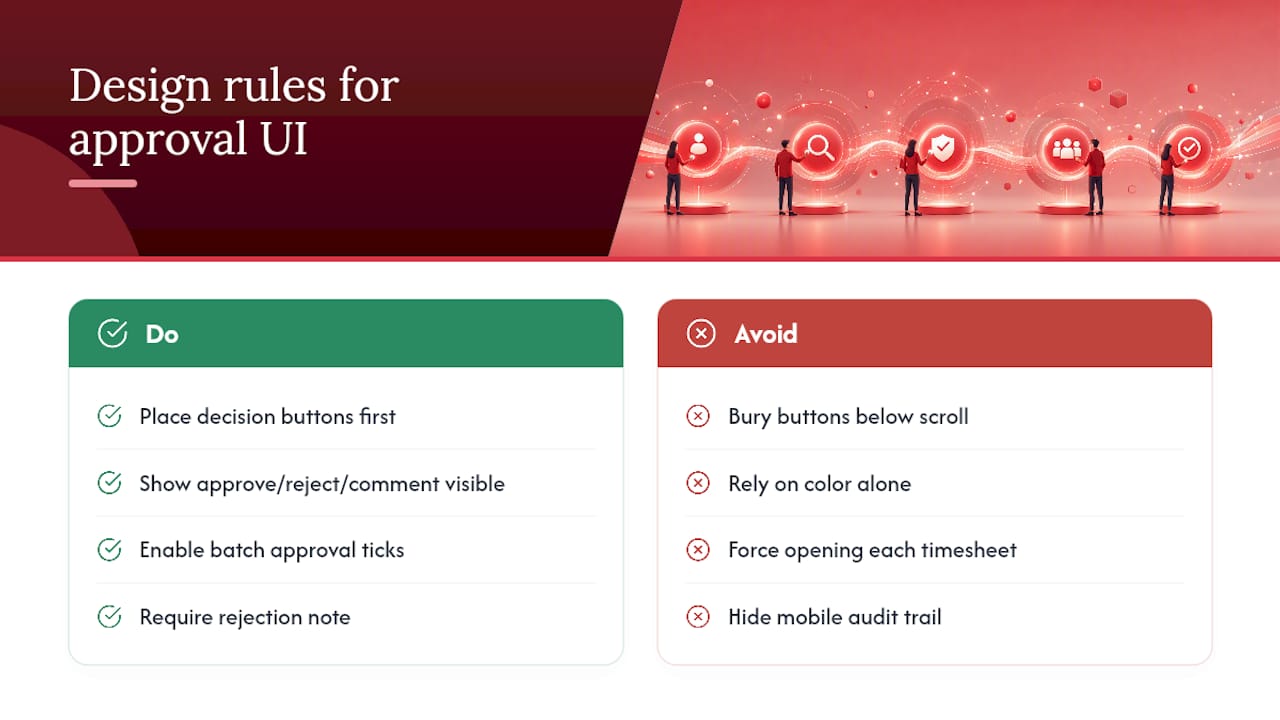
An approval screen that takes five clicks to reject a single line will get ignored until the backlog forces someone’s hand. The interfaces that work share a few habits.
Put the decision buttons where the eye lands first, not buried below a scroll. A manager reviewing twenty timesheets before a Friday deadline needs approve, reject and comment visible without hunting. Colour‑code status clearly, but don’t rely on colour alone since some reviewers will be checking on a small phone screen in bad light.
Batch approval matters more than most designers assume. If nine timesheets are identical and correct, forcing a manager to open each one individually is how approvals get rubber‑stamped without being properly checked, or worse, ignored entirely. A well‑built interface lets a reviewer scan a summary table, tick the clean ones, and drop into detail only on the entry that looks wrong.
Rejection needs a mandatory note field, not an optional one. An approver who can reject with no explanation will do exactly that under time pressure, and the employee is left guessing what to fix. Mobile access matters too, since a lot of approval happens between meetings or on a commute rather than at a desk. If the mobile view strips out the audit trail or hides the comment history, reviewers lose the context they need to make a fair call.
Finally, surface pending counts prominently wherever managers already look, a dashboard, a notification badge, an email digest. The goal is to make an unapproved timesheet visible before it becomes late, not after.
Timesheet approval and compliance with labour law
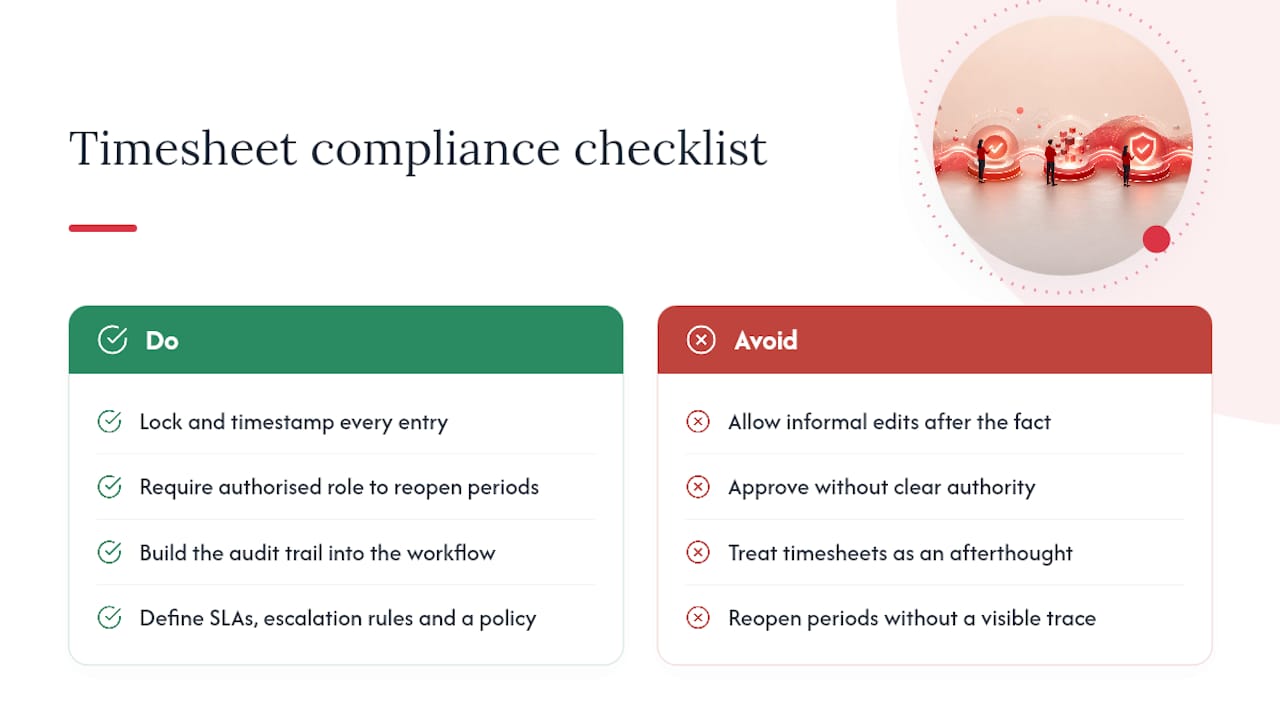
A properly configured approval workflow does more than tidy up payroll. It’s the record that proves compliance if a wage dispute or an employment tribunal claim ever surfaces. Locked, timestamped entries with a full audit trail show exactly who worked what hours, who signed off, and when, which is precisely the evidence needed to demonstrate that overtime, breaks and minimum pay obligations were met.
The risk without one is straightforward: hours logged informally, edited after the fact with no record, or approved by someone with no clear authority to do so. That’s not just sloppy administration, it’s a genuine exposure if working time records get challenged. Reopening a closed period should always require an authorised role and leave a visible trace, because an unexplained retroactive edit is exactly what regulators and tribunals look for when assessing whether records were manipulated.
There’s a practical governance angle too. A workflow with defined SLAs, escalation rules and a written policy behind it demonstrates that a business takes wage and hour obligations seriously, rather than treating timesheets as an afterthought. That matters most in sectors with tight margins and heavy shift work, care, hospitality, security, where a single miscalculated overtime run can trigger a wave of underpayment claims across an entire site. Building the audit trail into the approval workflow itself, rather than bolting it on afterwards, is the difference between a business that can answer a compliance question in minutes and one that spends weeks reconstructing records from spreadsheets and email threads.
Data privacy and security in timesheet approval systems
Timesheet data includes location history, working patterns and sometimes salary‑linked information, which makes it more sensitive than it looks at first glance. Any approval system handling that data needs role‑based access as a baseline, so a site supervisor can see their own team’s hours without browsing every employee across the business.
Geofenced clock‑in raises a specific consideration worth addressing directly: location data should only be captured during clock‑in and clock‑out events, not tracked continuously through a shift, and staff should know exactly what’s being recorded and why. Two‑factor authentication on manager and admin accounts matters more here than in most business software, since an approver account with sign‑off rights is a genuinely valuable target if compromised.
Audit trails cut both ways on privacy. They’re essential for compliance, but retention policies need limits too, keeping records as long as legally required rather than indefinitely by default. Tenant‑level data separation matters for any multi‑site or multi‑client operation, since a security firm running several client contracts through one platform needs certainty that one client’s staff data never surfaces in another’s reports.
What one manager learnt piloting a new approval workflow
Speed and oversight pull in opposite directions, and most businesses only work that out after a mistake. A single approver suffices for a small team where hours rarely need context. Multi‑leg approval earns its complexity once billable hours, project codes or overtime enter the picture. Pilot any change with one team for two pay cycles, measure error rate and processing time, then use the policy checklist to judge whether it actually held up under real pressure.
— Michael
Get your timesheet approval workflow running with Time Prof
Time Prof is the practical shortcut past the CSV handoffs and chased‑up emails this article has spent most of its length describing. Role‑based routing, automated reminders and escalation, a full audit trail, and lock/close periods that feed straight into payroll all sit in one platform, so nothing has to be rebuilt from scratch every pay cycle.

Before booking a demo, have three things ready: your pay cycle length, a rough map of who approves whose hours, and the name of your payroll provider. That’s enough for Time Prof’s team to show you a configuration close to what you’d actually run. Sectors like care and security tend to need multi‑leg approval and geofenced clock‑in from day one, so mention that upfront and the demo will reflect it. If workload and cover planning are also on your list, the workforce management tools checklist is worth a look before your call. Start by visiting Time Prof to book a demo and see the approval workflow configured against your own pay cycle.
Sources
- Timesheet Approvals | Tempo Help Center
- Timesheet management (Timewize blog)
- Timesheet Approval Workflow: Step-by-Step Remote Team Guide (KonarkPro)