Auditable resident-care updates: a manager's guide to staff communication
Learn how to effectively communicate resident care updates to staff with structured messaging and audit logs for improved accountability.

Use a shift-linked workforce platform with structured message templates, audit logs and real-time tasking to communicate resident-care updates to staff. This is the only approach that gives you a defensible record of who knew what, and when they acted on it. If you’re starting today, run a pilot on one unit for a short period: switch on structured message templates and require a shift ID on every resident-related message.
Two things make this work in practice. First, SBARD (situation, background, assessment, recommendation, decision) is the standard structure for safety-critical messages in care settings, and it stops handovers turning into rambling voice notes. Second, immutable audit logs mean every message and task completion is timestamped and can’t be quietly edited after the fact, which matters enormously the day an inspector or a family member asks a hard question.
- Adopt shift-linked tasking so every update belongs to a working team, not a name that’s gone home.
- Standardise safety-critical messages using SBARD prompts.
- Log everything immutably, with role-based access controls limiting who can see what.
- Start small: one unit, two weeks, then expand.
Key Takeaways
Shift-linked tasking, SBARD-structured messages and immutable audit logs together turn resident-care updates into a defensible, trackable system rather than a memory-dependent handover.
| Point | Details |
|---|---|
| Structure every safety message | Use SBARD prompts so situation, background, assessment, recommendation and decision are never skipped. |
| Link updates to shifts, not people | Tie every message and task to a shift ID so nothing is lost when staff change. |
| Pilot before full roll-out | Trial one unit for two to four weeks with baseline measures before expanding home-wide. |
| Track adoption and completion | Monitor SBARD adoption rate and task completion against due times weekly. |
| Choose an audit-ready platform | Time Prof links shift-linked messages, tasks and audit logs directly to rota and attendance data. |
Table of Contents
- What features does a system for communicating resident care updates to staff actually need?
- How do you roll out a shift-linked communication system without disrupting care?
- What makes resident-care updates properly auditable?
- How do you know the system is actually working?
- What usually goes wrong when homes deploy this, and how do you avoid it?
- What actually separates the homes that get this right?
- How Time Prof supports auditable, shift-linked resident updates
- Frequently asked questions
- Sources
What features does a system for communicating resident care updates to staff actually need?
Not every workforce tool marketed at care homes has the right architecture underneath. Before you inform staff about resident care through any digital system, check it has these seven capabilities.
- Shift-linked tasking and messages. Every update carries a shift ID, tying it to a specific team rather than an individual who might be off tomorrow.
- Structured message templates. SBARD prompts force staff to fill in situation, background, assessment, recommendation, and decision, so nothing critical gets skipped under pressure.
- Real-time notifications. The right person on the current shift sees the update the moment it’s logged, not when they happen to check a noticeboard.
- Task assignment with due times and ownership. A vague note becomes a specific job someone is accountable for completing by a set time.
- Immutable audit trail and timestamping. Every message and task completion is recorded permanently, which is what makes the system genuinely audit-ready.
- Role-based access and two-factor authentication. Sensitive resident information stays visible only to the staff who need it, and login security prevents impersonation.
- Integration with rota, attendance and shift data, plus offline mobile support. Updates tie directly to who was actually on shift and clocked in, and staff can log a note from a resident’s room without signal.
Shift linkage does the heavy lifting here. When an update is tied to a shift ID rather than a person, it survives staff turnover, sickness and shift swaps intact. Nobody loses a critical task because the person who wrote it is now three days off.
Pro Tip: Set a default due time on every task template (for example, “within two hours” for a safety alert) so staff don’t have to think about it under pressure. Reducing decisions at the point of capture is what actually gets templates adopted.
Standardise a small set of message types early: a safety alert, a follow-up task, and a family update log. Trying to cover every scenario on day one is how pilots stall.
How do you roll out a shift-linked communication system without disrupting care?
Pick one unit, not the whole building. A pilot with clear success criteria tells you whether the system works before you commit every shift to it.
- Select a single unit with a manager willing to champion the change.
- Enable structured templates and require a shift ID on all resident-related messages.
- Identify two or three pilot champions among senior carers, not just management.
- Collect baseline measures before you switch anything on, so you can prove improvement later.
- Run the pilot for two to four weeks and review against your success criteria weekly.
| Stage | Duration | Focus |
|---|---|---|
| Pilot | a few weeks | One unit, baseline measures, champion feedback |
| Incremental roll-out | several weeks | Unit-by-unit expansion, adjusted templates |
| Ongoing optimisation | Continuous | KPI review, template refinement, retraining |
Training needs to be short and practical rather than a single long session that nobody remembers by Friday. Effective sessions cover:
- Fifteen-minute walkthroughs of SBARD prompts using real (anonymised) examples from your own home.
- Peer shadowing, where a confident user sits with a hesitant one for a shift.
- Weekly sampling of a handful of handovers to check quality and completeness.
- A clear escalation route when adoption on a unit stays low after two weeks.
On configuration: map shift IDs directly to your existing rota and attendance data so the system knows automatically who was on duty, rather than asking staff to type it in. Make key fields on safety-critical templates mandatory, but leave everything else optional. Every extra required field is friction, and friction is what kills adoption in week two.
What makes resident-care updates properly auditable?
Auditability isn’t a feature you switch on. It’s the combination of controls that let you reconstruct exactly what happened, who knew it, and what they did about it.
- Immutable audit logs that record every message and task completion with a timestamp nobody can quietly alter afterwards.
- Role-based permissions so access to resident information matches job role, not convenience.
- Two-factor authentication on any account that can view or log resident data.
- Change history for edits, so a corrected entry doesn’t overwrite the original.
- Defined retention policies for shift-linked messages, agreed with your data protection lead rather than left to default settings.
In practice, a genuine audit trail lets you answer three questions in minutes rather than days: who recorded the change in a resident’s condition, which shift owned the follow-up task, and what evidence shows the task was actually completed. Linking each of these back to shift IDs and clocking-in records is what turns a message log into proof, rather than just a chat history. When a message is created, note whether the correct staff member was clocked in for that shift.
For retention, keep resident-related messages and task records available for as long as your regulator or internal governance policy specifies, and make sure deletions (where they’re genuinely needed) leave a trace rather than a silent gap. When an inspection or internal review asks for evidence, you should be able to export a report by unit, by date range, or by resident within minutes, not by digging through paper files.
How do you know the system is actually working?
Numbers tell you faster than instinct whether handovers are improving. A handful of KPIs, reviewed regularly, catch problems before they become incidents.
- Percentage of safety-related messages using the structured SBARD template.
- Task completion rate against the assigned due time.
- Average time between a message being logged and action being taken.
- Percentage of shift handovers where open tasks were resolved before the next shift started.
- SBARD adoption rate across the whole unit or home.
Statistic callout: The AHRQ’s guidance on communicating resident condition changes recommends pairing standardised tools with measurement cycles (PDSA) to sustain improvement rather than treating training as a one-off event.
Review operational items daily at shift change, trends weekly with your management team, and governance-level reporting monthly. A downward trend in task completion rate on one unit, sustained for several days, is your signal to visit that unit and find out why, not to wait for the monthly report.
What usually goes wrong when homes deploy this, and how do you avoid it?
Most failed rollouts don’t fail because the technology is bad. They fail because of predictable, avoidable habits.
- Over-notification. When every minor update pings every phone, staff start ignoring alerts altogether, including the ones that matter.
- Fragmented toolsets. Running WhatsApp for some updates, paper for others and the platform for the rest guarantees something falls through a gap.
- Missing shift linkage. Messages tied to a person rather than a shift get lost when that person is off or leaves.
- Skipped templates. Staff who bypass SBARD prompts under time pressure produce vague, hard-to-act-on notes.
- Low training uptake and unclear escalation ownership. If nobody’s explicitly responsible for chasing adoption, it simply doesn’t happen.
Pro Tip: Set notification priority levels from day one, so a genuine safety alert looks and sounds different from a routine task reminder. This single change does more to prevent alert fatigue than any amount of staff reminders.
None of this works without a non-blame reporting culture sitting underneath the technology. A system that logs everything can feel like surveillance if staff fear punishment for raising concerns honestly. Pair the controls with a genuinely supportive response to what staff report, and the honesty follows.
What actually separates the homes that get this right?
Structured templates without shift linkage still lose information the moment someone goes off duty; shift linkage without structure just produces well-organised noise. You need both together, and most homes I’ve seen implement one and skip the other.
Sample a handful of handovers every week rather than auditing everything. It’s enough to catch a unit where adoption is slipping, and you can hand that to a local champion before it becomes a pattern. Resist the urge to customise every template on day one. Simple defaults, adopted properly, beat elaborate configurations nobody finishes setting up.
How Time Prof supports auditable, shift-linked resident updates
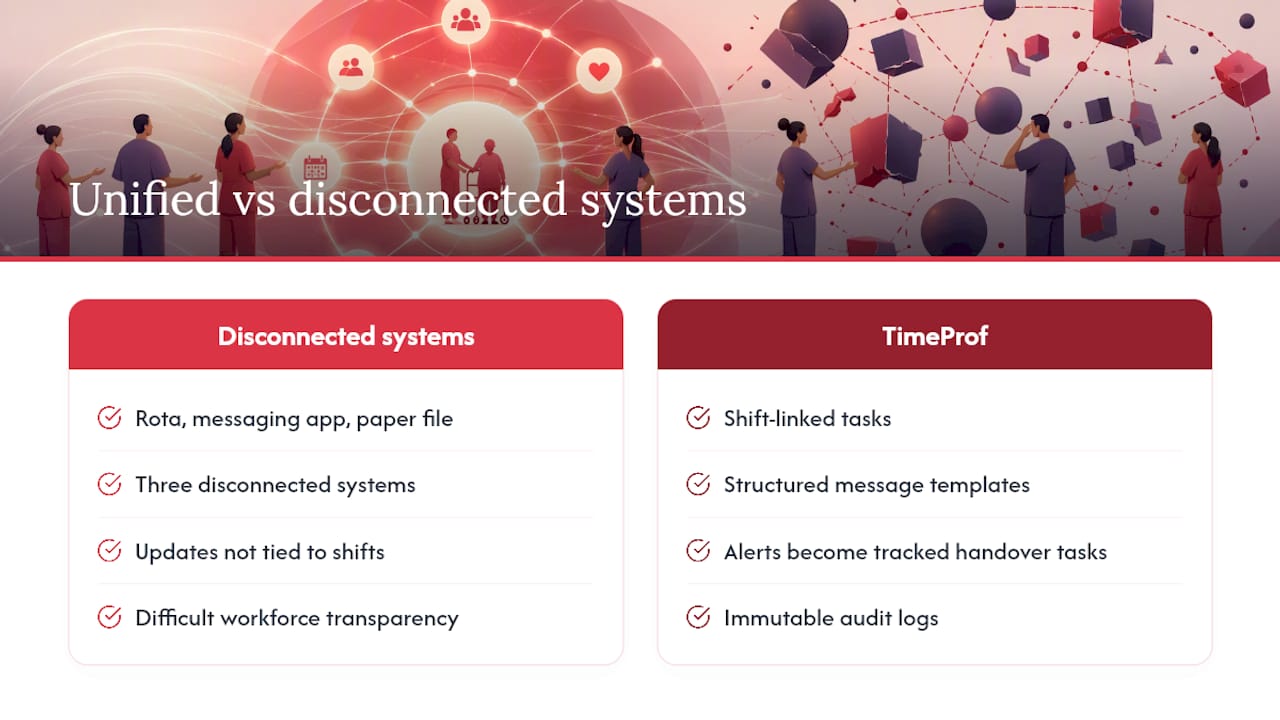
Timeprof brings shift-linked tasks, structured message templates, real-time notifications and immutable audit logs together in one platform, rather than leaving you to stitch together a rota system, a messaging app and a paper file. Rota and attendance data connect directly to messages and tasks, so every update is automatically tied to the shift and staff member who were actually clocked in, backed by role-based access and two-factor authentication to keep resident information restricted to the right people.

If you manage staff across multiple sites, workforce transparency becomes far easier when every message, task completion and clock-in sits in one auditable record instead of three disconnected systems. In a demo, ask to see a safety alert created on one shift turn into a tracked task that’s visible, with its due time and owner, on the next shift’s handover screen. That single flow is usually what convinces a sceptical manager. Staff can also log and check messages from their own device even without signal, using mobile-first tools built for care staff rather than a desktop-only system nobody checks on the floor.
Book a demo with Time Prof and see how shift-linked tasking, audit records and structured templates work together on your own rota and resident data.
Frequently asked questions
What’s the fastest way to start improving how staff receive resident updates? Run a pilot on one unit for a short period with structured templates and mandatory shift IDs. You’ll see whether adoption sticks before committing the whole home.
Do we need SBARD for every message, or just safety alerts? Reserve full SBARD structure for safety-critical updates. Routine family-update logs and simple tasks can use a lighter template so staff don’t abandon the system out of frustration.
How long should we keep shift-linked resident messages? Set a retention window agreed with your data protection lead, long enough to satisfy regulatory review and internal governance, with any deletions leaving a visible trace rather than a silent gap.
What’s a realistic first KPI to track? Task completion rate against due time is the simplest starting point. It’s easy to measure and directly reflects whether updates are being acted on, not just logged.
Sources
- SBAR for Care Homes (SBARD) - North West Knowledge Now
- Module 2. Communicating Change in a Resident’s Condition | Agency for Healthcare Research and Quality