Multi-site workforce management: a 2026 guide for managers
Discover what is multi-site workforce management in this 2026 guide. Learn to streamline operations for better visibility and compliance.

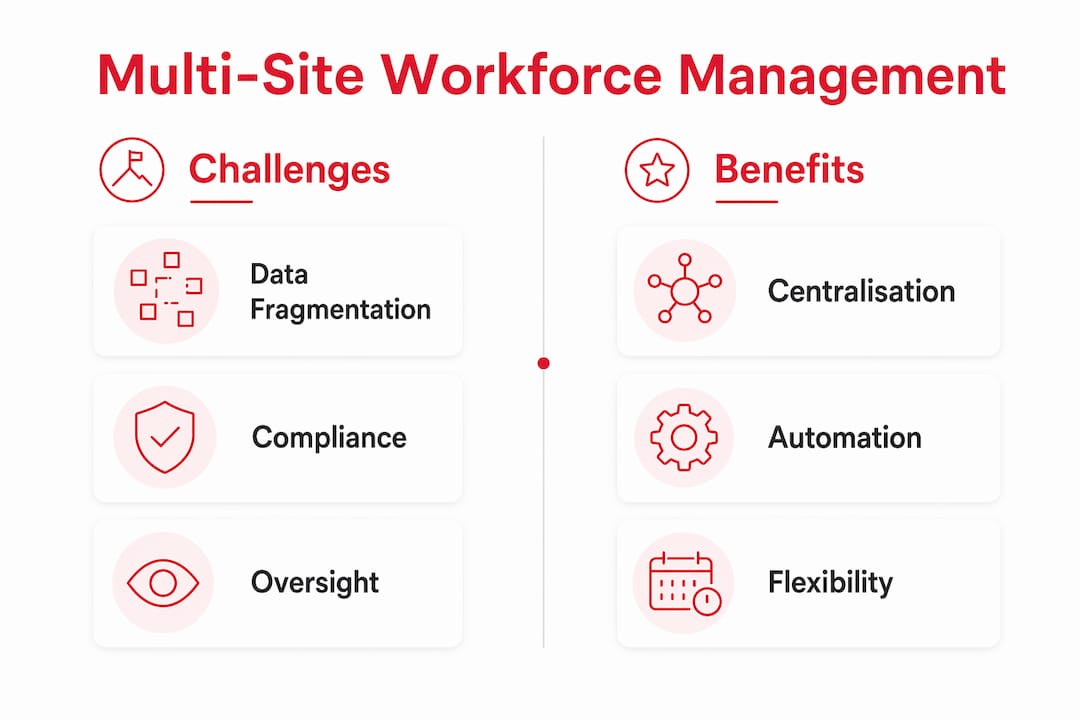
Multi-site workforce management is the centralised coordination of hiring, scheduling, attendance, and compliance across several business locations within a single unified system. The industry term for this discipline is multi-location workforce management, and the two phrases are used interchangeably across healthcare, security, and hospitality operations. Without a dedicated approach, labour data fragments across locations, causing compliance risks and delayed decisions. Managers who consolidate these functions into one platform gain real-time visibility, reduce administrative overhead, and apply consistent policies at every site. This guide explains how the model works, what technology supports it, and how to balance corporate standards with local flexibility.
What is multi-site workforce management?
Multi-site workforce management is defined as the practice of overseeing staff scheduling, attendance, compliance, and performance across two or more physical locations through a single, integrated system. The goal is a uniform data-driven approach that replaces personal knowledge and site-by-site guesswork with one reliable source of truth. Effective multi-location management covers five core categories: labour costs, compliance, performance, retention, and safety. Tracking all five across every site gives managers the evidence they need to spot underperforming locations before problems escalate.
The discipline matters most in industries where staff are dispersed, shifts are variable, and regulatory requirements differ by location. A hospital trust managing wards across three towns, a hotel group running properties in different regions, or a security firm covering dozens of client sites all face the same core problem. Each location generates its own data, its own scheduling conflicts, and its own compliance obligations. Multi-site workforce management brings all of that under one roof.

How does multi-site management differ from single-site management?
Single-site management relies on direct oversight. A manager walks the floor, knows every team member by name, and resolves issues face to face. That personal knowledge works well at one location. It breaks down the moment a second or third site enters the picture.
The table below shows where the two models diverge most sharply.
| Consideration | Single-site management | Multi-site management |
|---|---|---|
| Data visibility | Local, often informal | Centralised, real-time dashboards |
| Compliance tracking | One set of rules | Location-specific rule sets |
| Scheduling authority | One manager | Delegated, role-based permissions |
| Communication | Face to face | Platform-based messaging and announcements |
| Performance review | Intuition and observation | Standardised metrics across all sites |
The compliance dimension is where single-site habits cause the most damage at scale. Local employment law, site-specific licensing requirements, and sector regulations vary by region. A manager applying the same rules everywhere creates legal exposure. Centralised dashboards replace delayed reports and siloed data with a live view of every site, which is the minimum requirement for managing compliance at scale.
The loss of direct oversight is the other critical shift. Multi-site managers must trust technology and delegated authority rather than personal presence. That requires a different mindset and a different set of tools.
What tools support effective multi-site staff management?
The right technology stack for multi-location operations centres on a workforce management platform that connects scheduling, attendance, compliance, and communication in one place. Centralised ATS platforms enable unified hiring with standardised workflows and shared talent pools across multiple locations. That removes the duplication of effort that occurs when each site recruits independently.
Beyond hiring, the platform features that matter most to multi-site managers are:
- Role-based access controls that let site managers edit their own rotas without touching data from other locations.
- Automated compliance rules configured per location, so the system enforces the correct break patterns, maximum hours, and certification requirements at each site automatically.
- Real-time attendance tracking with geofenced clock-in, so managers know who is on site and where without relying on phone calls.
- Integrated payroll data flow that pulls confirmed hours directly into payroll, reducing manual entry errors.
- Mobile-first staff portals that give workers visibility of their shifts, leave balances, and tasks without needing to contact a manager.
Automation is the biggest operational gain. Centralised platforms reduce administrative time by 77% through automated workflows across multiple locations. That figure reflects the cumulative saving from removing manual rota-building, paper timesheets, and phone-based shift swaps. Managers redirect that time to site visits, staff development, and operational planning.
Pro Tip: Start with a phased rollout rather than deploying across all sites at once. Select two or three site manager champions, run a pilot, refine the configuration based on their feedback, and then roll out enterprise-wide. Adoption rates are significantly higher when frontline managers feel ownership of the system from the start.
Platforms like Timeprof combine shift planning, geofenced clock-in, audit-ready reporting, and a mobile staff portal in one system. That removes the need to stitch together separate applications for scheduling, communication, and compliance.
What are the key benefits of multi-site workforce management?
Implementing a centralised approach to managing multiple locations produces measurable gains across several operational areas. The benefits are not theoretical. They show up in payroll accuracy, compliance audit results, and manager workload within weeks of deployment.
-
Reduced administrative burden. Automated scheduling, digital timesheets, and centralised leave management remove hours of manual work from every manager’s week. That time compounds across a multi-site operation.
-
Consistent compliance enforcement. Multi-location WFM software configures compliance rules per location automatically, so the system applies the correct rules at each site without relying on individual managers to remember them.
-
Improved labour cost control. Real-time visibility into hours worked, overtime, and agency spend across all sites lets managers act on cost variances the same day they appear, not at the end of the month.
-
Better staff experience. When workers can view their rotas, claim open shifts, and request leave through a mobile app, they spend less time chasing managers for information. That reduces friction and improves retention, which matters acutely in healthcare and hospitality where turnover is high.
-
Faster operational response. A live dashboard showing attendance, open shifts, and site-level performance means managers can redeploy staff or escalate issues within minutes rather than hours.
Healthcare trusts use these capabilities to manage bank staff across multiple wards. Hospitality groups use them to balance seasonal demand across properties. Security firms use them to verify that the right certified officer is on the right site at the right time. The use case differs, but the underlying benefit is the same: control without being physically present.
How do you balance corporate control with local flexibility?
Effective multi-site management balances corporate standards with local adaptations rather than enforcing rigid top-down control. The misconception is that centralisation means uniformity in every detail. It does not. It means uniformity in the things that matter legally and financially, with flexibility in the things that vary by site.
The practical approach works as follows:
- Standardise the non-negotiables. Pay rates, compliance rules, disciplinary procedures, and data security standards apply identically at every site. These are set at corporate level and locked in the system.
- Delegate scheduling authority. Local scheduling tasks are handled by site managers within the boundaries the system enforces. They build rotas, approve leave, and manage shift swaps without needing central approval for every decision.
- Use role-based permissions to protect critical controls. A site manager can edit their own rota but cannot change pay rates or override compliance rules. That boundary is set in the platform, not enforced by policy documents that people may not read.
- Review performance data centrally. Headquarters monitors labour costs, absence rates, and compliance scores across all sites through a single dashboard. Underperforming sites are identified by data, not by rumour.
Pro Tip: Build your policy framework in layers. Define what is fixed at corporate level, what is configurable at regional level, and what is fully delegated to site managers. Document this clearly before you configure the platform. Trying to redesign the permission structure after go-live is far more disruptive than getting it right at the start.
Strong multi-location management starts with clear process design, policy creation, technology choice, and ongoing performance review. The technology enforces the policy. The policy reflects the business model. Getting those two things aligned is the work that happens before anyone logs into the system.
Key takeaways
Multi-site workforce management works because it replaces fragmented, site-by-site data with a single, centralised system that enforces consistent rules while giving local managers the authority they need to run their sites.
| Point | Details |
|---|---|
| Centralise the data | Replace siloed spreadsheets with one platform that shows all sites in real time. |
| Automate compliance rules | Configure location-specific rules in the system so enforcement is automatic, not manual. |
| Delegate with boundaries | Give site managers scheduling authority within role-based permissions set at corporate level. |
| Measure five categories | Track labour costs, compliance, performance, retention, and safety across every site. |
| Pilot before full rollout | Test with site champions first to refine configuration and build adoption before enterprise deployment. |
What I have learned from watching multi-site operations succeed and fail
The managers who struggle most with multi-site operations are not the ones with the most sites. They are the ones who try to manage ten locations the way they managed one. They rely on relationships, phone calls, and personal memory. That works until it does not, and when it fails, it fails badly.
The shift that changes everything is accepting that you cannot be everywhere. Your job becomes designing the system that runs in your absence. That means investing time upfront in policy design and platform configuration, which feels slow and bureaucratic when you are used to just getting things done. The payoff is that the system handles the routine so you can focus on the exceptions.
The other lesson I would pass on is about resistance. Staff and site managers often push back on new platforms, not because the technology is bad, but because change feels like criticism of how they worked before. The pilot champion approach addresses this directly. When a respected site manager has shaped the configuration and can say “I helped build this,” the resistance drops significantly.
Communication between headquarters and sites is the final piece that most implementations underestimate. The platform provides the data. The manager still needs to act on it, explain decisions, and keep site teams informed. A system that gives you visibility is only as good as what you do with what you see.
How Timeprof supports multi-site operations

Timeprof is built for exactly the kind of multi-site complexity described in this guide. The platform brings shift planning, geofenced clock-in, real-time attendance, leave management, and site-based messaging into one mobile-friendly system. Managers get a live dashboard across all their sites. Staff get a self-service portal for shifts, leave, and tasks. Role-based access means site managers work within the boundaries you set, and audit-ready reports mean compliance evidence is always available. If you are replacing spreadsheets and phone calls with something that actually scales, explore Timeprof’s platform to see how it fits your operation.
FAQ
What is multi-site workforce management?
Multi-site workforce management is the centralised coordination of scheduling, attendance, compliance, and staff oversight across two or more business locations through a single integrated platform.
What are the biggest challenges of multi-site management?
Fragmented data, inconsistent compliance enforcement, and the loss of direct managerial oversight are the three most common challenges. A centralised platform addresses all three by consolidating data and automating rule enforcement.
How do you manage multiple locations without losing control?
Use role-based permissions to delegate scheduling authority to site managers while keeping compliance rules and pay settings locked at corporate level. A live dashboard gives headquarters visibility without requiring physical presence.
What features should a multi-site workforce management platform include?
The core features are real-time attendance tracking, location-specific compliance rules, role-based access controls, mobile staff self-service, and centralised reporting across all sites.
How long does it take to implement a multi-site workforce management system?
Implementation timelines vary by organisation size, but a pilot rollout with site champions typically takes four to eight weeks before enterprise-wide deployment begins.
— Michael