Manage staff availability patterns: a manager's guide
Learn to manage staff availability patterns effectively. This guide provides tools and strategies to build conflict-free schedules and boost team morale.

Staff availability management is the practice of collecting, updating, and acting on each employee’s declared working hours to build conflict-free schedules. When managers fail to manage staff availability patterns correctly, the result is last-minute shift gaps, frustrated staff, and costly manual rearrangements. The good news is that a structured workflow, supported by the right software, removes most of that friction. This guide covers the tools, update frequencies, common pitfalls, and a step-by-step process to give you full control over your workforce schedules.
What tools and processes support effective availability pattern management?
The standard industry approach to staff availability management follows a four-step software workflow: staff request a change, a manager reviews it, the manager approves or denies it with a reason, and the schedule updates automatically. Each step creates an audit trail. That trail protects both the business and the employee if a dispute arises later.
Dedicated workforce management software outperforms spreadsheets on every practical measure. Spreadsheets hold static data that goes stale the moment a staff member’s circumstances change. Software holds live data that updates the moment a request is approved. The difference matters most when you are building next week’s rota on a Friday afternoon.
Scheduling software groups employees by location or by available day, giving managers a filtered view rather than a wall of names. That grouping makes workload balancing faster and reduces the chance of assigning someone to a site they cannot reach. Timeprof applies this logic across multiple sites simultaneously, so a manager overseeing several locations sees one consolidated dashboard rather than separate spreadsheets for each.

The table below shows where spreadsheets fall short compared to software-managed availability.
| Feature | Spreadsheet | Workforce management software |
|---|---|---|
| Data currency | Static, updated manually | Live, updated on approval |
| Conflict detection | None | Automated warnings |
| Approval audit trail | None | Full request and decision log |
| Multi-site visibility | Separate files | Single consolidated view |
| Staff self-service | Not available | Mobile portal for requests |
Pro Tip: Assign a named availability approver for each site or department. When staff know exactly who reviews their requests, response times drop and requests stop falling through the gaps.
Roles matter as much as tools. Every location needs a designated approver who receives notifications when a request arrives. Without that role defined, requests sit unread and schedules are built on outdated data.
How often should staff update their availability and why does frequency matter?
Managers should require availability updates at least monthly to prevent scheduling conflicts. Monthly is the minimum. For teams with high turnover, variable contracts, or seasonal demand, fortnightly updates are more realistic.
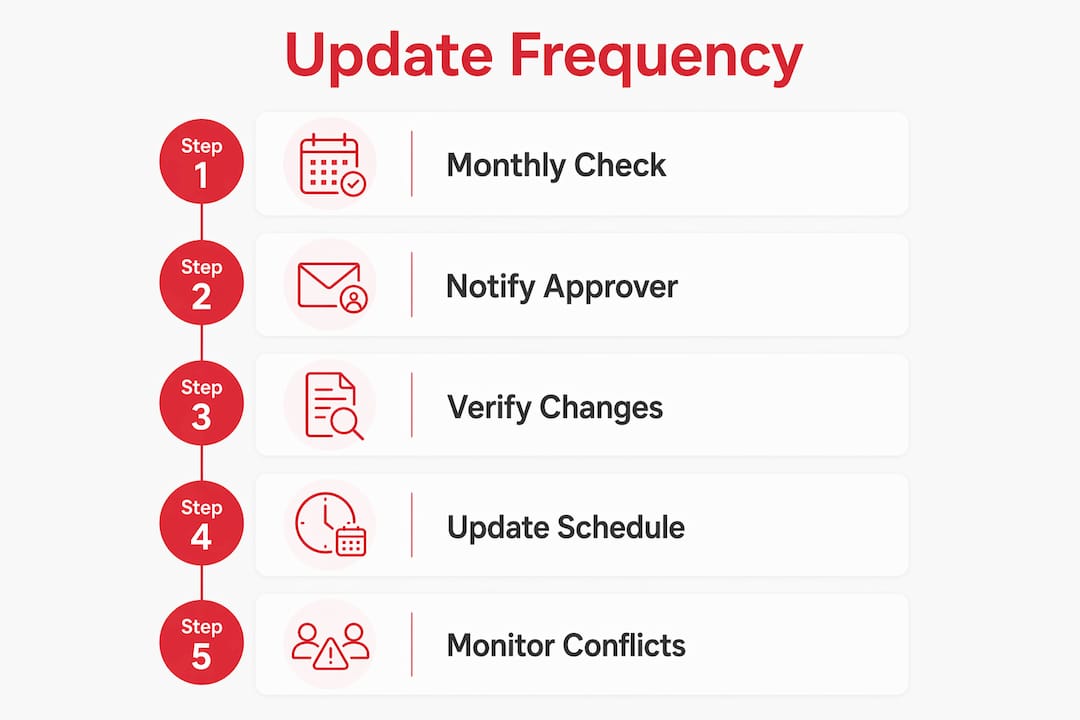
Outdated availability is one of the top causes of scheduling conflicts. A staff member who changed their childcare arrangements three months ago but never updated their profile will keep appearing as available on days they cannot work. The manager builds a rota around that assumption, the conflict surfaces on the day, and someone has to scramble for cover.
Team size changes the calculation. For teams of fewer than 20, a manager can often track availability informally. Teams over 20 benefit from dedicated software with structured update cycles. The administrative load of chasing 30 or 40 staff members individually is simply not sustainable without a system that prompts them automatically.
The risks of infrequent updates include:
- Shift gaps caused by assigning staff who are no longer available on a given day
- Increased swap and change requests, which signal the schedule is not working
- Manager time lost to manual rearrangements that a live system would have prevented
- Reduced staff trust when they feel their availability is being ignored
Pro Tip: Make updating availability as easy as possible. If staff can submit changes from a mobile app in under a minute, compliance rates rise without any enforcement effort from you.
High volumes of swap requests are a reliable early warning sign. When staff are constantly swapping shifts, the underlying availability data is probably wrong. Treat a spike in swap requests as a prompt to audit your availability records, not just to approve the swaps.
What are common mistakes when managing staff availability patterns?
Overriding employee availability without a direct conversation is the single most damaging mistake a manager can make. It creates immediate scheduling conflicts and erodes the trust that makes a team function. Staff who feel their declared availability is routinely ignored stop updating it accurately, which compounds the problem.
Manual data entry is the second major source of errors. When availability lives in a spreadsheet, a single mistyped date or accidentally overwritten cell can cascade into multiple wrong shifts. There is no version history, no alert, and no way to know the error exists until someone fails to show up.
Common mistakes and their remedies:
- Ignoring automated warnings. Software flags conflicts for a reason. Dismissing them without investigation leads to double-booked staff and uncovered shifts.
- Building rotas before availability is confirmed. Publishing a schedule before the current period’s availability updates are in forces you to rebuild it later.
- No defined approver. Requests with no clear recipient go unanswered. Assign a named approver for every team or site.
- Skipping the reason field. Requiring staff to provide a reason when requesting a change creates accountability and helps managers make better decisions.
- Treating availability as permanent. Life changes. A schedule built on six-month-old availability data will generate conflicts every week.
Automated red-flag features in workforce management software catch most of these errors before they reach the published rota. The software alerts the manager when a proposed shift clashes with a staff member’s recorded unavailability. That alert takes two seconds to process. Fixing the resulting conflict after the rota is published takes considerably longer.
How to implement an effective staff availability workflow
A structured workflow removes the guesswork from employee scheduling. The five steps below apply whether you manage a single site or a network of locations.
- Assign availability approvers per location. Every site needs one named manager who receives and acts on availability requests. This prevents requests from sitting unread.
- Configure notification and approval rules in your system. Set the system to alert the approver immediately when a request arrives. Set a response deadline, typically 48 hours, so staff are not left waiting.
- Communicate the process clearly to staff. Tell them when to submit updates, how to do it, and what happens next. Staff who understand the process comply with it.
- Review, approve, or deny with a recorded reason. A denial without explanation breeds resentment. A brief note, such as “minimum cover required on this date,” gives the staff member context and keeps the record clean.
- Update the live schedule immediately on approval. Do not batch approvals and update the rota once a week. Each approved change should reflect in the schedule the same day.
The table below maps each step to the manager’s specific action.
| Workflow step | Manager action |
|---|---|
| Request received | Review against current coverage needs |
| Approval decision | Approve or deny with a written reason |
| Schedule update | Reflect the change in the live rota immediately |
| Monitoring | Check swap request volume weekly for early warning signs |
| Audit | Review availability records monthly and prompt updates |
Software visibility reduces the manual effort of searching for replacements and lowers the rate of scheduling errors. Managers who move from spreadsheets to a live system typically spend less time on reactive rota fixes and more time on the work that actually requires their judgement.
Treating availability as live data rather than a static record is the single most effective shift in mindset a manager can make. It changes availability from a form you fill in once to a continuous conversation between staff and management.
Key takeaways
Effective staff availability management requires live data, structured approval workflows, and monthly update cycles to prevent scheduling conflicts and reduce manager workload.
| Point | Details |
|---|---|
| Monthly updates are the minimum | Require staff to refresh availability at least monthly to keep scheduling data accurate. |
| Four-step workflow is the standard | Request, review, approve or deny, and update the schedule. Each step needs a named owner. |
| Automated warnings prevent conflicts | Software flags clashes before the rota is published, saving significant reactive effort. |
| Overriding without conversation damages trust | Always speak to a staff member before overriding their declared availability. |
| High swap volumes signal a data problem | A spike in shift swaps usually means the underlying availability records are out of date. |
Why availability management is the scheduling problem nobody talks about
I have watched managers spend entire Friday afternoons rebuilding rotas that should have taken 20 minutes. The culprit is almost always the same: availability data that nobody updated. The manager assumed the records were current. They were not. Three staff members were scheduled on days they had flagged as unavailable weeks earlier, and the conflict only surfaced when the rota was published.
The cultural shift is harder than the technical one. Getting staff to update their availability consistently requires them to trust that you will act on it. If they have submitted changes before and seen them ignored, they stop bothering. The fix is not a better form. It is a visible, fast response every time a request comes in. When staff see their update acknowledged within 24 hours, they start treating the system as useful rather than performative.
Software visibility genuinely reduces manager fatigue. When I speak to managers who have moved from spreadsheets to a live platform, the consistent feedback is not “it’s faster.” It is “I stop worrying about it.” That reduction in cognitive load is underestimated. A manager who is not mentally tracking 30 availability exceptions in their head makes better decisions about everything else.
The managers who get this right do one thing differently: they treat availability management as an ongoing process, not a one-off data collection exercise. They check swap volumes weekly. They prompt updates before the scheduling window opens. They respond to requests the same day. That discipline, more than any software feature, is what produces a schedule that actually works.
— Michael
How Timeprof supports your availability management process
Managing workforce schedules across multiple sites, shift patterns, and staff contracts is genuinely complex. Timeprof is built to handle that complexity without adding to your administrative load.

Timeprof brings availability requests, approvals, and live rota updates into one workforce intelligence platform. Staff submit availability changes through the mobile portal. Managers receive instant notifications, review requests against current coverage, and approve or deny with a recorded reason. The schedule updates immediately. There are no spreadsheets to reconcile, no emails to chase, and no version conflicts. For managers across care, hospitality, security, retail, and cleaning, Timeprof replaces fragmented systems with a single, reliable source of information for both managers and staff.
FAQ
What does “manage staff availability patterns” mean in practice?
It means collecting, updating, and acting on each employee’s declared working hours through a structured approval process. The goal is to build schedules that reflect actual availability rather than assumptions.
How often should staff update their availability?
At least monthly is the industry standard minimum. Teams with variable contracts or high turnover benefit from fortnightly update cycles.
What is the biggest risk of using spreadsheets for availability tracking?
Spreadsheets hold static data with no conflict detection. A single outdated entry can produce a scheduling conflict that only surfaces on the day of the shift.
How do I know if my availability data is out of date?
A spike in shift swap and change requests is a reliable indicator. High request volumes signal that the published schedule does not reflect how staff are actually available to work.
Can I override a staff member’s availability if I need cover?
You can, but overriding without a direct conversation damages trust and often creates further conflicts. Always speak to the staff member first and record the reason for the override in the system.